

Post Detail
BackAxon ERP Official
12 weeks ago
Why Purchase Invoice Management Matters for Inventory Accuracy and Supplier Payments
Receiving inventory is only one part of the purchasing process. The real challenge begins when supplier invoices aren't recorded accurately. Even if inventory reaches the warehouse, incorrect invoice processing can create stock discrepancies, inaccurate supplier balances, and unreliable financial reports.
As purchasing volumes grow, businesses often struggle to verify received quantities, match invoices with purchase orders, update inventory, and monitor vendor payments. These gaps lead to duplicate invoices, delayed payments, poor inventory visibility, and reporting errors that affect everyday operations.
Axon ERP solves these challenges through an integrated Purchase Invoice Management system that connects purchasing, inventory, accounting, supplier payments, and purchase returns within a single workflow.
What Is a Purchase Invoice in ERP Software?
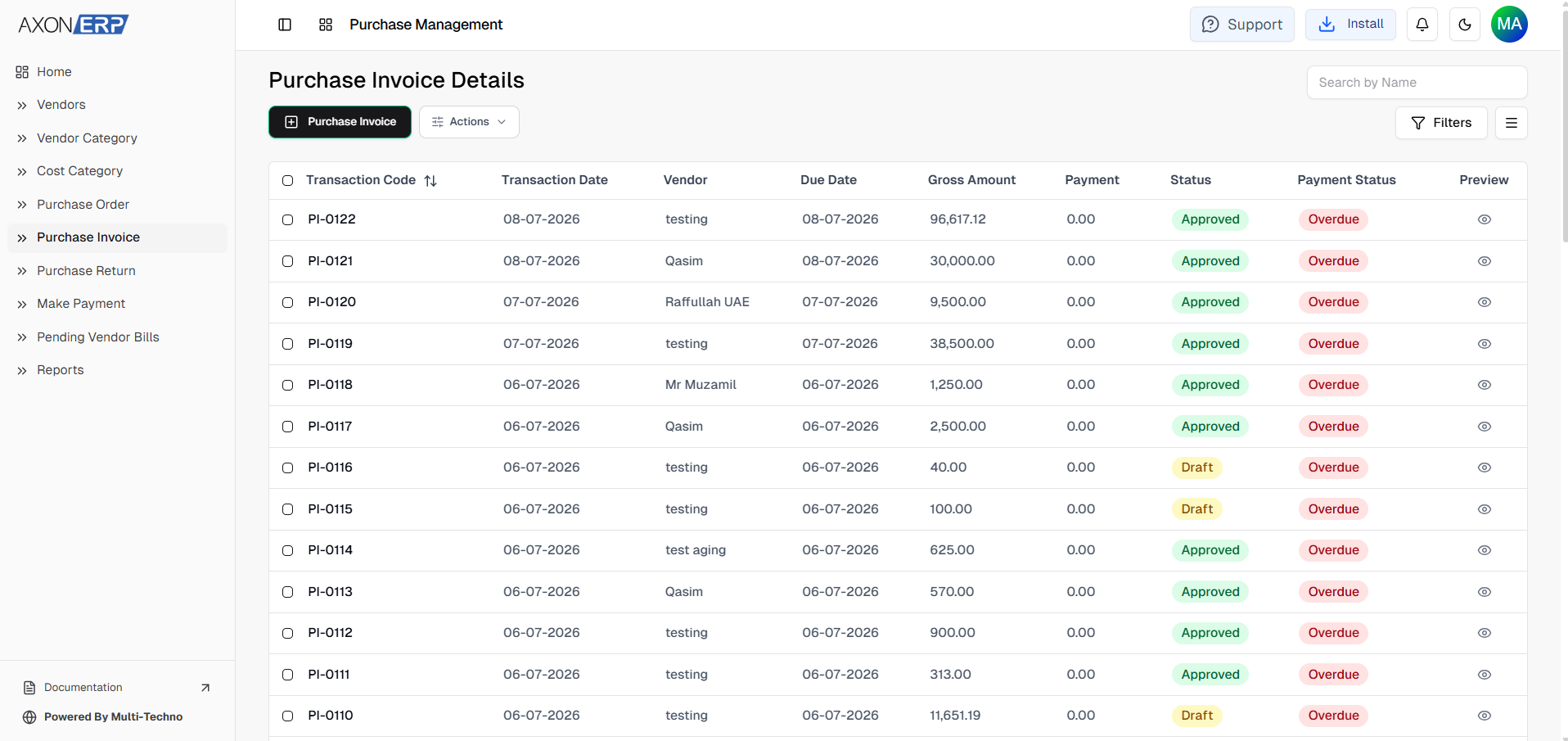
A Purchase Invoice is the document that officially records goods or services received from a supplier. It confirms what has been purchased, updates inventory, creates the supplier accounts payable, and serves as the financial record for the transaction.
Unlike a Purchase Order, which represents an intention to buy, a Purchase Invoice confirms that the purchase has been received and should now become part of the company's inventory and accounting records. It serves as the official record that goods have been received and the supplier is now eligible for payment according to the agreed purchasing terms.
A typical Purchase Invoice contains information such as:
- Vendor
- Warehouse
- Transaction Date
- Due Date
- Purchased Items
- Quantity
- Unit Price
- Discount
- Tax
- Total Amount
- Payment Terms
- Reference Number
- Additional Notes
Once confirmed, the Purchase Invoice becomes the foundation for inventory updates, supplier payments, purchase returns, and financial reporting throughout the purchasing lifecycle.
Why Purchase Invoice Management Matters
Accurate Purchase Invoice Management is essential for maintaining both inventory accuracy and financial control. Every supplier invoice directly affects stock availability, vendor balances, and business expenses.
Without a structured invoice management process, businesses commonly experience:
- Inventory quantities that don't match physical stock
- Duplicate supplier invoices
- Incorrect purchase costs
- Delayed vendor payments
- Difficulty reconciling supplier balances
- Limited visibility into purchasing expenses
- Errors between warehouse and finance records
These problems become increasingly difficult to manage as purchasing volumes grow.
Axon ERP helps eliminate these challenges by maintaining a centralized Purchase Invoice workflow where inventory, purchasing, and accounting remain synchronized. Every confirmed invoice updates the appropriate business records while preserving complete traceability across the purchasing process.
Creating and Managing Purchase Invoices in Axon ERP
Purchase Invoices in Axon ERP can be created in two different ways depending on the organization's purchasing workflow.
The recommended approach is to generate a Purchase Invoice directly from an approved Purchase Order. This maintains complete traceability throughout the purchasing cycle while reducing duplicate data entry.
However, businesses also have the flexibility to create Purchase Invoices directly from the Purchase Invoice module whenever a Purchase Order is not part of their workflow.
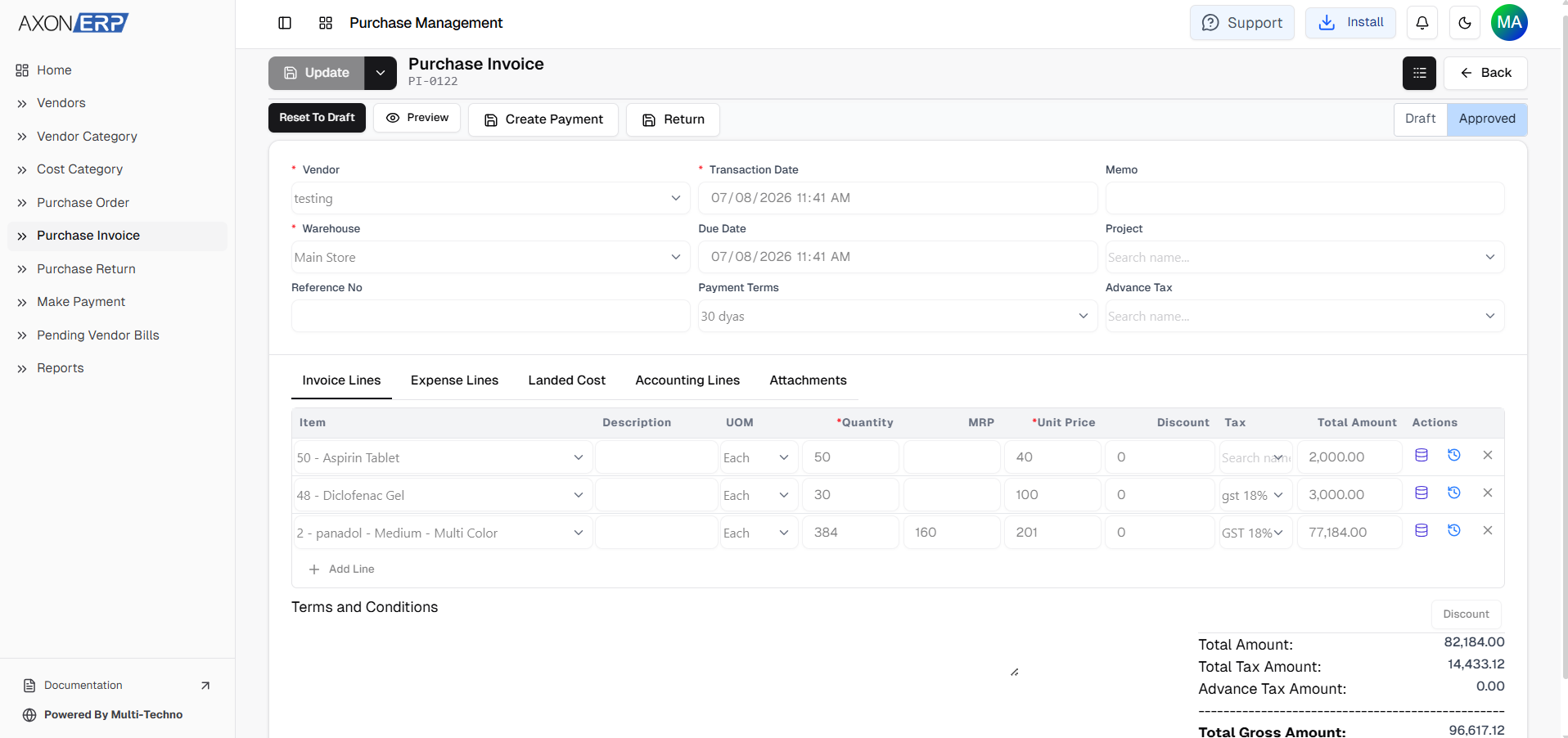
When creating a Purchase Invoice, users begin by selecting the required vendor and warehouse before entering transaction details such as the transaction date, due date, payment terms, reference number, memo, and other optional information.
After completing the invoice header, users add the purchased inventory items.
Each invoice line allows users to define:
- Item
- Description
- Unit of Measure (UOM)
- Quantity
- Unit Price
- Discount
- Tax
- Total Amount
Additional tabs also allow businesses to record Expense Lines, Landed Costs, Accounting Lines, supporting Attachments, and other purchasing information whenever required. This allows businesses to include additional purchasing costs such as freight, transportation, handling charges, or other procurement-related expenses whenever applicable.
The Purchase Invoice is initially saved in Draft status, allowing users to review and verify supplier information before final confirmation.
Confirming Purchase Invoices and Updating Inventory
Creating a Purchase Invoice does not immediately update inventory or financial records.
In Axon ERP, a Purchase Invoice is first saved as a Draft, allowing users to review supplier details, purchased items, pricing, taxes, and other invoice information before final approval.
Once everything has been verified, users can Confirm the Purchase Invoice. This is the stage where the transaction officially becomes part of the purchasing process.
After confirmation, Axon ERP automatically:
- Updates inventory by adding the received stock to the selected warehouse.
- This ensures that stock levels only increase after the purchasing transaction has been officially approved, helping prevent inventory discrepancies.
- Generates the required accounting entries for the transaction.
- Creates the vendor outstanding balance for future payment processing.
- Locks the Purchase Invoice to prevent unauthorized modifications.
If changes are required after confirmation, authorized users can first reset the invoice back to Draft, make the necessary updates, and then confirm it again. This workflow helps maintain both operational flexibility and data integrity by ensuring inventory and financial records remain accurate.
Managing Supplier Payments and Purchase Returns
Purchase Invoice Management does not end after inventory is received.
Once a Purchase Invoice has been confirmed, Axon ERP provides quick access to the next steps in the purchasing lifecycle.
Users can create a Vendor Payment directly from the Purchase Invoice using the Make Payment option. Since the vendor information and outstanding balance are already linked with the invoice, payment processing becomes faster while reducing manual data entry.
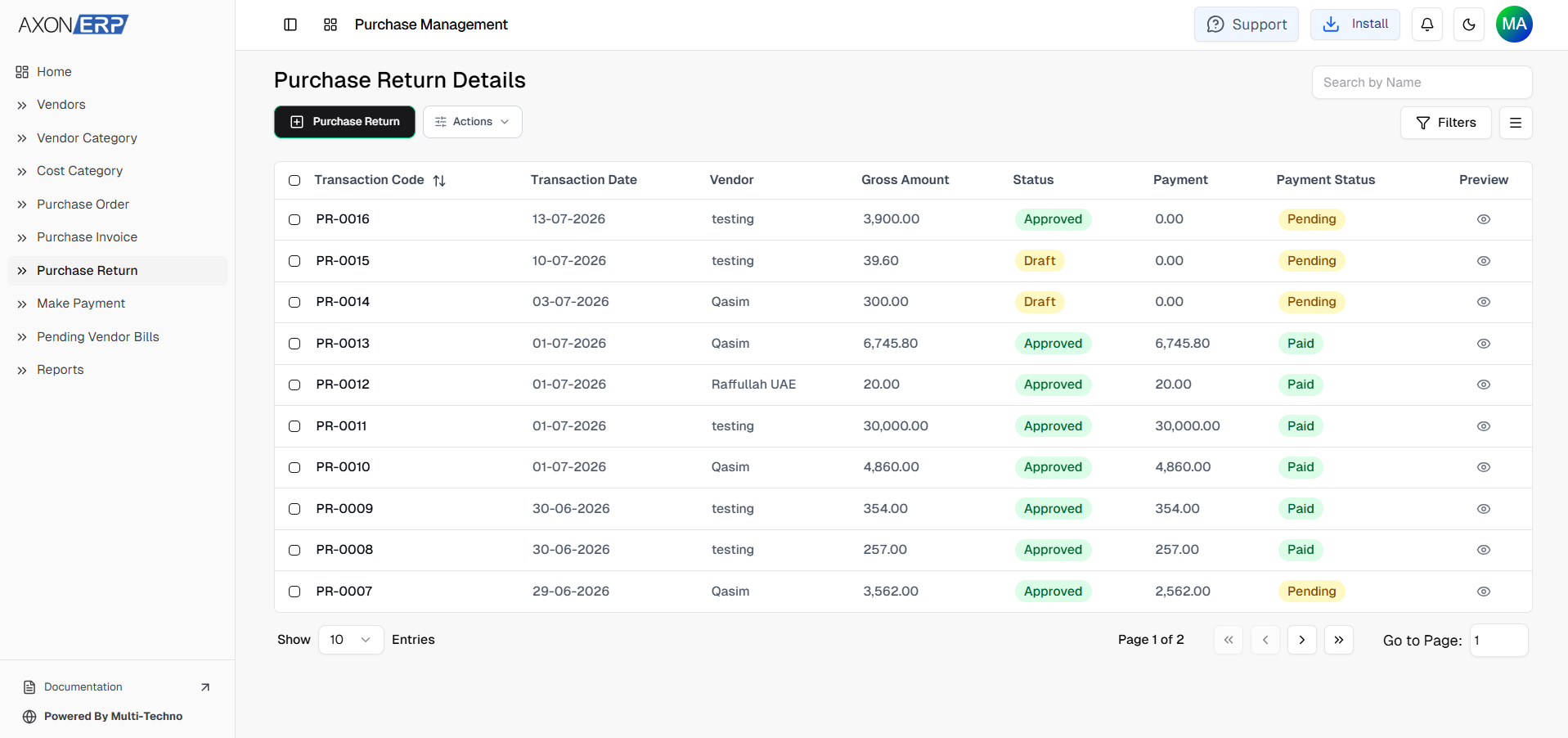
Similarly, if purchased items need to be returned because of damage, quality issues, or incorrect deliveries, users can create a Purchase Return directly from the same Purchase Invoice using the Return option.
Because both payments and returns remain connected to the original Purchase Invoice, businesses maintain complete traceability throughout the procurement process while reducing reconciliation work.
Purchase Invoice Reports in Axon ERP
Accurate reporting is essential for monitoring purchasing activities and controlling business expenses.
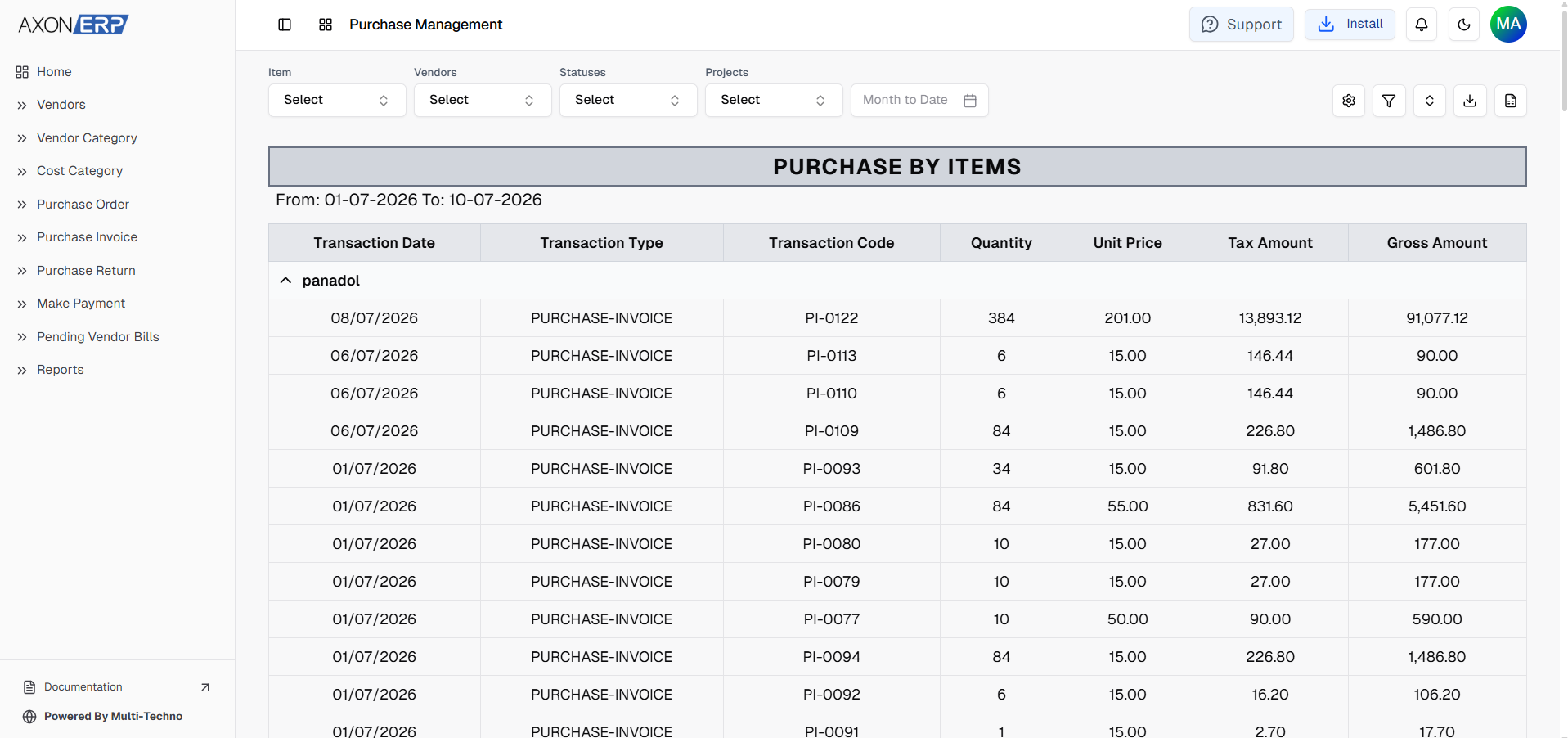
Axon ERP includes dedicated Purchase Invoice reports that help organizations analyze supplier purchases and monitor procurement trends from different perspectives.
Available reports include:
- Purchase Invoice by Month for reviewing purchasing activity over specific time periods.
- Purchase Invoice by Item for analyzing purchasing trends for individual inventory items.
- Purchase Invoice by Vendor for monitoring purchases made from each supplier.
These reports allow procurement and finance teams to identify purchasing patterns, review supplier activity, compare procurement costs, and make better purchasing decisions based on reliable business data.
Like other reports within Axon ERP, users can also customize report views to display the information most relevant to their operational requirements.
Benefits of ERP-Based Purchase Invoice Management
Managing Purchase Invoices through an integrated ERP system provides far more than accurate recordkeeping. It connects purchasing, inventory, and finance into a single workflow that improves efficiency across the business.
Accurate Inventory Updates
Inventory is updated only after Purchase Invoices are confirmed, helping businesses maintain reliable stock levels and reduce inventory discrepancies.
Better Supplier Payment Control
Every confirmed Purchase Invoice automatically creates the vendor outstanding balance, making it easier for finance teams to manage upcoming supplier payments.
Reduced Manual Processing
Generating Purchase Invoices from approved Purchase Orders minimizes duplicate data entry while improving purchasing accuracy.
Improved Financial Accuracy
Automatic accounting entries help ensure purchasing transactions remain synchronized with financial records, reducing reconciliation effort and reporting errors.
Complete Purchasing Traceability
Every Purchase Invoice remains connected with its vendor, inventory items, Purchase Order (when applicable), supplier payment, and Purchase Return, providing complete visibility throughout the purchasing lifecycle.
Stronger Procurement Management
Centralized Purchase Invoice Management allows businesses to monitor purchasing activities, control supplier spending, and maintain more organized procurement operations as the business grows.
Best Practices for Managing Purchase Invoices
To maintain accurate purchasing and financial records, businesses should follow a few practical guidelines:
- Verify supplier invoices before confirming them.
- Match Purchase Invoices with approved Purchase Orders whenever possible.
- Review item quantities, prices, taxes, and discounts before approval.
- Confirm Purchase Invoices only after inventory has been received.
- Process supplier payments directly from confirmed Purchase Invoices.
- Create Purchase Returns from the related Purchase Invoice to maintain complete transaction history.
- Regularly review Purchase Invoice reports to monitor purchasing activity and supplier performance.
- Keep all purchasing records centralized within the ERP system instead of relying on spreadsheets or manual documentation.
Following these practices helps businesses improve inventory accuracy, strengthen financial control, and simplify supplier invoice management.
Final Thoughts
A Purchase Invoice is much more than a record of goods received. It connects inventory, purchasing, supplier management, and accounting into a single business process that directly affects operational efficiency and financial accuracy.
Axon ERP simplifies this process by providing a centralized Purchase Invoice Management system where businesses can record supplier invoices, update inventory after confirmation, generate accounting entries automatically, process vendor payments, create purchase returns, and monitor purchasing activity through comprehensive reports.
As purchasing operations grow, managing supplier invoices manually becomes increasingly difficult. A structured ERP workflow helps eliminate duplicate work, improve inventory accuracy, strengthen supplier payment control, and provide complete visibility into every purchasing transaction.
By integrating Purchase Invoice Management with the broader Purchase Management workflow, Axon ERP enables organizations to build a more efficient, accurate, and scalable procurement process that supports long-term business growth.