

Post Detail
BackAxon ERP Official
12 weeks ago
How Purchase Order Management in Axon ERP Streamlines Business Purchasing
Every successful purchasing process starts with a well-managed purchase order. Before inventory reaches the warehouse or supplier invoices are processed, businesses need a structured way to communicate exactly what they want to purchase, from whom, and under what terms.
Imagine a company purchasing raw materials from multiple suppliers every week. One department requests inventory through emails, another places orders over the phone, while the finance team waits for invoices without knowing which orders were actually approved. Over time, this lack of structure leads to duplicate purchases, delayed deliveries, inventory shortages, and poor visibility into outstanding supplier commitments.
These challenges become even more difficult as businesses grow and work with multiple vendors, warehouses, and purchasing teams. Without a standardized purchasing process, tracking supplier orders, monitoring pending deliveries, and matching invoices with approved orders can quickly become a time-consuming task.
Axon ERP addresses these challenges through its Purchase Order Management system. Instead of managing supplier orders manually, businesses can create standardized purchase orders, route them through an approval process, and maintain complete visibility into every purchasing transaction from order creation to invoice generation.
By connecting vendors, warehouses, inventory items, and purchasing workflows within a single platform, Axon ERP helps organizations improve purchasing accuracy, strengthen procurement control, and simplify day-to-day purchasing operations.
What Is a Purchase Order in ERP Software?
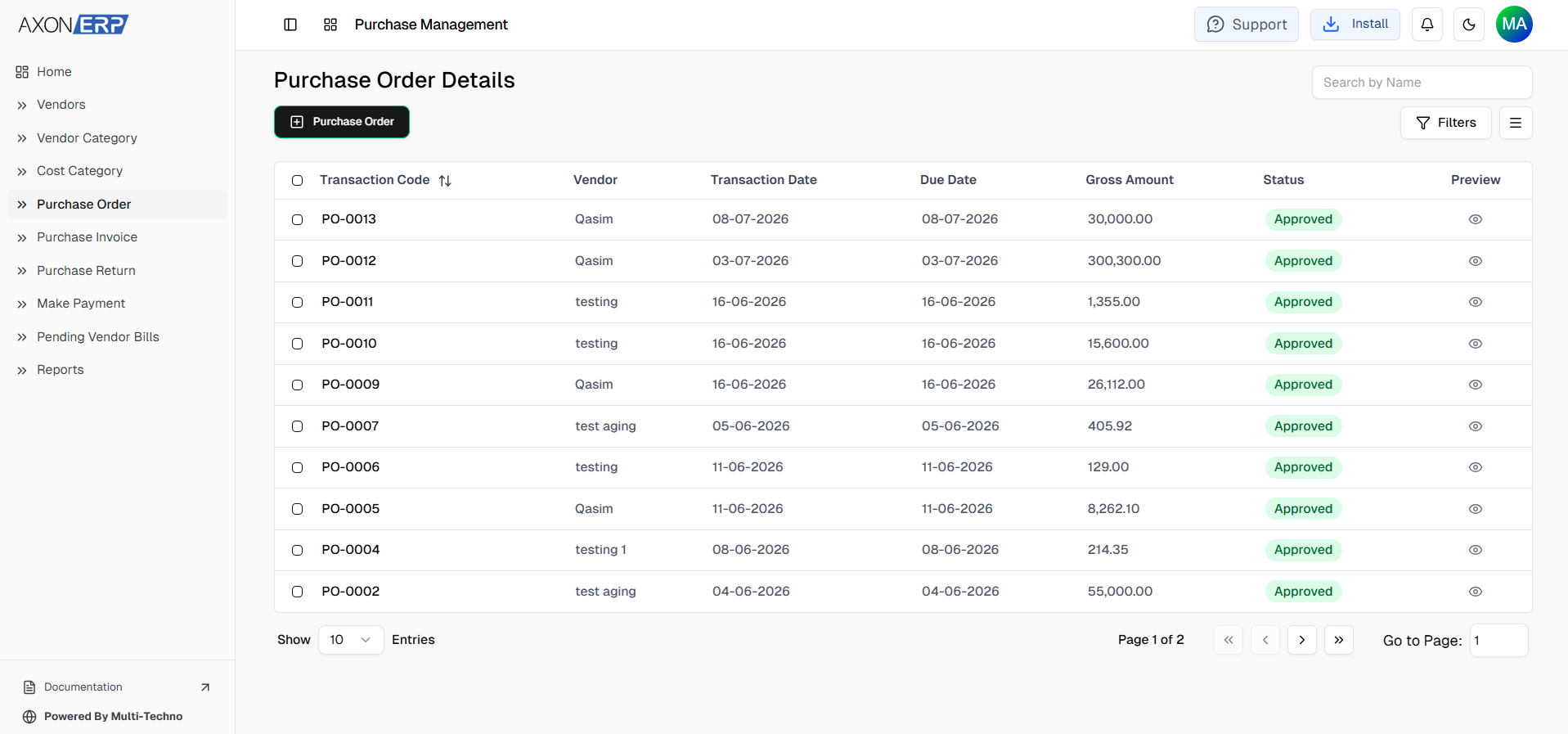
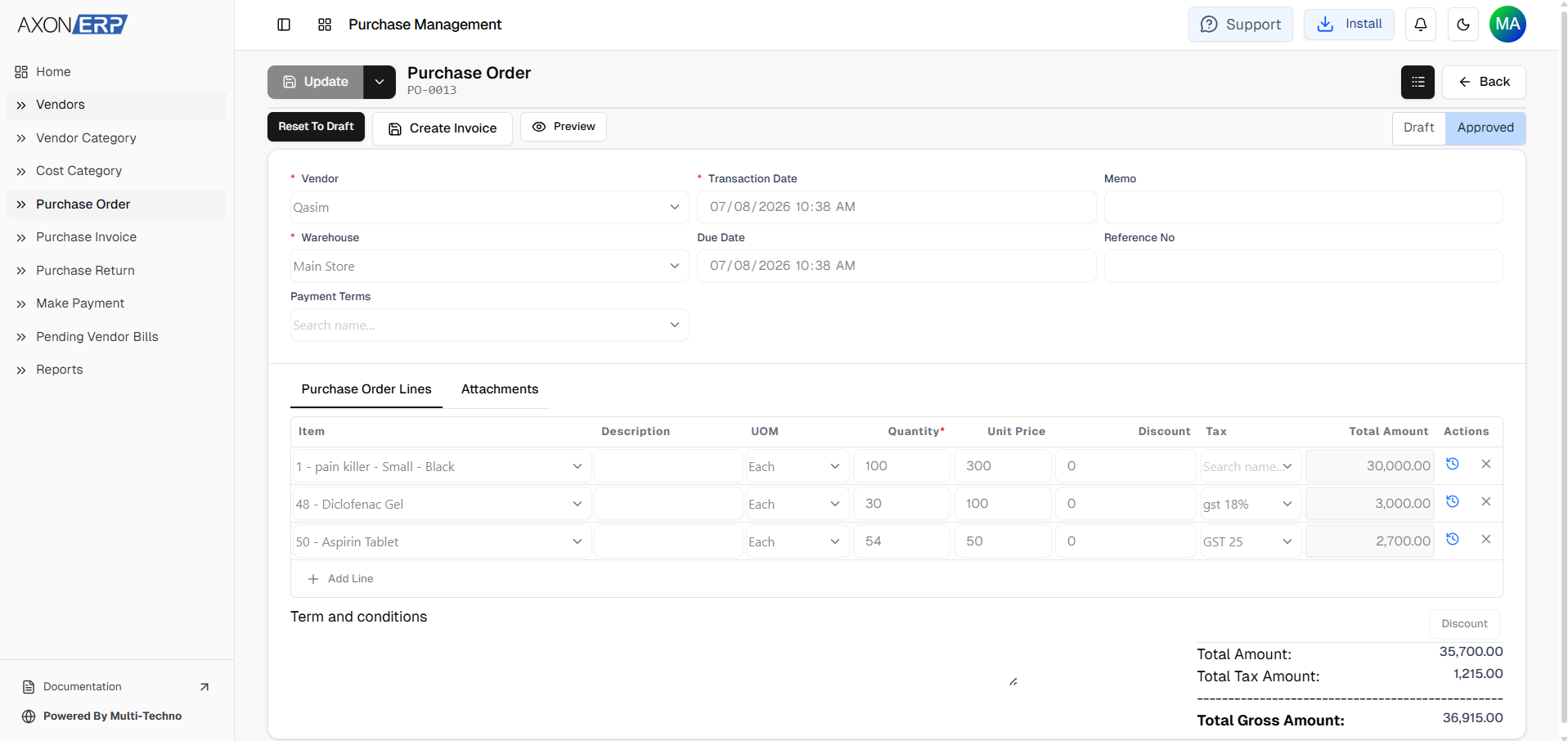
A Purchase Order (PO) is an official document created by a buyer to request goods or services from a supplier. It specifies exactly what the business wants to purchase, including the required items, quantities, prices, delivery details, and other purchasing terms.
Rather than relying on emails, phone calls, or handwritten requests, ERP software creates a structured purchasing workflow where every order is properly documented before inventory is received.
A typical Purchase Order includes:
- Vendor
- Warehouse
- Transaction Date
- Due Date
- Inventory Items
- Unit of Measure (UOM)
- Quantity
- Unit Price
- Discount
- Tax
- Total Amount
- Reference Number
- Payment Terms
- Additional Notes or Attachments
Once approved, the Purchase Order becomes the official purchasing document that both the business and supplier can reference throughout the purchasing cycle.
Why Purchase Orders Matter
Purchase Orders are much more than simple buying requests. They create accountability throughout the purchasing process by ensuring that every order is reviewed, approved, and documented before inventory is purchased.
Without a structured Purchase Order system, businesses often encounter problems such as:
- Unauthorized purchases
- Duplicate supplier orders
- Incorrect item quantities
- Pricing inconsistencies
- Difficulty tracking pending supplier deliveries
- Challenges matching supplier invoices with approved purchases
- Limited visibility into purchasing commitments
These issues not only increase procurement costs but can also affect inventory planning, supplier relationships, and financial accuracy.
Axon ERP helps eliminate these problems by providing a centralized Purchase Order workflow where every purchasing transaction is linked to the appropriate vendor, warehouse, and inventory items. Procurement teams gain complete visibility into pending orders, while finance teams can easily track which purchase orders have already been converted into supplier invoices.
Instead of treating purchasing as a series of isolated transactions, Axon ERP creates a connected workflow that improves purchasing control from the very first order.
Creating and Managing Purchase Orders in Axon ERP
Once vendors have been organized, businesses can begin the purchasing process by creating Purchase Orders.
In Axon ERP, every Purchase Order starts by selecting the vendor from whom the goods will be purchased. Users then choose the warehouse where the inventory will be received and enter the required transaction details such as the transaction date, due date, payment terms, reference number, or internal notes if needed.
After completing the purchase order header, users add the required inventory items. When an item is selected, Axon ERP automatically retrieves its default Unit of Measure (UOM) and unit price from the Item Master, reducing manual data entry and helping maintain pricing consistency across purchasing transactions.
Users simply enter the required quantity for each item, apply discounts or taxes if applicable, and create the Purchase Order. The order is initially saved as a Draft, allowing it to be reviewed before approval.
Once verified, the Purchase Order can be confirmed. After approval, the document becomes read-only to protect purchasing records from accidental modifications. If changes are required later, authorized users can first reset the document back to Draft, make the necessary updates, and then approve it again.
This approval workflow helps businesses maintain stronger purchasing controls while ensuring every procurement transaction remains properly documented.
From Purchase Order to Purchase Invoice
Creating a Purchase Order does not immediately increase inventory stock.
Instead, the Purchase Order acts as a purchasing commitment between the business and its supplier. Inventory is only updated after the related Purchase Invoice is created and approved.
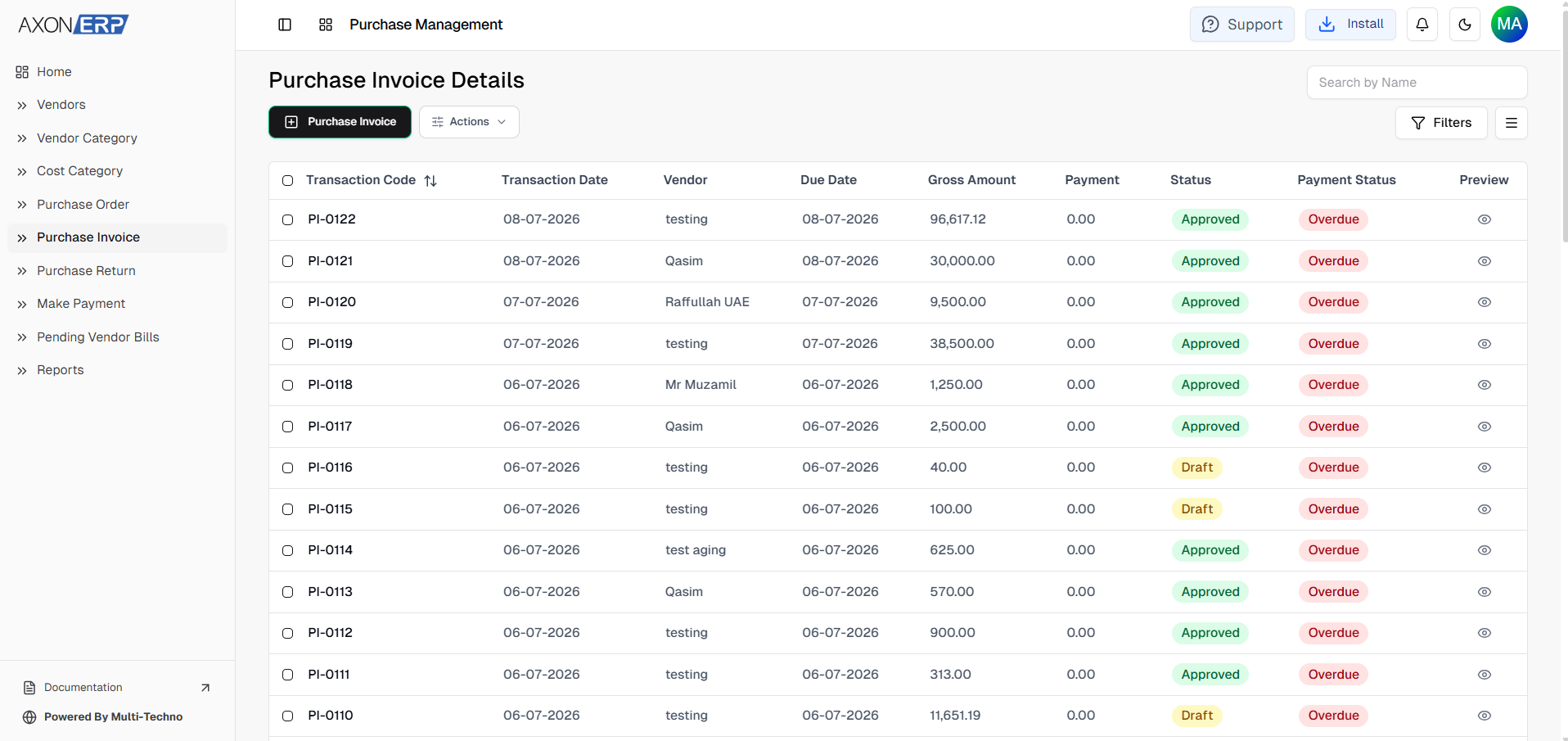
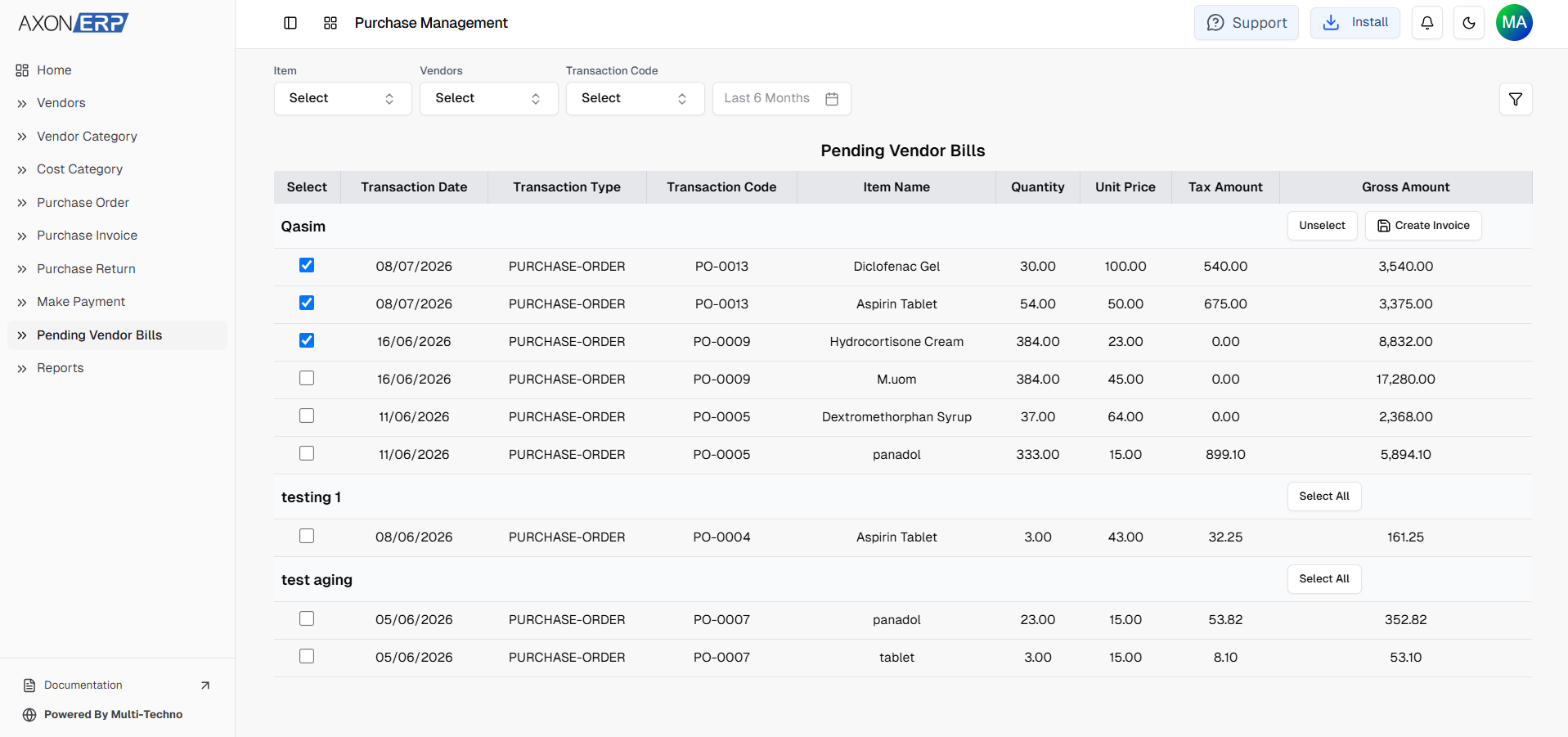
To simplify this process, Axon ERP allows users to generate a Purchase Invoice directly from the approved Purchase Order. Instead of creating the invoice manually, users click the Create Invoice button available on the Purchase Order.
This opens the Pending Vendor Bills screen, where users can view all pending purchase orders grouped by vendor.
From there, users select the required purchase order items and generate the Purchase Invoice with a single action.
The invoice is automatically linked back to the original Purchase Order and is created in Draft status for review before final approval.
This workflow eliminates duplicate data entry while maintaining complete traceability between purchasing documents.
Tracking Purchase Order Status
One of the biggest advantages of Axon ERP is that it allows businesses to monitor the progress of every Purchase Order throughout its lifecycle.
Instead of manually checking whether invoices have been created, users can instantly identify the current status of each Purchase Order.
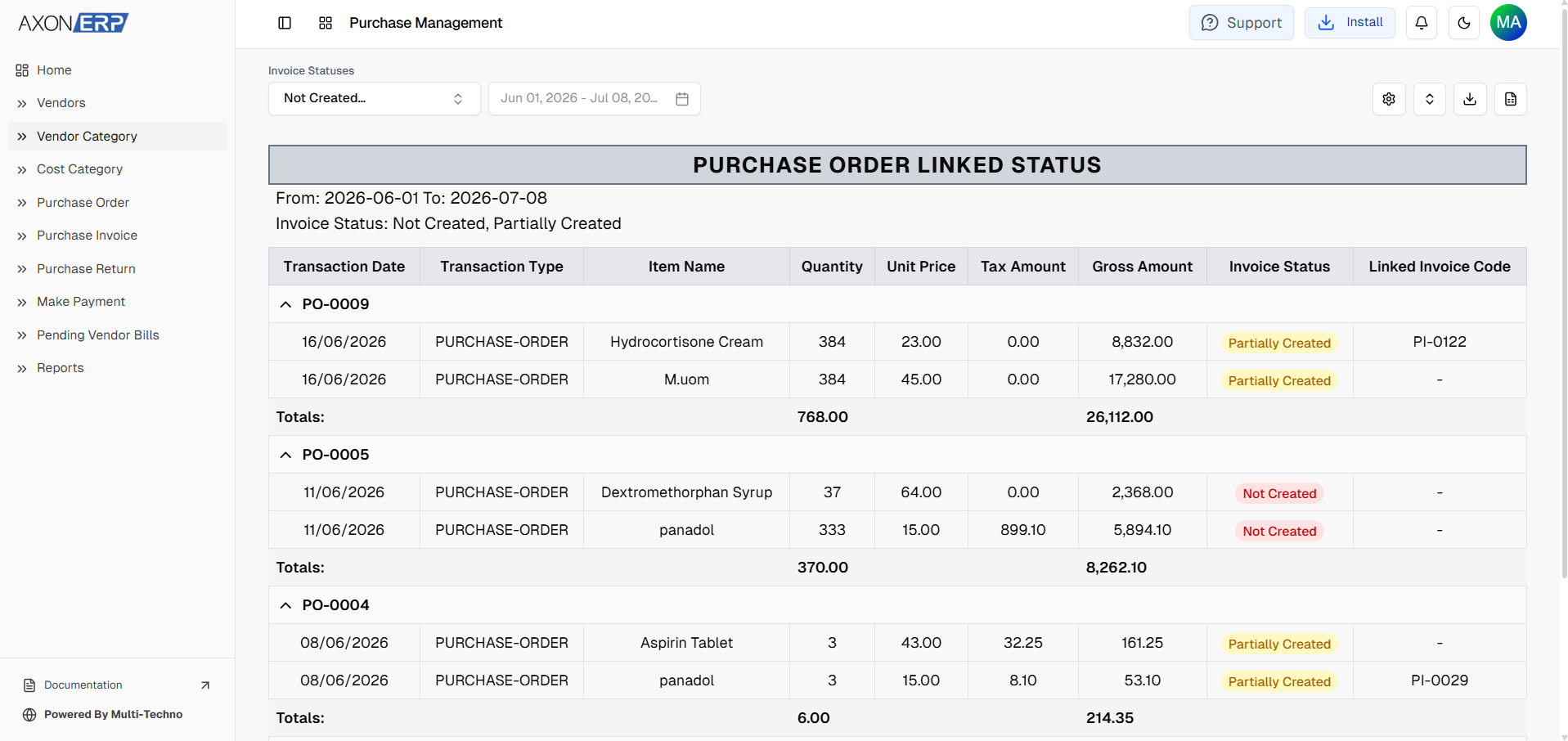
Depending on the invoicing progress, a Purchase Order may appear as:
- Not Created — No Purchase Invoice has been generated yet.
- Partially Created — Some items from the Purchase Order have been invoiced while others are still pending.
- Fully Created — All items from the Purchase Order have been converted into Purchase Invoices.
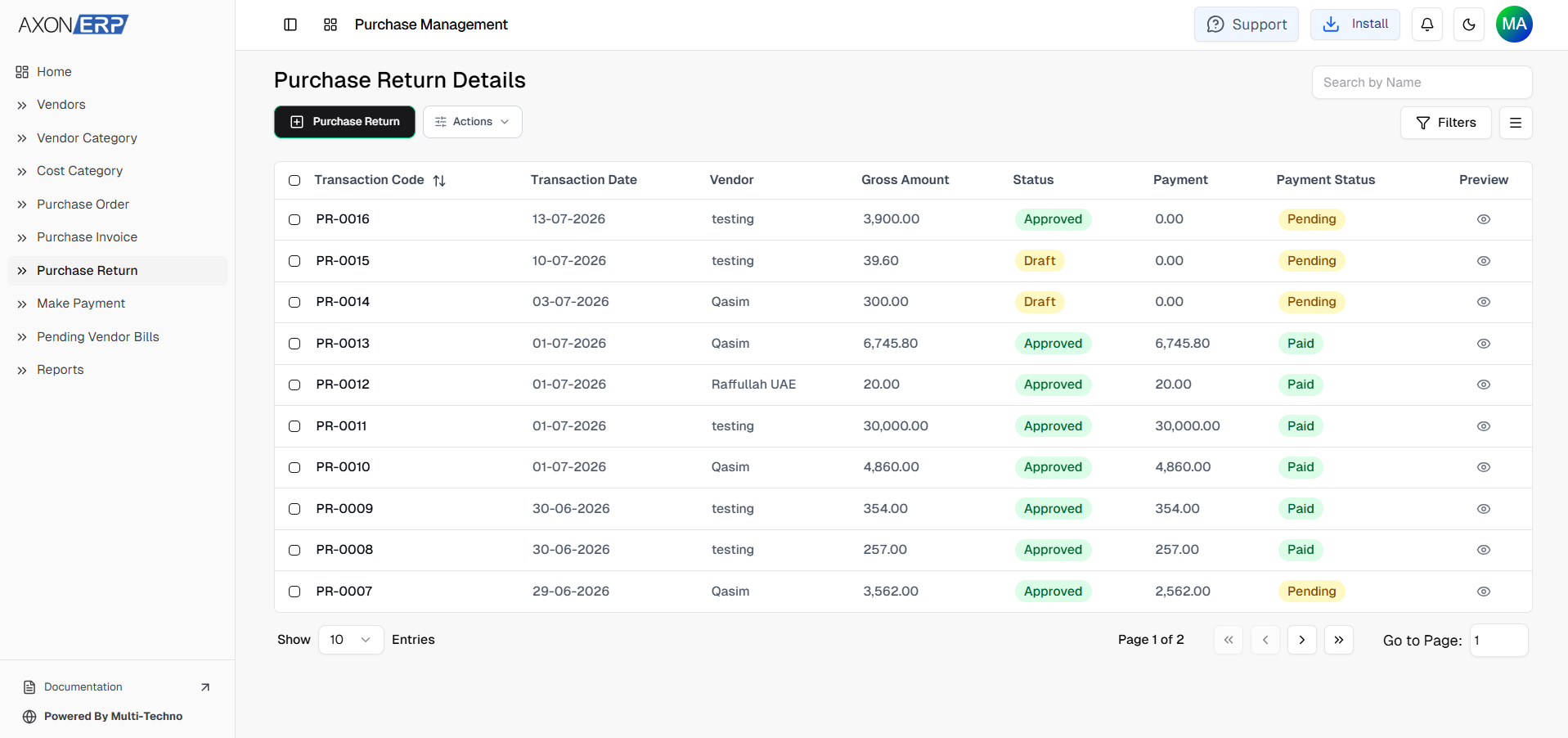
This visibility helps purchasing teams avoid duplicate invoicing while ensuring no ordered items are overlooked.
Purchase Order Reports in Axon ERP
Axon ERP also includes dedicated Purchase Order reports that help businesses monitor purchasing activities and supplier performance.
Some of the most useful reports include:
- Purchase Order by Month for analyzing purchasing activity over time.
- Purchase Order by Item to review purchasing trends for individual inventory items.
- Purchase Order by Vendor to monitor procurement from each supplier.
- Purchase Order Linked Invoice Report, which tracks the relationship between Purchase Orders and Purchase Invoices.
Among these, the Purchase Order Linked Invoice Report provides valuable visibility into the purchasing workflow.
Users can review Purchase Orders vendor-wise, see all associated items, identify whether invoices have been created, and monitor the current invoice status using filters or complete report views.
This improves purchasing transparency and helps procurement teams identify pending supplier invoices before they affect inventory availability.
Benefits of ERP-Based Purchase Order Management
Using a structured Purchase Order system offers several advantages for growing businesses.
Better Purchasing Control
Every purchase request follows a standardized approval process before inventory is received.
Reduced Manual Data Entry
Purchase Invoices can be generated directly from approved Purchase Orders, minimizing duplicate work.
Improved Inventory Planning
Purchasing teams know exactly which items have been ordered and which are still awaiting delivery.
Complete Document Traceability
Every Purchase Invoice remains linked to its original Purchase Order, simplifying audits and procurement tracking.
Better Supplier Management
Organizations can monitor supplier purchasing history, outstanding orders, and purchasing trends from a centralized ERP platform.
Purchase Order Management is one of the core capabilities of modern ERP software, helping businesses standardize purchasing activities while improving inventory and financial control.
Best Practices for Managing Purchase Orders
To maintain an efficient purchasing workflow, businesses should:
- Create accurate vendor records before placing orders.
- Verify item quantities and pricing before approval.
- Review Purchase Orders while they are still in Draft status.
- Approve Purchase Orders only after proper verification.
- Generate Purchase Invoices directly from approved Purchase Orders whenever possible.
- Regularly monitor Purchase Order reports to identify pending supplier invoices.
- Keep purchasing records centralized inside the ERP system.
Following these practices helps organizations improve purchasing accuracy while maintaining better financial and inventory control.
Final Thoughts
An efficient purchasing process depends on more than simply ordering inventory. Businesses need a structured workflow that connects suppliers, purchase orders, invoices, warehouses, and inventory into a single system.
Axon ERP's Purchase Order Management feature provides exactly that. From creating vendor-based purchase orders to generating linked Purchase Invoices and monitoring purchasing progress through detailed reports, the system helps organizations simplify procurement while maintaining complete operational visibility.
As purchasing volumes increase, having a centralized Purchase Order process becomes essential for improving supplier coordination, strengthening inventory planning, and reducing manual administrative work.
By integrating Purchase Orders with the broader Purchase Management workflow, Axon ERP enables businesses to build a faster, more accurate, and better-controlled procurement process that supports long-term operational growth.