


Post Detail
BackAxon ERP Official
2 hr ago
Why Bank Reconciliation Matters When ERP and Bank Balances Differ
A bank balance in an ERP and the balance shown by the bank statement do not always match immediately. The difference can come from timing differences, missing transactions, bank charges, outstanding payments, incorrect entries, or transactions that have not yet been reconciled.
Bank reconciliation helps finance teams understand these differences instead of assuming that either the ERP or bank statement is automatically correct. By comparing financial records with actual bank activity, businesses can identify what has cleared, what remains outstanding, and where an accounting adjustment may be required.
When Your ERP and Bank Balance Don't Match
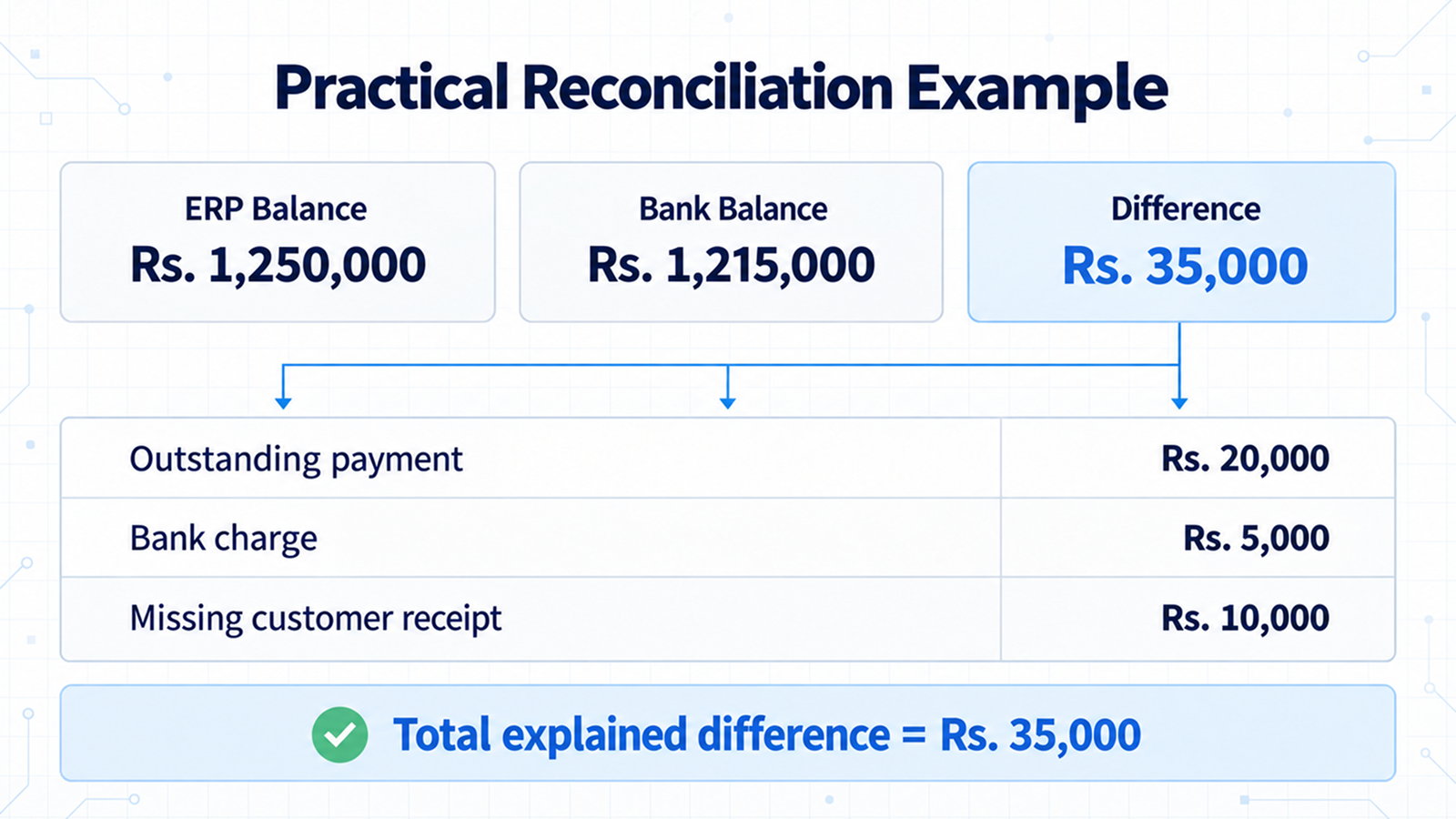
Suppose a business's ERP shows a bank balance of Rs. 1,250,000, while its latest bank statement shows Rs. 1,215,000.
There is a Rs. 35,000 difference.
The first reaction should not be to change the ERP balance simply because the two figures are different. The finance team needs to determine what created the difference.
For example, the Rs. 35,000 could include:
- A supplier payment of Rs. 20,000 recorded in the ERP but not yet cleared by the bank.
- Rs. 5,000 in bank charges that have not yet been recorded in the ERP.
- A customer receipt of Rs. 10,000 that reached the bank but has not yet been properly recorded or allocated.
The numbers in this example are simple, but the principle becomes more important as transaction volume increases.
A business may have hundreds of receipts, payments, transfers, and other bank transactions during a month. Without a proper reconciliation process, small differences can remain unnoticed and become harder to investigate later.
The bank reconciliation process is therefore not simply about making two balances equal. It is about finding out why they are different and deciding what action, if any, is required.
What Bank Reconciliation Actually Checks
Bank reconciliation compares the financial activity recorded in an ERP with the transactions reported by the bank for a specific period.
At a basic level, finance teams need to determine:
- Which transactions appear in both records?
- Which ERP transactions have not appeared on the bank statement?
- Which bank transactions are missing from the ERP?
- Are any amounts different?
- Are there duplicate entries?
- Are there bank charges or deductions that have not been recorded?
- Are there transactions that cannot yet be identified?
The objective is not necessarily to remove every difference immediately. Some differences are legitimate timing items.
For example, a payment can be recorded in the ERP before the bank clears it. In that situation, the ERP and bank statement can temporarily show different balances even though neither record is necessarily wrong.
The same principle applies when a bank processes a charge before the corresponding accounting entry has been created in the ERP.
A proper reconciliation helps separate these legitimate timing differences from actual accounting problems.
Why Do ERP and Bank Balances Differ?
There is usually more than one reason why an ERP bank balance and a bank statement can differ.
1. Timing Differences
A transaction can exist in the ERP before it appears on the bank statement.
A supplier payment, for example, may be entered into the accounting system today while the cheque or bank transfer is cleared several days later.
The ERP therefore shows the payment while the bank has not yet reflected it.
This is a timing difference rather than necessarily an accounting error.
2. Bank Charges and Fees
Banks can deduct service charges, transfer fees, and other amounts directly from an account.
If the charge appears on the bank statement but has not yet been entered into the ERP, the two balances will differ.
The finance team needs to identify the charge and record the appropriate accounting entry so that the ERP reflects the actual bank activity.
3. Customer Payments
A customer may make a payment that reaches the business bank account while the payment has not yet been properly allocated to the customer's outstanding transaction.
This becomes more important when a business receives multiple payments or partial payments.
A payment can exist in the bank records while the accounting records still require investigation to determine which transaction or account it belongs to.
4. Supplier Payments
The same issue can occur with payments made to suppliers.
A payment may already be recorded against a vendor while the corresponding bank transaction has not cleared.
This is where accurate purchase transactions and payment records become important. If the original transaction or payment information is incorrect, reconciliation can become more difficult because the finance team has to investigate both the bank entry and the underlying accounting record.
5. Duplicate Transactions
A transaction entered twice can create a difference even when the original transaction itself is correct.
For example, if a bank payment of Rs. 50,000 is entered twice in the ERP, the accounting records may show Rs. 100,000 while the bank reflects only Rs. 50,000.
Reconciliation can help bring this type of inconsistency to attention before it affects later reporting.
6. Incorrect Amounts
Sometimes the correct transaction exists, but the recorded amount is wrong.
A bank statement may show a payment of Rs. 75,000 while the ERP contains Rs. 57,000.
The transaction cannot be treated as fully matched until the difference has been investigated.
7. Internal Transfers
Businesses with multiple bank accounts may regularly transfer money between their own accounts.
If one side of the transfer is recorded incorrectly or the transaction is missing from one account, the individual bank balances can become difficult to reconcile.
This is especially important for businesses managing several bank accounts, branches, or operating locations.
8. Unrecognized Transactions
A bank statement can sometimes contain a transaction that the finance team does not immediately recognize.
Instead of ignoring the difference, the transaction should be investigated.
It may be a bank charge, transfer, payment, deposit, or another transaction that has not yet been recorded correctly in the ERP.
Not Every Difference Means There Is an Error
This is one of the most important points in bank reconciliation.
Suppose the ERP contains a Rs. 100,000 supplier payment, but the bank statement does not show it yet.
It would be incorrect to immediately assume that the payment entry is wrong.
The payment may simply be outstanding.
Now consider a different situation.
The bank statement contains a Rs. 4,500 bank charge, but there is no corresponding entry in the ERP.
That difference requires a different type of investigation because the bank has already processed the transaction while the accounting records have not reflected it.
This distinction matters because reconciliation is not about changing records simply because two balances differ. It is about identifying the reason for the difference and taking the appropriate accounting action.
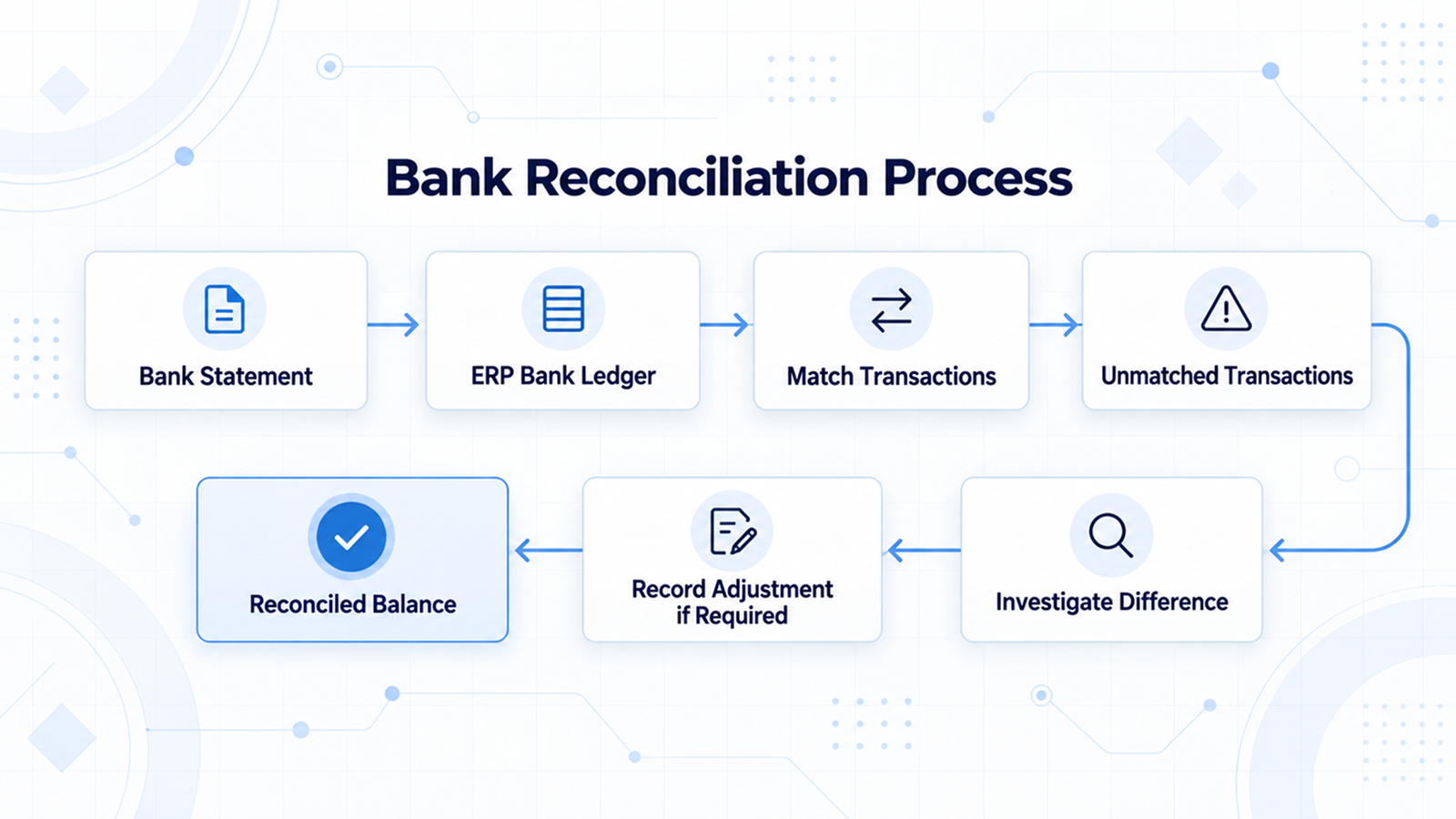
How Finance Teams Investigate a Reconciliation Difference
A useful reconciliation review starts with the period being checked and then works through the transactions that make up the difference.
1. Confirm the Reconciliation Period
Make sure the bank statement and ERP transactions being compared belong to the same period.
Using different dates can create differences that are not actually accounting problems.
2. Verify the Opening Balance
An incorrect opening balance can carry a difference into every subsequent reconciliation.
Before investigating individual transactions, confirm that the starting balance is correct.
3. Compare Receipts and Deposits
Check whether money received by the business appears correctly in both the ERP and bank records.
This includes customer receipts, cash deposits, and other incoming transactions.
4. Review Payments
Look for payments that have been recorded in the ERP but have not yet cleared the bank.
These may be legitimate outstanding transactions rather than errors.
5. Check Bank Charges and Deductions
Review charges, fees, and other deductions appearing on the bank statement.
If a bank transaction has no corresponding accounting entry, determine whether an adjustment is required.
6. Investigate Unmatched Transactions
Any transaction that cannot be explained should be reviewed before the reconciliation is considered complete.
The amount, date, reference, customer, supplier, and transaction type can all help identify the source of the difference.
7. Check for Duplicate or Incorrect Entries
Duplicate transactions and incorrect amounts can create reconciliation problems even when the underlying business transaction is valid.
8. Record Required Adjustments
If the difference represents a missing accounting entry, the appropriate transaction should be recorded in the ERP.
The adjustment should reflect the actual reason for the difference rather than being used simply to force the final balance to match.
9. Recheck the Final Position
After the differences have been investigated, review the final position again against the available bank records.
The purpose is to make sure that the reconciliation reflects the underlying transactions rather than simply producing a matching number.
Different accounting systems provide different tools for this process. Some support automatic or manual matching of bank transactions, while others provide payment reconciliation workflows for connecting payments with customer or vendor records. Microsoft also documents bank reconciliation as a method for comparing internal bank records with bank transactions and identifying missing payments or bookkeeping errors.
What Happens When Reconciliation Is Delayed?
A small unexplained difference may not look important when it first appears.
The problem is that unresolved differences can remain in the accounting records and become harder to trace later.
When reconciliation is delayed:
- Outstanding payments can remain unresolved.
- Bank charges may remain unrecorded.
- Customer payments may not be properly allocated.
- Vendor balances can require additional investigation.
- Duplicate or incorrect entries can remain unnoticed.
- Month-end financial review can take longer.
- Finance teams may spend more time tracing older transactions.
Regular reconciliation helps identify these issues while the underlying transactions are still easier to trace.
Microsoft's accounting guidance recommends completing bank reconciliation at regular intervals and describes it as a practical way to identify missing payments and bookkeeping errors.
How Reconciliation Fits Into the ERP Accounting Cycle
Reconciliation is not a separate activity from the rest of accounting.
Sales transactions, purchases, receipts, payments, journal entries, and other financial activity create records that eventually contribute to the General Ledger and financial reports.
For example, a sale may affect customer receivables and revenue, while the later customer payment affects the relevant bank and customer accounts.
The same applies to purchases and supplier payments.
This is why reconciliation should be viewed as part of the wider accounting cycle rather than an isolated finance task.
The accuracy of these records also depends on a clear Chart of Accounts. When transactions are recorded against the appropriate accounts, finance teams can more reliably trace activity from individual transactions through the General Ledger and into financial reports.
Once the underlying records are correct, reconciliation helps finance teams identify differences, make required adjustments, and maintain more reliable information for reports such as the Trial Balance, Profit & Loss, Balance Sheet, and Cash Flow.
How Reconciliation Works in Axon ERP
Axon ERP's Finance module is designed around double-entry accounting and integrates financial activity across other ERP modules. Its documented finance capabilities include Journal Entries, General Ledger, bank management, bank reconciliation, and financial statements.
The Finance module also provides bank management for multiple bank accounts and supports bank reconciliation between bank statements and Axon ERP records.
However, reconciliation within Axon is not limited to the bank reconciliation workflow.
Axon also provides transaction-level reconciliation features for customers and vendors. These are useful when finance teams need to review related financial transactions and reconcile customer or vendor balances.
Vendor Reconciliation
When Vendor Reconciliation is opened, Axon displays the relevant vendor transactions with information such as:
- Serial number
- Transaction code
- Transaction date
- Debit
- Credit
- Vendor name
For example, a vendor transaction can appear with its transaction code and amount, allowing the finance user to review the financial activity associated with that vendor.
The important part is the reconciliation action.
The user does not need to manually reconcile every listed transaction individually. After reviewing the relevant records, the Reconciliation action can be used to process the reconciliation through the system workflow.
This is useful when a vendor has multiple related transactions that need to be reviewed together.

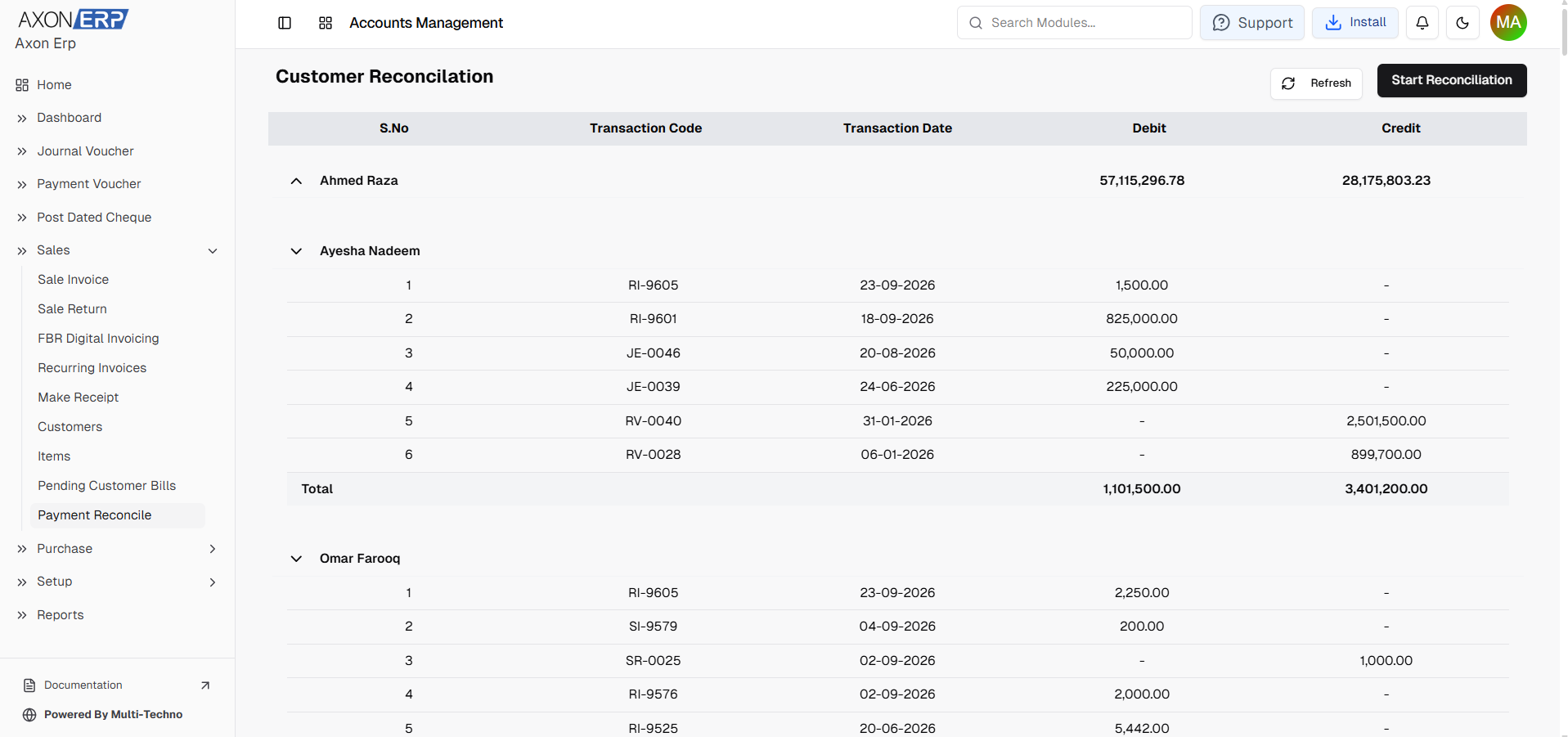
Customer Reconciliation
Axon also provides Customer Reconciliation.
The customer reconciliation screen shows customer-related transactions with their transaction codes, dates, debit and credit values.
A single customer can have multiple financial transactions in the reconciliation view. These may include receipts, invoices, journal entries, and other related records.
For businesses dealing with multiple or partial customer invoices, this provides a way to review the customer's related financial activity together rather than treating every payment as an isolated record.
Axon's reconciliation workflow can therefore help reduce repetitive manual work when customer or vendor transactions need to be reviewed and reconciled.
It is important, however, to distinguish these workflows from bank statement reconciliation. Customer and vendor reconciliation focuses on related party transactions, while bank reconciliation compares the business's bank records with the transactions reported by the bank.

What Should Be Checked Before Completing Reconciliation?
Before considering a reconciliation complete, finance teams should review a few basic points:
- Is the correct bank account being reviewed?
- Does the reconciliation cover the correct period?
- Is the opening balance correct?
- Have receipts and deposits been checked?
- Have outstanding payments been reviewed?
- Have bank charges and deductions been identified?
- Are there duplicate transactions?
- Do transaction amounts match?
- Are unexplained transactions still present?
- Have required accounting adjustments been recorded?
- Has the final balance been reviewed again?
A checklist like this helps prevent the reconciliation process from becoming a simple exercise of matching numbers without understanding the underlying transactions.
Bank Reconciliation and Month-End Closing
Bank reconciliation becomes particularly important during month-end closing.
Financial reports are only as reliable as the transactions behind them. If bank charges, customer receipts, outstanding payments, or incorrect entries remain unresolved, the finance team may have to investigate them while preparing month-end reports.
Completing reconciliation regularly moves much of this investigation closer to the time when the transactions actually occurred.
That makes it easier to identify the source of a difference, review the supporting transaction, and record any required adjustment before financial reports are finalized.
For businesses processing a high volume of transactions, this can also reduce the amount of manual investigation required at the end of an accounting period.
Bank Reconciliation Checklist
Before closing a reconciliation period, confirm that:
- The bank statement and ERP period match.
- The opening balance has been verified.
- Receipts and deposits have been reviewed.
- Outstanding payments have been identified.
- Bank charges have been checked.
- Customer and supplier payments have been reviewed.
- Duplicate or incorrect entries have been investigated.
- Unrecognized transactions have been explained.
- Required accounting entries have been recorded.
- The final position has been reviewed against the bank records.
The purpose is not simply to make the numbers look the same. The purpose is to understand the difference, resolve genuine discrepancies, and maintain reliable financial records.
Final Takeaway
ERP and bank balances can differ for perfectly legitimate reasons, including timing differences, outstanding payments, bank charges, missing entries, and incorrect transactions.
The important part is not the difference itself but understanding why the difference exists.
Regular bank reconciliation gives finance teams a structured way to compare ERP records with actual bank activity, investigate unmatched transactions, and record adjustments when required.
In an ERP such as Axon, this process sits within a broader accounting environment where bank management, financial transactions, customer and vendor reconciliation, General Ledger records, and financial reporting are connected.
When reconciliation is performed consistently, finance teams spend less time trying to explain old differences and have a clearer picture of the financial position of the business.