

Post Detail
BackAxon ERP Official
13 weeks ago
How FBR Digital Invoicing Software Simplifies Business Compliance and IRIS Integration
FBR Digital Invoicing Is Changing How Businesses Create Sales Invoices
Creating a sales invoice is no longer just an accounting task for many businesses in Pakistan. Organizations that fall under Federal Board of Revenue (FBR) Digital Invoicing requirements must ensure every invoice follows the prescribed standards before it can be submitted successfully.
This means businesses must not only prepare invoice details correctly but also verify customer registration, select the appropriate IRIS Sale Type, choose the correct transaction scenario, and ensure the invoice passes FBR validation requirements before submission.
For companies processing dozens or even hundreds of invoices every day, managing these requirements manually quickly becomes difficult.
Common challenges include:
- Verifying whether a customer is registered with FBR.
- Checking if the customer's registration is currently active.
- Selecting the correct IRIS Sale Type.
- Choosing the appropriate FBR transaction scenario.
- Correcting invoices that fail FBR validation.
- Testing invoice submissions before moving to the live environment.
- Maintaining compliance while continuing normal sales operations.
When these activities are handled outside the ERP system, finance teams often spend unnecessary time switching between multiple screens, validating information manually, correcting rejected invoices, and repeating the same compliance checks for every transaction.
As Pakistan Digital Invoicing requirements continue to expand, businesses increasingly need systems that simplify both compliance and day-to-day invoicing.
How Axon ERP Connects Your Business with FBR
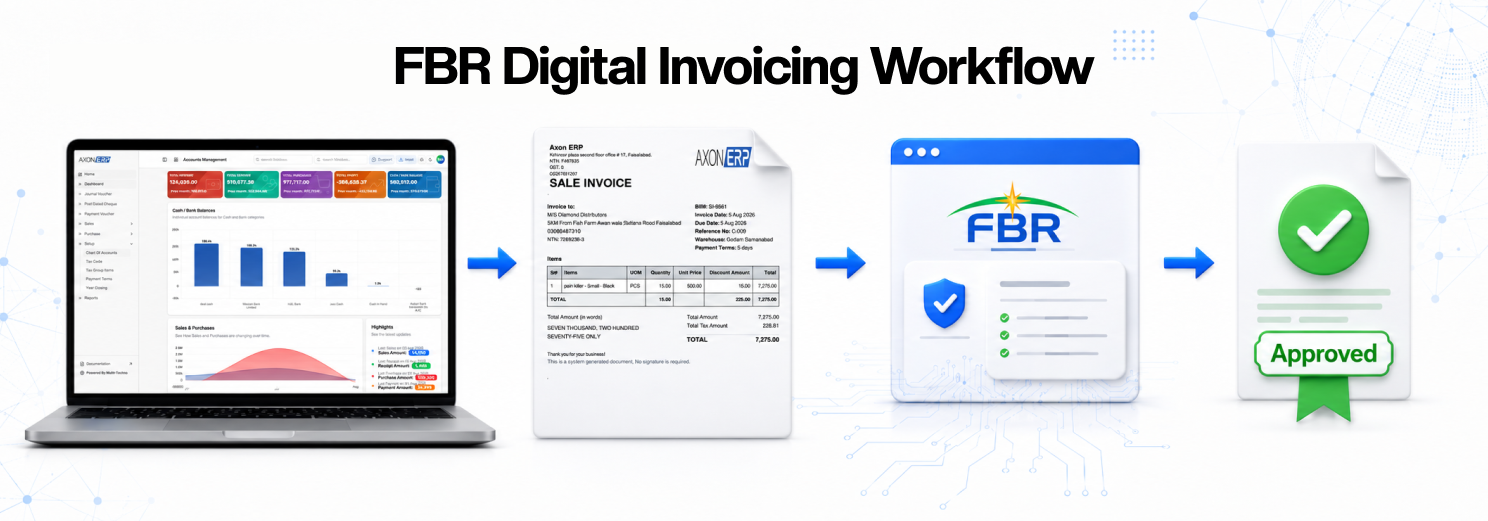
Axon ERP brings the complete FBR Digital Invoicing and FBR e-Invoicing process into a single workflow.
Rather than preparing invoices in one system and completing FBR compliance separately, businesses can configure their FBR integration, verify customer registration, create digital invoices, validate required information, and submit invoices through a centralized ERP environment.
The objective is not simply to generate invoices but to help businesses maintain accurate records while reducing manual verification, minimizing submission errors, and making FBR compliance part of the normal sales process instead of a separate administrative task.
Before businesses can start submitting digital invoices, the integration must first be configured inside the ERP system.
That setup is where the complete FBR Digital Invoicing workflow begins.
Setting Up FBR Digital Invoicing in Axon ERP
Before businesses can start submitting digital invoices to FBR, the integration must first be configured inside Axon ERP.
The setup is managed from the Company Profile under the Integration Setup section, where administrators configure the required FBR connection before users begin creating digital invoices.
The integration setup includes options such as:
- Enable FBR POS Integration
- Enable IRIS Live Digital Invoicing
- Enable Sandbox Testing
- IRIS API URL
- IRIS Token
- IRIS Sale Types
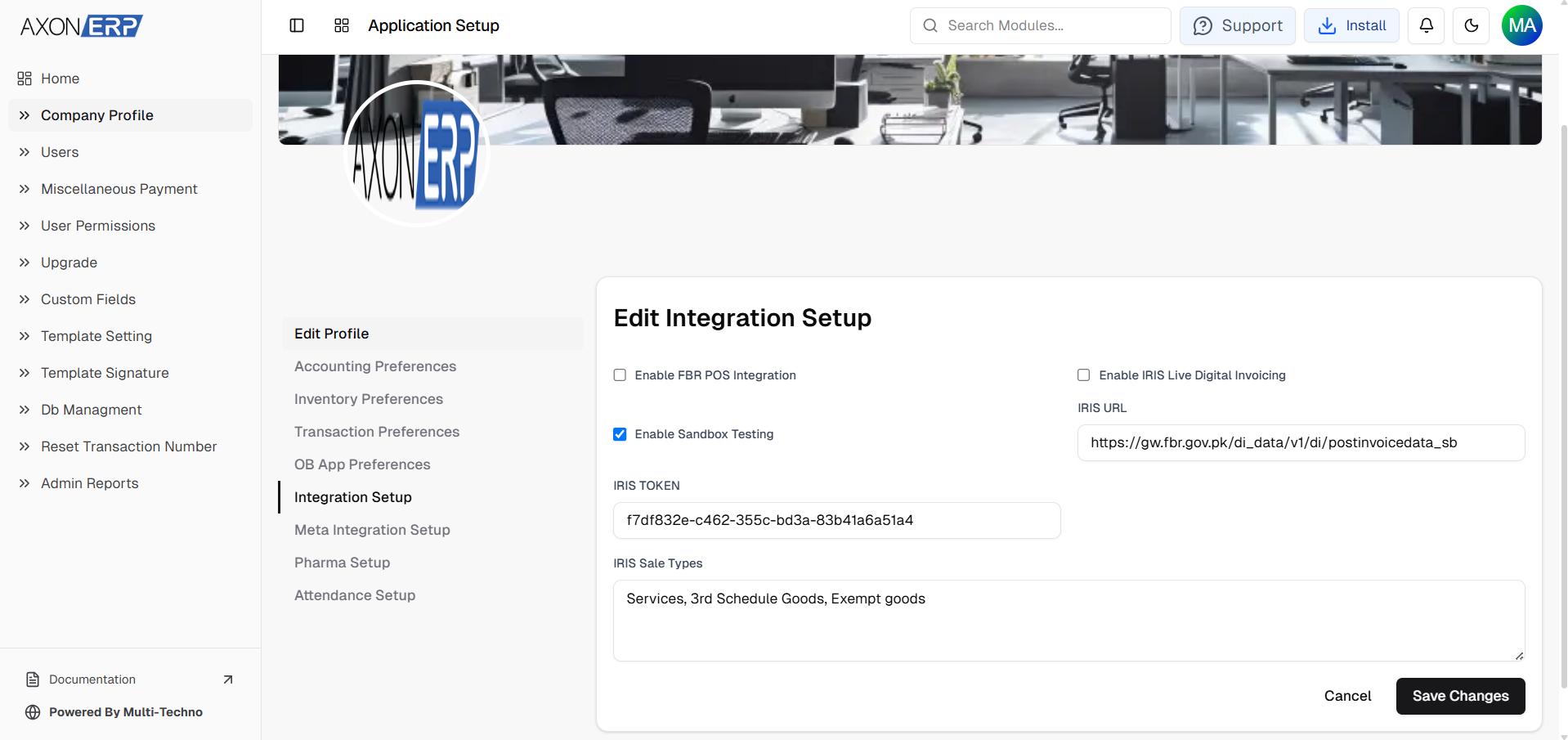
These configuration options allow businesses to control how digital invoices are validated, tested, and submitted to the FBR environment.
Because businesses normally begin with testing before moving to production, Axon ERP allows organizations to work in the Sandbox environment first. This helps finance teams understand the complete invoicing process, verify configurations, and practice invoice submission before switching to the live FBR environment.
Only one integration mode remains active at a time, allowing businesses to work either in the Sandbox environment for testing or in the Live IRIS environment for actual invoice submission.
Many organizations also receive implementation support during this stage. Before enabling live digital invoicing, businesses can test sample invoices, verify their configuration, and train users on the complete workflow to ensure invoices are submitted correctly once the live environment is activated.
Once the integration has been configured successfully, the FBR Digital Invoicing module becomes available within the Sales section of Axon ERP. From there, users can begin creating compliant digital invoices without leaving the ERP environment.
Creating an FBR Digital Invoice
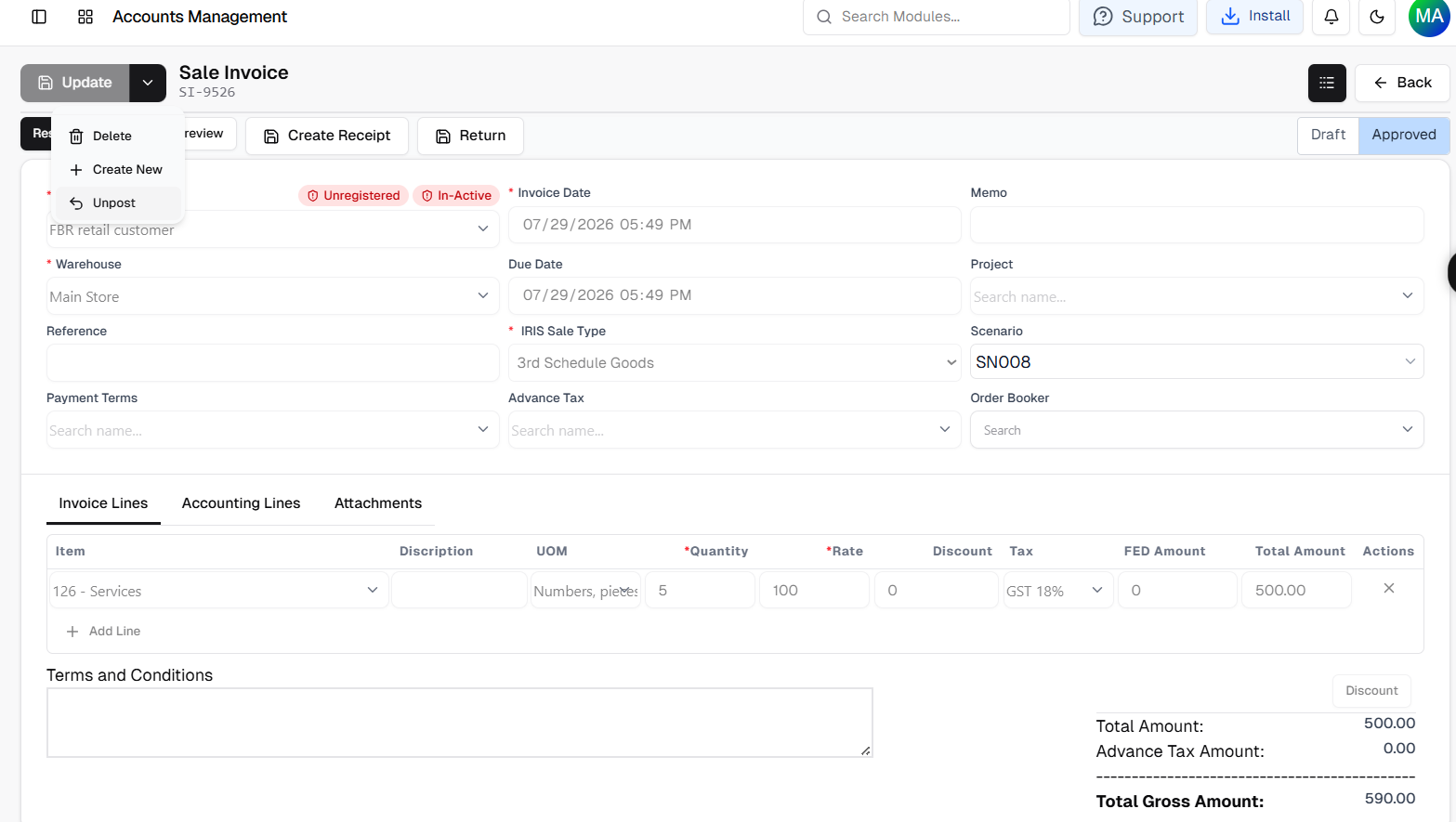
Although the FBR Digital Invoice screen looks similar to a standard Sales Invoice, it contains additional compliance fields required for electronic submission to FBR.
Users still enter the normal sales information, including customer details, invoice items, quantities, pricing, and tax information. However, before the invoice can be submitted, several FBR-specific fields must also be completed.
These include:
- IRIS Sale Type
- FBR Transaction Scenario
- Customer Registration Status
- Customer Active Status
These fields help businesses identify whether the selected customer is eligible for FBR Digital Invoicing before submission. One of the biggest advantages of Axon ERP is that customer verification happens automatically through integrated FBR APIs, reducing manual verification and improving invoice accuracy.
When a customer is selected, the system communicates with FBR through integrated APIs to retrieve the customer's registration information. Users can immediately see whether the customer is registered or unregistered and whether the registration is currently active. This information is retrieved in real time through FBR integration APIs.
This removes the need to verify customer information separately before preparing the invoice while helping reduce compliance errors caused by incorrect customer records.
After selecting the appropriate IRIS Sale Type, choosing the required FBR Scenario, and completing the remaining invoice information, the invoice is saved in Draft status. Every Digital Tax Invoice is validated before it can be submitted to the FBR platform.
Before the invoice can be submitted to FBR, Axon ERP performs validation checks to ensure all mandatory information required for digital invoicing has been provided.
If any required information is missing or fails validation, the system displays an error message and the invoice remains in Draft status. This allows users to correct the information before attempting submission again.
Only invoices that successfully pass validation can be confirmed and submitted to the FBR environment. This helps businesses reduce rejected invoices while maintaining compliance with FBR submission requirements.
Validation Before Live Submission
Unlike a standard Sales Invoice, an FBR Digital Invoice is not sent immediately after it is created.
Axon ERP first validates the invoice against the required FBR submission rules.
This validation helps ensure that important information such as customer details, IRIS Sale Type, transaction scenario, and other mandatory fields are completed before the invoice is transmitted.
If validation is successful, confirming the invoice automatically submits it to the configured FBR environment. Every FBR IRIS Invoice is checked against the required submission rules before it is transmitted.
If validation fails, the invoice is not submitted. Instead, users receive a validation message, allowing them to correct the required information while the invoice remains in Draft status.
This controlled workflow reduces failed submissions and helps businesses maintain compliance without interrupting their normal invoicing process.
Testing Before Moving to the Live Environment
Implementing FBR Digital Invoicing is not simply a matter of enabling the integration and immediately submitting live invoices. Businesses first need to ensure their configuration, customer information, and invoicing process work correctly before operating in the production environment.
Axon ERP supports this through its Sandbox Testing environment.
During implementation, businesses can enable Sandbox Testing from the Integration Setup and create sample digital invoices without affecting live FBR records. This allows finance teams to understand the complete workflow, verify invoice information, and become familiar with the submission process before switching to the live environment.
Many organizations also complete user training during this stage. Finance and accounting teams learn how to configure the integration, create compliant invoices, resolve validation issues, and understand the complete digital invoicing workflow before live operations begin.
Once testing has been completed successfully, businesses can enable Live IRIS Digital Invoicing and begin submitting actual invoices to FBR through the same ERP workflow.
This approach helps reduce implementation risks while giving users confidence before working with live tax data.
Managing Changes After Invoice Submission
Business requirements sometimes change even after an invoice has already been submitted.
A user may need to correct invoice information, update transaction details, or remove an invoice that was created incorrectly.
To support this operational requirement, Axon ERP provides an Unpost workflow within the ERP system.
When required, users can unpost the submitted invoice, returning it to Draft status inside Axon ERP. Once the invoice is back in Draft, users can make the necessary changes or delete the transaction according to their internal business requirements. Any modifications made after unposting remain within Axon ERP. Previously submitted invoices on the FBR portal are not automatically updated through this workflow.
After the required changes have been completed, the invoice can be posted again within the ERP.
This workflow allows businesses to maintain flexibility inside their own ERP environment while continuing to manage invoice records efficiently.
Sales Reporting After Digital Invoicing
FBR Digital Invoices remain part of the normal sales process inside Axon ERP.
Instead of maintaining separate reporting screens, approved digital invoices continue to appear within the existing sales reporting structure, allowing businesses to analyze transactions through the same reports they already use for sales operations.
Businesses can review digital invoices through reports such as:
- Sales by Customer
- Sales by Month
- Sales by Item
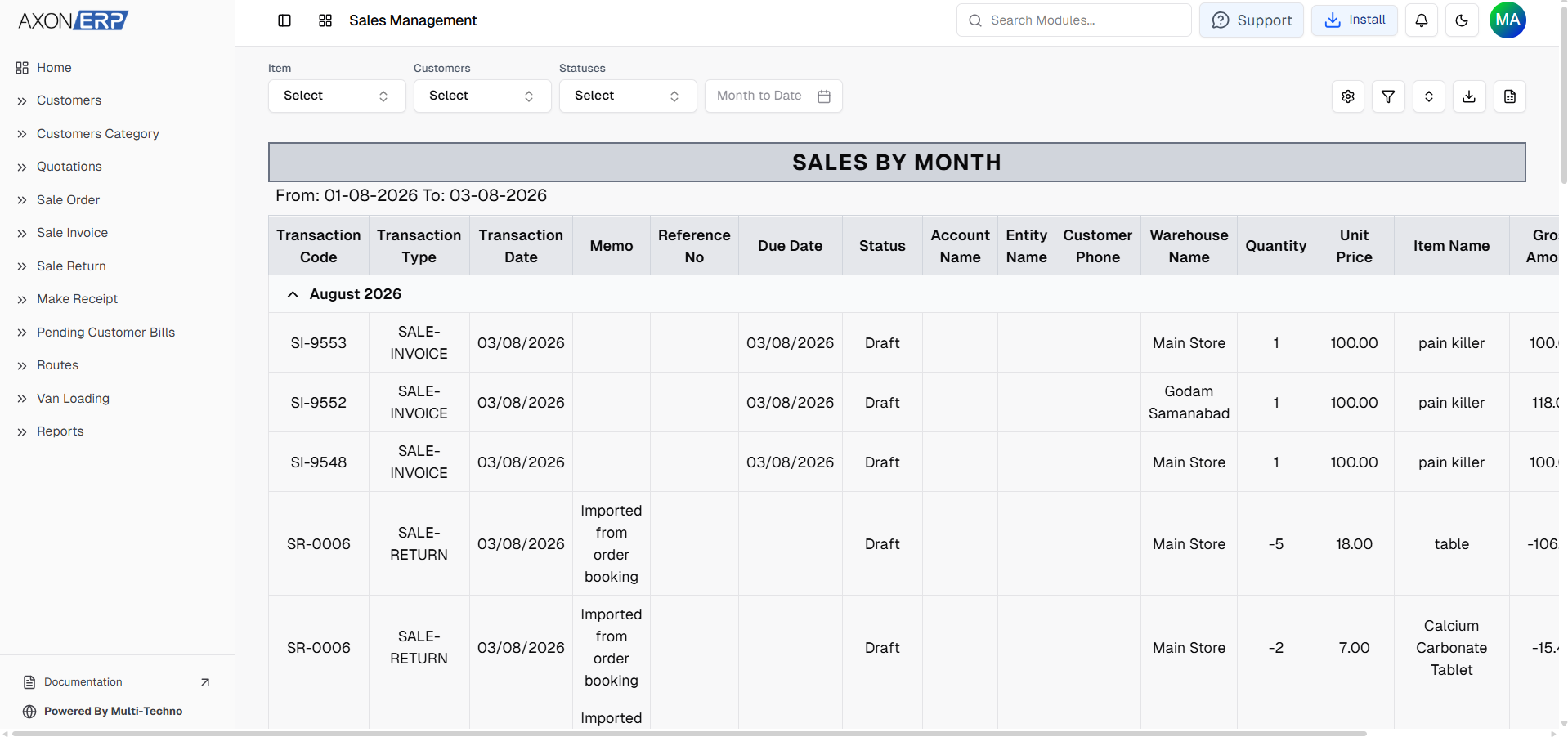
These reports help finance teams review submitted invoices without maintaining separate reporting processes for digital invoicing.
Since FBR Digital Invoices are processed as sales transactions inside Axon ERP, businesses do not need a separate reporting module. Because digital invoices remain connected with the overall sales module, businesses maintain complete visibility into their sales activity while avoiding duplicate reporting processes.
Why FBR Digital Invoicing Matters
Managing FBR compliance involves much more than submitting invoices electronically.
An effective FBR Digital Invoicing Software helps businesses:
- Simplify FBR compliance.
- Reduce manual verification work.
- Verify customer registration through integrated APIs.
- Improve invoice accuracy before submission.
- Minimize validation errors.
- Test invoice submissions before going live.
- Centralize digital invoicing within the ERP.
- Maintain reliable financial records.
- Improve compliance readiness.
- Reduce invoice rejection during submission.
By bringing customer verification, invoice creation, validation, and digital submission into a single workflow, businesses spend less time on administrative activities and more time focusing on day-to-day operations.
Final Thoughts
As digital tax compliance becomes increasingly important in Pakistan, businesses need more than a traditional invoicing system. Businesses looking for reliable Digital Invoice Software Pakistan also need seamless compliance with FBR requirements without increasing manual work. They need a solution that helps them prepare compliant invoices, verify customer information, and manage digital submissions without relying on disconnected processes.
Axon ERP simplifies the complete FBR Digital Invoicing workflow by connecting integration setup, customer verification, invoice creation, IRIS configuration, validation, Sandbox Testing, and live invoice submission within one centralized ERP system.
Whether businesses are preparing for their first FBR integration or managing high volumes of digital invoices every day, Axon ERP helps streamline compliance while reducing manual work and improving operational efficiency.
With built-in validation, integrated customer verification, flexible testing through Sandbox mode, and centralized invoice management, businesses can confidently manage FBR Digital Invoicing while maintaining accurate financial records and supporting long-term tax compliance while simplifying everyday sales operations. This makes Axon ERP a practical solution for businesses that want to modernize invoicing while staying compliant with evolving FBR requirements.