


Post Detail
BackAxon ERP Official
2 hr ago
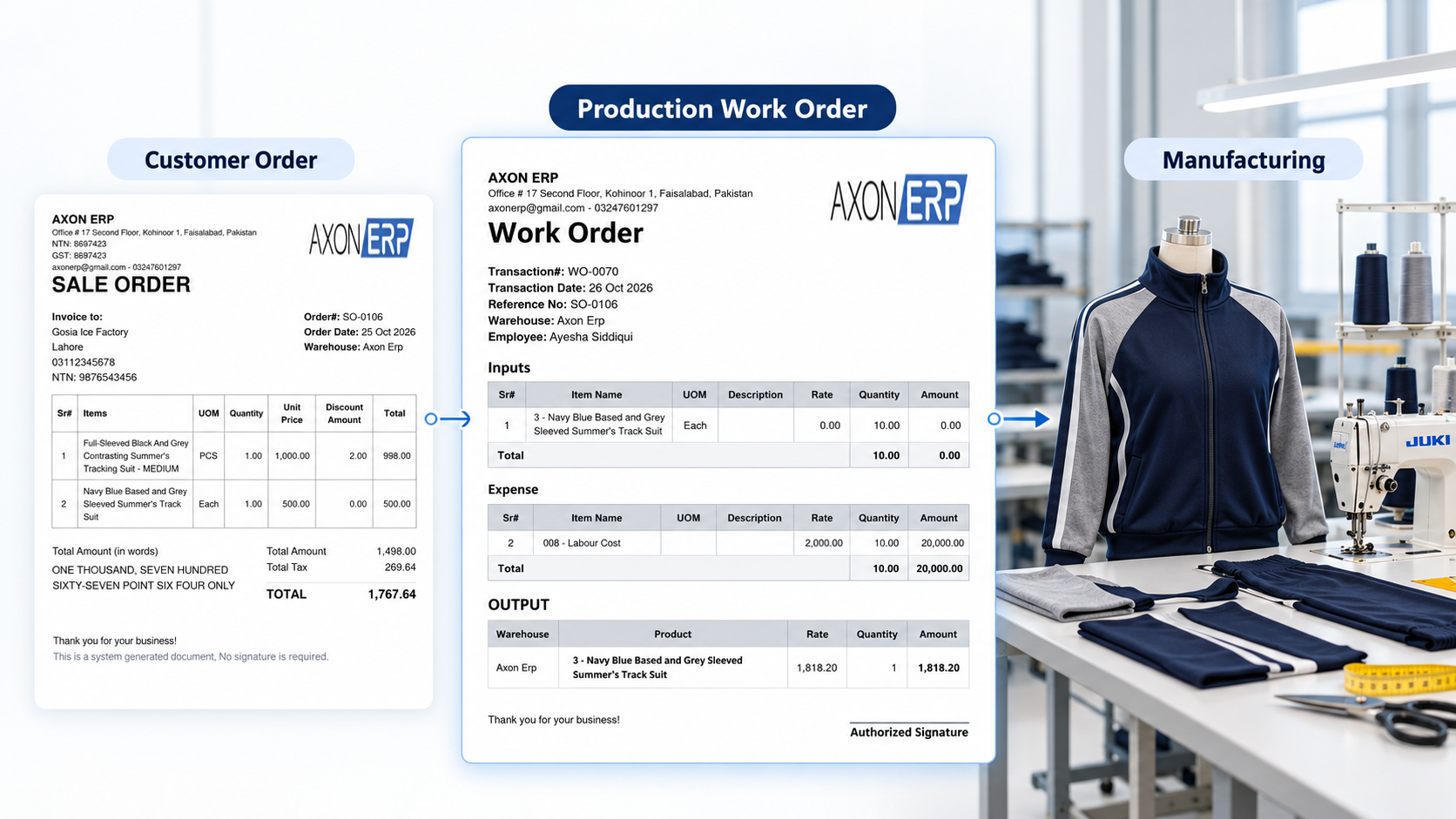
Managing Production Work Orders Without Losing Track of Customer Orders
When customer orders increase, managing production becomes more complicated than simply knowing what needs to be manufactured. Teams must understand which orders require production, what quantities need to be built, which materials are required, and how production work should move between departments.
Without a clear process, sales and production teams may work with different information. A customer order can be confirmed by sales while production is still waiting for instructions, material requirements, or an assigned production task. These gaps can make it difficult to maintain visibility over customer commitments and manufacturing activities.
Production work order management helps manufacturers organize production requirements into defined work orders. When connected with the sales order process, it gives teams a clearer way to move from customer demand toward production execution.
Why Customer Orders Become Difficult to Track During Production
A customer orders and a production work order serve different purposes. The customer order records what the customer wants to purchase, while the work order organizes the manufacturing work required to produce the specified item and quantity.
Problems arise when the information connecting these activities is unclear or handled through separate manual processes.
Common challenges include:
- Unclear production priorities: Teams may struggle to identify which pending customer orders require production attention first.
- Inconsistent order information: Sales and production staff may rely on different records or manually communicated instructions.
- Unclear production responsibilities: Without defined assignments, employees may not know which department or production activity requires their attention.
- Material preparation delays: Production work may be ready to begin, but the required materials still need to be issued or prepared.
- Limited order visibility: Sales staff may find it difficult to determine where a customer order stands once it enters the production process.
These issues do not necessarily mean a manufacturer needs a more complicated production system. Often, the first improvement is to establish a clear workflow connecting pending customer demand with production work.
What Is Production Work Order Management?
Production work order management is the process of organizing and controlling the work required to manufacture products. A work order identifies the item to be produced, the required quantity, and relevant production information needed to prepare the work.
Depending on the manufacturing system, a work order may also include material requirements, production routes, warehouse information, employee assignments, departmental tasks, and other operational details.
The exact information depends on the manufacturer's production process and the capabilities of its ERP software.
A work order is not the same as a sales order. A sales order represents customer demand, whereas a production work order represents manufacturing work associated with that demand or a production requirement.
Similarly, a work order is not necessarily a complete production plan. Production planning may involve additional decisions about capacity, schedules, material availability, deadlines, and resource allocation.
Understanding these distinctions helps manufacturers establish a workflow in which customer requirements can be translated into actionable production work without confusing order management with production scheduling.
From Pending Sales Order to Production Work Order
A practical production workflow begins by identifying customer orders that require manufacturing. Rather than treating every sales order as a separate manual instruction, manufacturers can use a defined process to move eligible orders into production.
The following stages illustrate how this process can work.
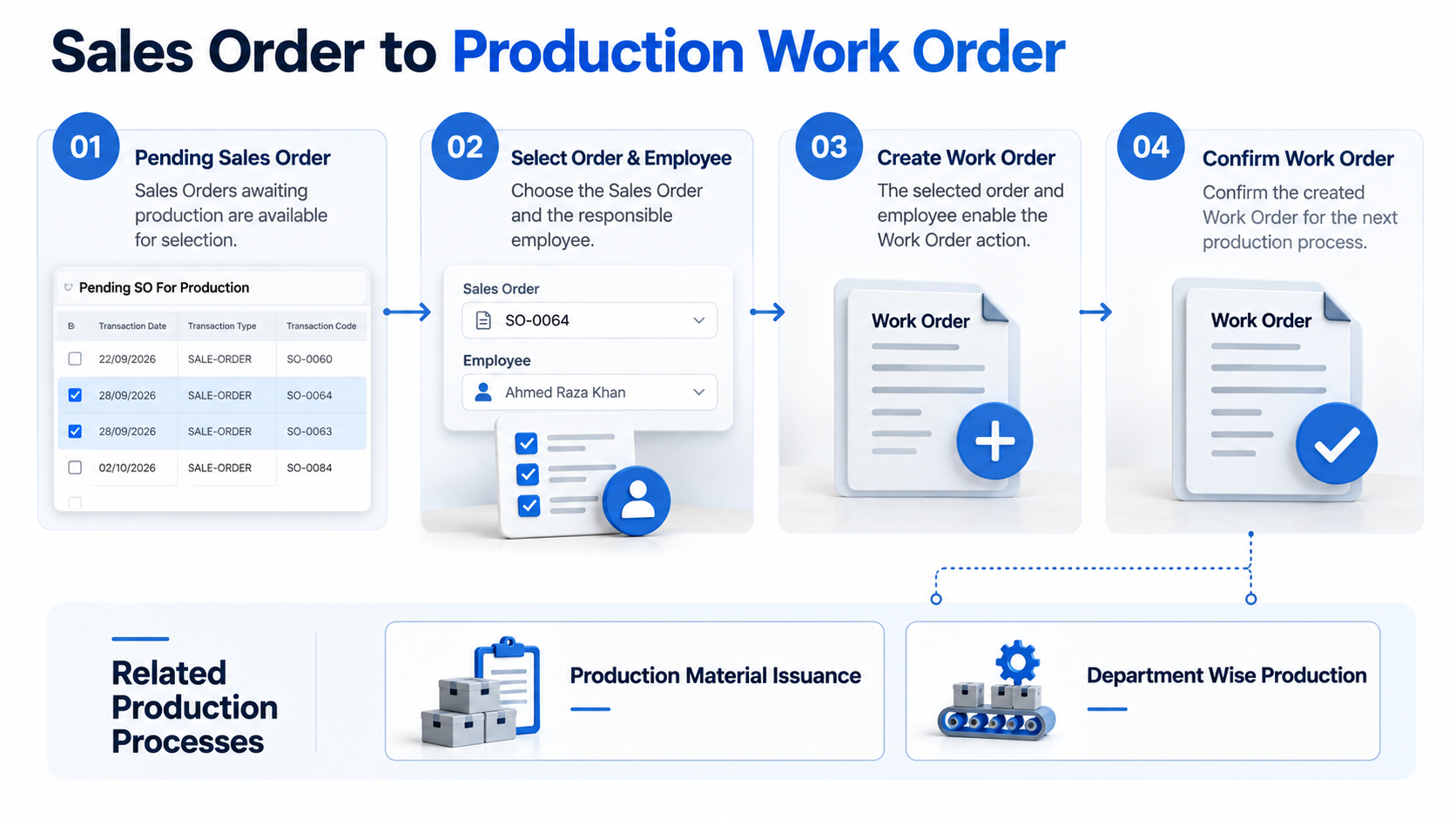
1. Identify Sales Orders Pending for Production
The first step is to identify sales orders that still require production work.
A dedicated pending-orders view can help staff identify which orders are awaiting production processing. Before creating a work order, the team should confirm the ordered item, required quantity, and relevant order details.
This initial check helps prevent production instructions from being prepared using incomplete or incorrect information.
2. Create the Work Order Against the Required Demand
Once an eligible sales order has been selected, the next step is to prepare its corresponding production work order.
The work order should clearly identify what needs to be manufactured and in what quantity. Where the system supports it, relevant employee, department, warehouse, and production-route information can also be included.
The objective is to move beyond a general customer request and establish a defined production record that the relevant team can process.
3. Review and Confirm the Work Order
Creating a work order and confirming it are not necessarily the same action.
A review stage allows the responsible person to check the production details before the work order moves forward. Depending on the system, confirmation may change the work order's status and make it ready for subsequent production processes.
Manufacturers should understand exactly what confirmation does in their ERP system. It should not automatically be assumed that confirming a work order also issues materials, starts production, or completes departmental assignments.
A clearly defined confirmation step helps establish when a production request is ready to proceed.
What Information Should a Production Work Order Contain?
A useful work order needs enough information to communicate the production requirement clearly. The precise fields depend on the product, manufacturing process, and ERP configuration.
Important information may include the following.
Item and Build Quantity
The item identifies the product to be manufactured, while the build quantity specifies how many units the work order covers.
These details provide the starting point for determining material requirements and organizing production activities. If the required quantity changes, the responsible team should understand whether the work order needs to be amended or replaced according to the system's procedures.
Production Route and Department
Production routes and department information help describe where or how the manufacturing work is expected to proceed.
For manufacturers working across multiple departments, clearly identifying the relevant production stages can reduce confusion about responsibilities. However, the presence of a production route does not by itself prove that the ERP system automatically schedules machines, assigns tasks, or tracks completion.
Those capabilities should be evaluated separately.
Material Requirements
Manufacturing often requires several components or raw materials to produce one finished item. A work order may reference the material quantities required for its build quantity.
For example, a manufacturer producing four units needs to understand which components are required and in what quantities. The team must then establish whether the required materials are available and how they will be issued to production.
The material requirements should be consistent with the product's defined Bill of Materials (BOM) and the applicable manufacturing process.
Warehouse and Employee Information
Warehouse information can help identify the relevant inventory location, while employee information can clarify responsibility for the work order.
These fields are useful only when their purpose is clearly understood within the company's workflow. Manufacturers should verify whether the ERP uses them for identification, assignment, stock processing, or another specific function.
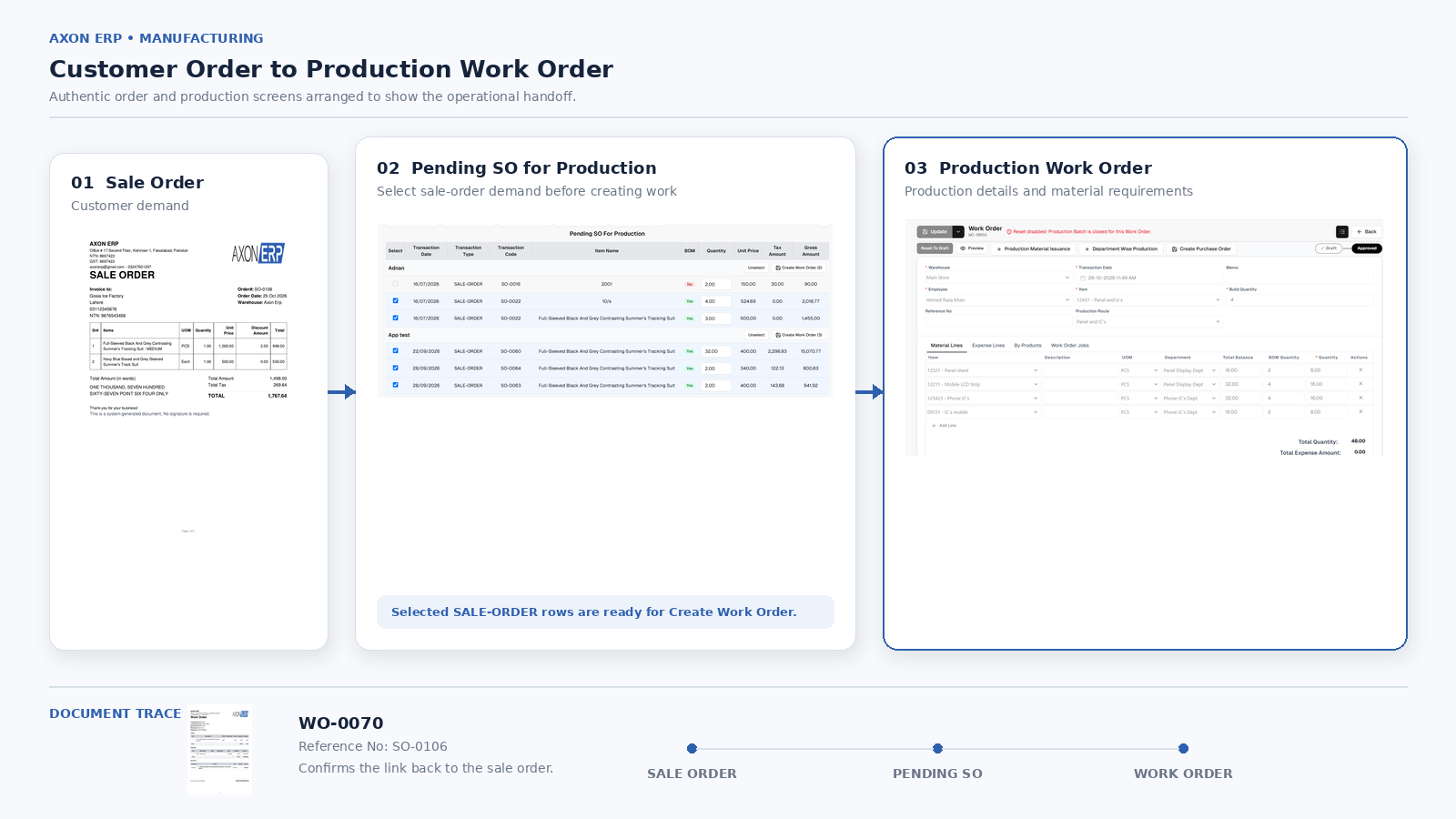
Why Material Issuance Matters After Work Order Preparation
Preparing a work order identifies the production requirement, but manufacturing also depends on having the necessary materials available to the production team.
Material issuance is the process through which materials are formally issued for the intended operational purpose. A manufacturer needs a clear procedure for identifying the required items, recording the quantities issued, and maintaining accurate inventory records.
Without this discipline, production staff may rely on informal requests or manual notes, making it harder to reconcile material usage with inventory records.
Before production begins, teams should establish:
- Which materials are required for the work order.
- Whether the required quantities are available.
- Which warehouse or inventory location supplies those materials.
- How issued quantities are recorded.
- How shortages, substitutions, or quantity differences are handled.
Work order preparation and material issuance should be treated as related but distinct activities. Creating a work order does not necessarily mean the materials have already been issued.
This distinction is particularly important for manufacturers that manage multiple orders and use the same components across different products.
Coordinating Work Across Production Departments
In a multi-department manufacturing environment, production work may need to pass through several operational stages. Each department must understand its responsibilities, the quantity involved, and the work that needs to be completed.
A department-level production process can help organize this work when the manufacturing ERP system supports the necessary records and controls.
For effective coordination, manufacturers should establish:
- Clear responsibility for each production activity.
- Consistent identification of the work order and related product.
- Defined procedures for transferring work between departments.
- A method for recording production quantities and relevant exceptions.
- A reliable way to communicate delays or incomplete work to the responsible team.
These practices help reduce the gap between preparing a production requirement and carrying out the actual manufacturing work.
However, departmental job creation, progress recording, and completion tracking are different capabilities. Businesses evaluating ERP software should confirm which of these functions are supported rather than assuming that a department listing automatically provides complete production tracking.
How ERP Work Order Management Helps Maintain Order Visibility
An ERP system can help connect sales demand and manufacturing records within a more organized business process. The practical benefit depends on how the system links orders, work orders, inventory transactions, and production activities.
When these records are appropriately connected, manufacturers can work toward several operational improvements.
A clearer record of production requirements: Staff can refer to defined work orders rather than relying entirely on informal instructions.
More consistent production handovers: Sales and production teams have a structured process for moving customer demand into manufacturing.
Better material accountability: When material issuance is properly recorded and connected to the relevant workflow, teams have a clearer basis for reviewing inventory management.
More organized departmental responsibilities: Where departmental production functions are supported, work can be organized around defined departments and production requirements.
Improved follow-up: Consistent order and production records give responsible staff a better starting point for investigating delays and identifying outstanding work.
These benefits should not be confused with automatic real-time visibility. A manufacturer still needs accurate data, clearly defined procedures, and the appropriate ERP functionality to know whether a production order is waiting for materials, in progress, delayed, or completed.
The goal is not simply to digitize a paper work order. It is to establish a dependable process through which customer requirements remain connected to the manufacturing work intended to fulfil them.
What to Check When Choosing Work Order Management Software
Manufacturers evaluating work order management software should look beyond whether the system allows users to create a work order. The more important question is whether the software supports the workflow their production operation actually needs.
Use the following checklist during a software evaluation.
- Sales order connection: Can pending sales orders be identified and used to initiate production work orders?
- Work order confirmation: Is there a defined review and confirmation process before the work order proceeds?
- Production details: Can the system record the item, build quantity, production route, warehouse, and other relevant information?
- Bill of materials: Can the required components and quantities be defined consistently with the product structure?
- Material issuance: Can material issues be recorded and reconciled with inventory records?
- Department-level production: Does the system support the required departmental work records and responsibilities?
- Status visibility: Can users determine the actual status of a work order, and which actions or records establish that status?
- Exceptions and changes: How are quantity changes, material shortages, and production delays handled?
- Reporting: Can managers obtain the operational information they need without maintaining separate, conflicting records?
A demonstration should use a realistic customer order rather than an isolated work order form. Ask the software provider to demonstrate the complete supported process, from selecting the production requirement to the relevant downstream activities.
This approach makes it easier to distinguish a basic work order register from a manufacturing workflow that genuinely supports the business's operational requirements.
Frequently Asked Questions
What is the difference between a sales order and a production work order?
A sales order records a customer's purchasing requirement. A production work order organizes the manufacturing work required to produce an item and quantity. A sales order may initiate production, but the exact relationship depends on the business process and ERP system.
Can an ERP system create work orders from sales orders?
Some ERP systems support creating work orders from selected sales orders or other production requirements. The available process varies by system. Businesses should verify whether the work order is created directly, requires manual preparation, or needs review and confirmation before proceeding.
Is a production work order the same as a production plan?
No. A work order defines a particular production requirement. A production plan may address broader decisions such as scheduling, capacity, material availability, production priorities, and delivery commitments. Some systems connect these processes, but they should not be treated as interchangeable.
Why is material issuance important in work order management?
Material issuance records the quantities of materials released for production. When properly maintained, these records help businesses account for inventory movements and investigate differences between required, issued, and remaining quantities.
What should manufacturers check before confirming a work order?
They should review the product, build quantity, relevant material requirements, production route, warehouse information, and assigned responsibilities. They should also understand what confirmation changes in the ERP system and which subsequent steps remain necessary.
How does work order management help prevent customer order delays?
Work order management can provide a defined process for moving customer demand into manufacturing. Its effectiveness depends on accurate order information, clear responsibilities, material availability, and reliable follow-up. A work order alone cannot guarantee that production will finish on time.
Conclusion
Managing production work orders effectively requires more than creating a record of what needs to be manufactured. Manufacturers need a consistent process that connects customer demand with defined production requirements, material preparation, departmental responsibilities, and appropriate follow-up.
A structured ERP workflow can help establish that connection, but its value depends on the actual functions supported and the discipline with which teams use them.
For manufacturers experiencing gaps between sales commitments and production activity, the right starting point is to examine how pending customer orders become work orders, what information is carried forward, and how the subsequent production steps are recorded.