

Post Detail
BackAxon ERP Official
12 weeks ago
Why Customer Orders Become Difficult to Manage as Businesses Grow
Managing customer orders becomes increasingly challenging as businesses expand. What starts as a simple process of recording customer requests can quickly become difficult when orders begin arriving from multiple sales representatives, branches, phone calls, walk-in customers, and field order bookers.
Imagine a business processing dozens or even hundreds of customer orders every day. If those orders are managed through spreadsheets, WhatsApp messages, emails, or handwritten notes, employees often spend more time searching for order information than actually serving customers. Sales teams struggle to track pending orders, warehouses receive incomplete instructions, finance teams prepare invoices manually, and management has little visibility into the overall sales process.
As organizations continue growing, these small operational issues become much larger problems. Duplicate orders, pricing mistakes, delayed deliveries, missed customer requests, and poor communication between departments can all affect customer satisfaction and reduce business efficiency.
As order volumes continue to increase, businesses need a centralized system that keeps every customer order organized from creation to invoicing while giving every department access to the same real-time information.
Axon ERP helps businesses organize every customer order from a single platform where sales, warehouse, finance, and management teams all work with the same information. Instead of creating separate records for every stage of the sales process, businesses maintain one structured workflow that connects customer information, quotations, sales orders, invoices, and payments from beginning to end.
By centralizing customer orders, Axon ERP improves operational accuracy, reduces manual work, and provides complete visibility into every sales transaction throughout the business.
What Is Order Management Software?
Order Management Software is a centralized system used to create, organize, process, approve, and track customer orders throughout the entire sales cycle.
Instead of recording customer orders in spreadsheets or separate documents, businesses maintain every order inside one system where it remains connected with customers, inventory, warehouses, pricing, financial information, and future sales transactions.
A typical Sales Order contains:
- Transaction Code
- Customer
- Warehouse
- Transaction Date
- Due Date
- Items
- Quantity
- Unit Price
- Discount
- Tax
- Gross Amount
- Payment Terms
- Order Status
- Attachments
Because every Sales Order is maintained inside a centralized database, businesses can easily track customer orders, monitor pending transactions, and ensure every department works with accurate and up-to-date information.
Why Customer Order Management Matters
Customer orders are one of the most important parts of the sales process. Every invoice, delivery, and payment depends on accurate order information.
Without a structured Customer Order Management system, businesses commonly face problems such as:
- Duplicate customer orders.
- Incorrect pricing.
- Missing order details.
- Difficulty prioritizing customer orders.
- Poor communication between departments.
- Difficulty tracking customer order status.
- Manual order processing errors.
- Lost sales opportunities due to delayed responses.
These issues become more common as order volumes increase.
When sales teams manage orders manually, even small mistakes can affect inventory planning, invoicing, customer service, and delivery schedules.
Axon ERP eliminates these challenges by maintaining every Sales Order inside a centralized system where customer information, products, warehouses, pricing, and financial details remain connected throughout the complete Sales Workflow Management process.
Instead of recreating order information multiple times, businesses enter the information once and continue the sales process using the same transaction.
How Order Management Works in Axon ERP
Order Management in Axon ERP follows a structured workflow that keeps every customer order organized from the moment it is created until it is converted into the next stage of the sales process.
The process begins by selecting an existing customer from the centralized customer database. Since customer information has already been created inside the Business Contact Management module, users simply choose the customer without entering the same information again.
After selecting the customer, users complete the Sales Order by entering:
- Warehouse
- Transaction Date
- Due Date
- Order Booker
- Payment Terms
- Project
- Advance Tax
- Reference Number
- Internal Memo
Next, users add products using inventory items that already exist inside the Item Management module.
Each Sales Order line contains:
- Item
- Description
- Unit of Measure (UOM)
- Quantity
- Unit Price
- Discount
- Tax
- Gross Amount

Users can also add Terms & Conditions, apply an overall discount, and upload supporting documents through the Attachments section whenever additional specifications or customer documents need to be attached with the order.
Every Sales Order is initially saved as Draft, allowing the sales team to verify quantities, pricing, discounts, taxes, and customer requirements before final approval.
Once everything has been reviewed, the Sales Order is moved to Approved status, making it ready for the next stage of the sales workflow while ensuring every department works with verified and consistent order information.
How Sales Orders Connect with the Sales Process
A Sales Order is one of the most important documents in the entire sales lifecycle. It acts as the bridge between customer confirmation and the final sales transaction.
Once a customer confirms the products, pricing, and business terms, the Sales Order becomes the official record that every department follows. Instead of sales, warehouse, and finance maintaining separate documents, everyone works from the same Sales Order, ensuring consistency throughout the process.
The standard sales workflow inside Axon ERP follows this sequence:
Customer Category → Customer → Quotation → Sales Order → Sales Invoice → Customer Payment
Although the standard workflow follows Customer → Quotation → Sales Order, Axon ERP also provides the flexibility to create Sales Orders directly whenever businesses do not require a quotation stage.
After a Sales Order is approved, users can generate a Sales Invoice directly from the approved order. Since customer information, products, quantities, pricing, discounts, taxes, and financial details already exist inside the Sales Order, there is no need to enter the same information again.
The generated Sales Invoice is created in Draft status, allowing users to review the transaction before final approval. This reduces manual work while ensuring the invoice remains consistent with the approved customer order.
Because every document remains linked throughout the sales process, businesses can easily trace the complete customer journey from the initial inquiry to the final payment without creating duplicate records.
Managing Sales Orders Safely
Customer orders contain critical business information that directly affects invoicing, financial reporting, and customer deliveries.
Accidentally modifying or deleting approved orders can create inconsistencies across the sales process.
To maintain data integrity, Axon ERP follows a controlled approval workflow.
Every Sales Order is initially saved as Draft, allowing sales teams to review customer information, product quantities, pricing, discounts, taxes, payment terms, and supporting documents before confirming the transaction.
Once the order is moved to Approved status, it becomes available for invoice generation while maintaining the approved pricing and transaction details.
This approval process helps businesses improve internal controls, reduce pricing mistakes, and ensure only verified customer orders move forward in the sales cycle.
Order Booking App Integration
Many businesses rely on field sales representatives to collect customer orders during market visits.
Managing these orders manually often delays processing because sales representatives return to the office before entering customer orders into the ERP system.
Axon ERP eliminates this delay through its Order Booking Application.
Field Order Bookers can create customer orders directly from the mobile application, even while working offline. Once an internet connection becomes available, the application automatically synchronizes the data with Axon ERP.
Businesses can configure the synchronization behavior according to their operational requirements. Through Company Preferences, administrators can decide whether synchronized transactions should create Sales Orders or Sales Invoices automatically.
Organizations can also define the default Transaction Status and Payment Status, allowing synchronized transactions to be created directly as Approved whenever required.
Once synchronized, the transaction becomes immediately available inside Axon ERP, allowing office staff to continue invoicing, reporting, and customer servicing without manually entering the same order again.

Tracking Customer Orders from One Dashboard
As businesses grow, monitoring customer orders manually becomes increasingly difficult.
Sales managers need visibility into pending orders, finance teams need transaction values, and management requires a complete overview of sales activity.
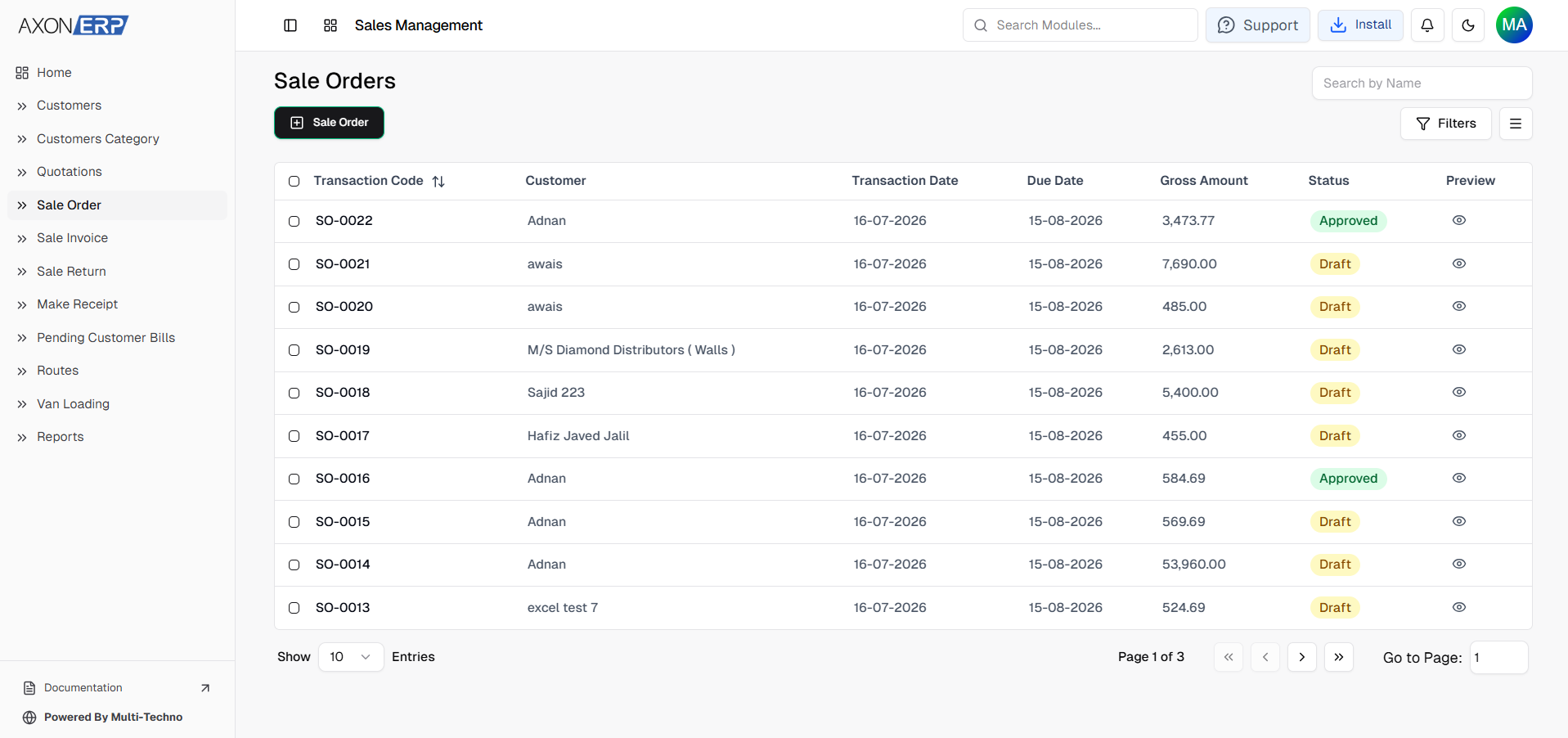
The Sales Order Dashboard inside Axon ERP provides a centralized view of every customer order created within the organization.
Each Sales Order displays important business information, including:
- Transaction Code
- Customer
- Transaction Date
- Due Date
- Gross Amount
- Status
Users can quickly search orders by customer name, apply filters to locate specific transactions, customize visible columns according to business requirements, and navigate large numbers of records using built-in pagination controls.
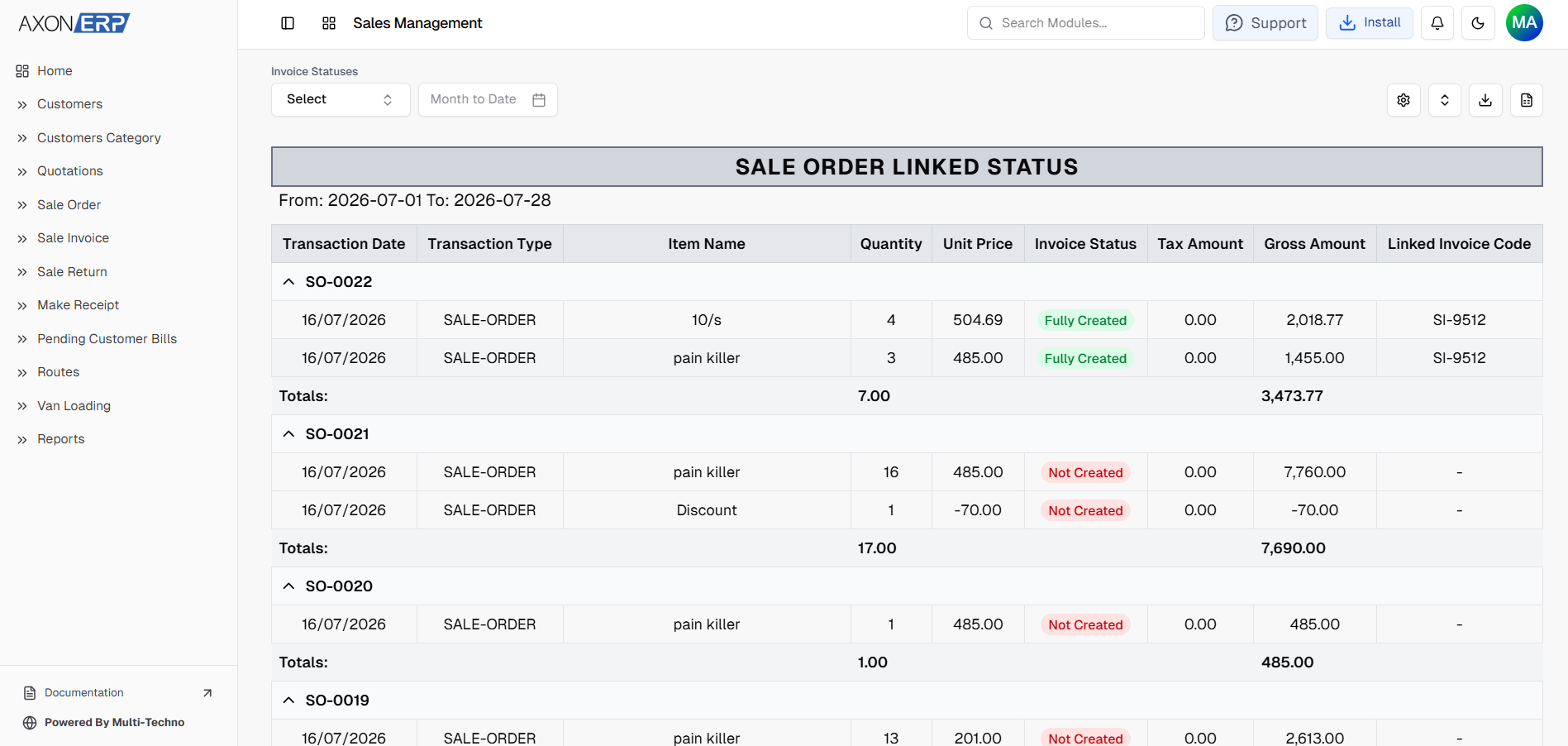
Every Sales Order receives a unique Transaction Code, making it easy to trace customer orders throughout the complete sales workflow.
Users can preview a professional Sales Order document at any time. The document includes customer information, ordered items, quantities, pricing, taxes, and totals, and can be printed, downloaded, or shared directly with customers whenever required.
Instead of searching through multiple spreadsheets or paper files, businesses maintain complete visibility over every customer order from one centralized dashboard.
Benefits of ERP-Based Order Management
A centralized Order Management Software provides significant advantages for businesses processing customer orders every day.
Instead of managing orders manually, Axon ERP standardizes the complete order management process.
Centralized Customer Orders
Every Sales Order is stored in one location, allowing sales, warehouse, finance, and management teams to access the same information whenever required.
Faster Order Processing
Customer information, inventory items, warehouses, pricing, and payment terms already exist inside the ERP system, allowing Sales Orders to be created much faster.
Improved Data Accuracy
Using centralized business information eliminates duplicate orders, incorrect pricing, and inconsistent customer records across departments.
Better Sales Visibility
Management can monitor Draft and Approved Sales Orders, review order values, and track overall sales performance from a single dashboard.
Faster Invoice Generation
Approved Sales Orders can be converted into Sales Invoices without entering customer information or product details again, reducing administrative work while improving accuracy.
Better Order Traceability
Every Sales Order receives a unique Transaction Code, making it easy to trace customer orders throughout the sales process. Businesses can quickly locate any order, review its status, and track related invoices without searching through multiple systems.
Better Team Collaboration
Sales, warehouse, finance, and management departments all work from the same Sales Order, improving communication and reducing operational delays.
Best Practices for Managing Customer Orders
To improve order accuracy and operational efficiency, businesses should follow a few simple best practices:
- Create customer records before creating Sales Orders.
- Use standardized inventory items instead of manual product descriptions.
- Verify pricing before approving customer orders.
- Review discounts, taxes, and payment terms carefully.
- Upload supporting documents whenever required.
- Use Draft status for internal verification.
- Approve Sales Orders only after complete review.
- Monitor pending customer orders regularly.
- Manage all customer orders inside a centralized ERP system instead of spreadsheets or manual registers.
Following these practices helps businesses improve order accuracy, reduce operational errors, and create a more efficient sales process.
Final Thoughts
As businesses grow, managing customer orders manually becomes increasingly difficult. Disconnected spreadsheets, duplicate records, delayed approvals, and inconsistent communication often slow down the entire sales process while increasing the risk of costly mistakes.
Axon ERP simplifies Customer Order Management by providing a centralized platform where every Sales Order is connected with customer information, inventory items, warehouses, pricing, and financial details. From creating Draft orders to approving transactions, synchronizing orders from the Order Booking App, and generating Sales Invoices, every step remains connected inside a single system.
By implementing Order Management Software in Axon ERP, businesses gain better visibility, faster order processing, improved collaboration between departments, and a more organized sales workflow. Instead of managing customer orders across multiple systems, organizations build a reliable foundation for accurate order processing, better customer service, and sustainable business growth.