

Post Detail
BackAxon ERP Official
12 weeks ago
Why Businesses Lose Repeat Customers Without Proper Contact Management
Managing customer relationships starts long before the first quotation is created. Every successful sales process depends on accurate customer information, organized business contacts, and a reliable system for managing customer records throughout the sales lifecycle.
Imagine a business receiving inquiries from dozens of potential customers every day. Sales representatives answer phone calls, respond to emails, send quotations, and negotiate prices. If customer information is stored across spreadsheets, WhatsApp conversations, personal contact lists, or handwritten notes, sales teams often waste valuable time searching for customer details before they can respond.
The situation becomes even more complicated when multiple employees interact with the same customer. One salesperson saves the customer's mobile number, another creates a new record with a different name, while the finance department stores separate billing information. As a result, duplicate customer records appear, follow-ups are missed, quotations become difficult to track, and businesses slowly lose repeat customers without realizing the real cause.
As organizations grow, managing customer information manually becomes increasingly difficult. Sales teams need immediate access to customer profiles, finance teams require accurate billing information, and management needs complete visibility into customer activity. Every customer interaction should remain connected throughout the entire sales process instead of being scattered across different systems.
Axon ERP solves these challenges through its centralized Sales Management System and Business Contact Management capabilities. Instead of maintaining customer records across multiple platforms, businesses can create a single customer database where every customer is categorized, searchable, and available throughout the complete sales lifecycle. Once a customer is created, the same record can be reused while creating Quotations, Sales Orders, Sales Invoices, payment transactions, and customer reports without entering the same information repeatedly.
By centralizing customer information, Axon ERP helps businesses improve communication, reduce duplicate records, increase sales efficiency, and build stronger long-term customer relationships.
What Is Business Contact Management in ERP Software?
Business Contact Management is the process of creating, organizing, maintaining, and managing customer information within an ERP system. Every customer record contains the business information required by sales, finance, warehouse, and management teams throughout the complete sales lifecycle.
Rather than creating customer information separately for every quotation or sales transaction, ERP software stores customer details in a centralized database where they can be accessed whenever new business activities take place.
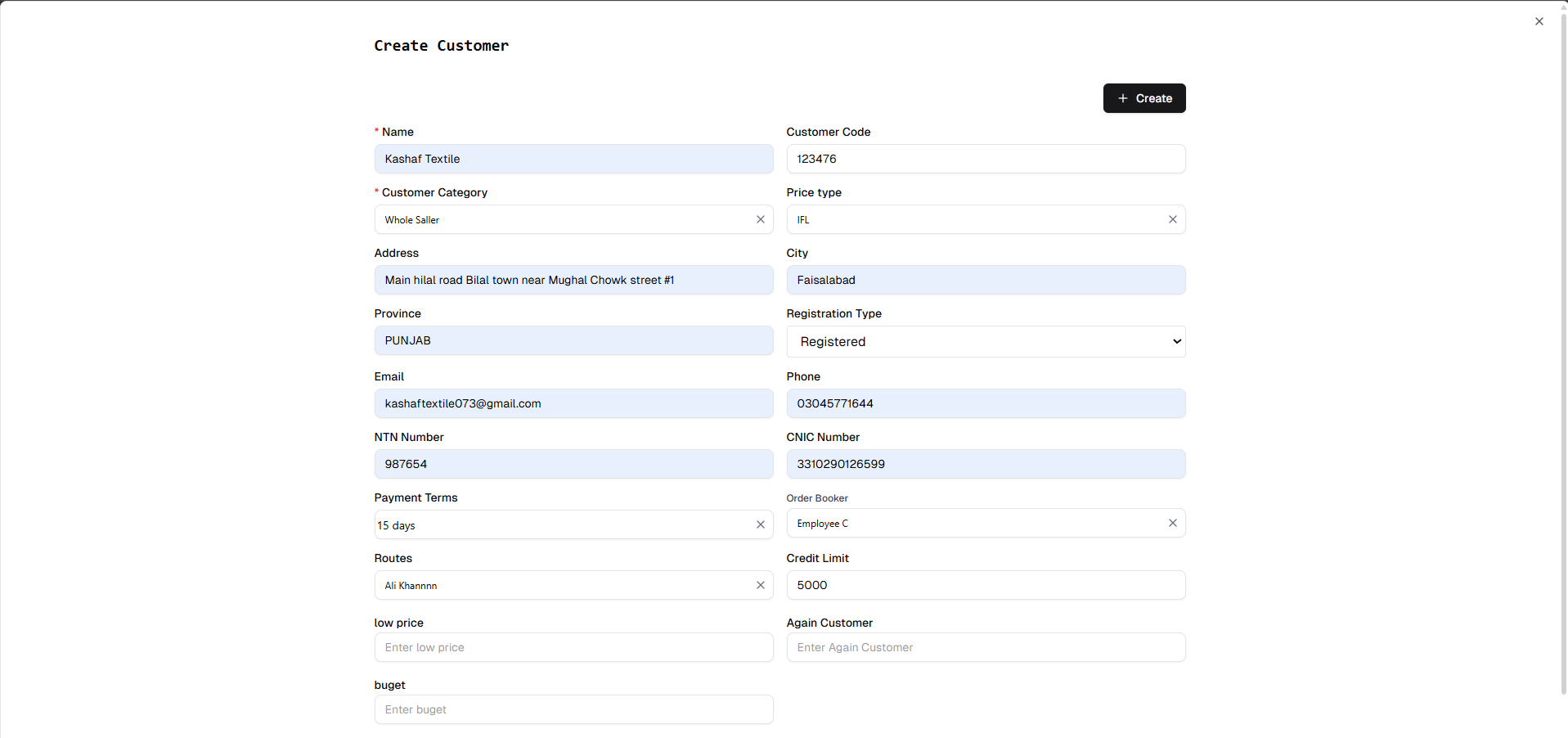
A typical customer record may include:
- Customer Code
- Customer Name
- Customer Category
- Company Name
- Contact Person
- Mobile Number
- Telephone Number
- Email Address
- Billing Address
- Delivery Address
- NTN / STRN (if applicable)
- Credit Limit
- Payment Terms
- Assigned Sales Representative
Because this information is stored centrally, every department works with the same customer data, reducing duplicate records and improving sales consistency.
Why Business Contact Management Matters
Business Contact Management is much more than maintaining a list of customers. It creates the foundation for an organized sales process.
Without a structured contact management system, businesses commonly experience:
- Duplicate customer records
- Missed follow-ups
- Incorrect customer information
- Delayed quotations
- Sales opportunities being overlooked
- Difficulty tracking customer history
- Poor communication between departments
These issues become even more significant as customer numbers continue growing.
Axon ERP eliminates these problems by maintaining a centralized customer database where every customer is uniquely identified and available for future sales activities. Sales teams no longer need to recreate customer information every time they prepare a quotation, while finance teams can rely on the same customer records for invoicing, payment tracking, and reporting.
How Business Contact Management Works in Axon ERP
Business Contact Management in Axon ERP follows a structured workflow designed to organize customer information before any sales activity begins.
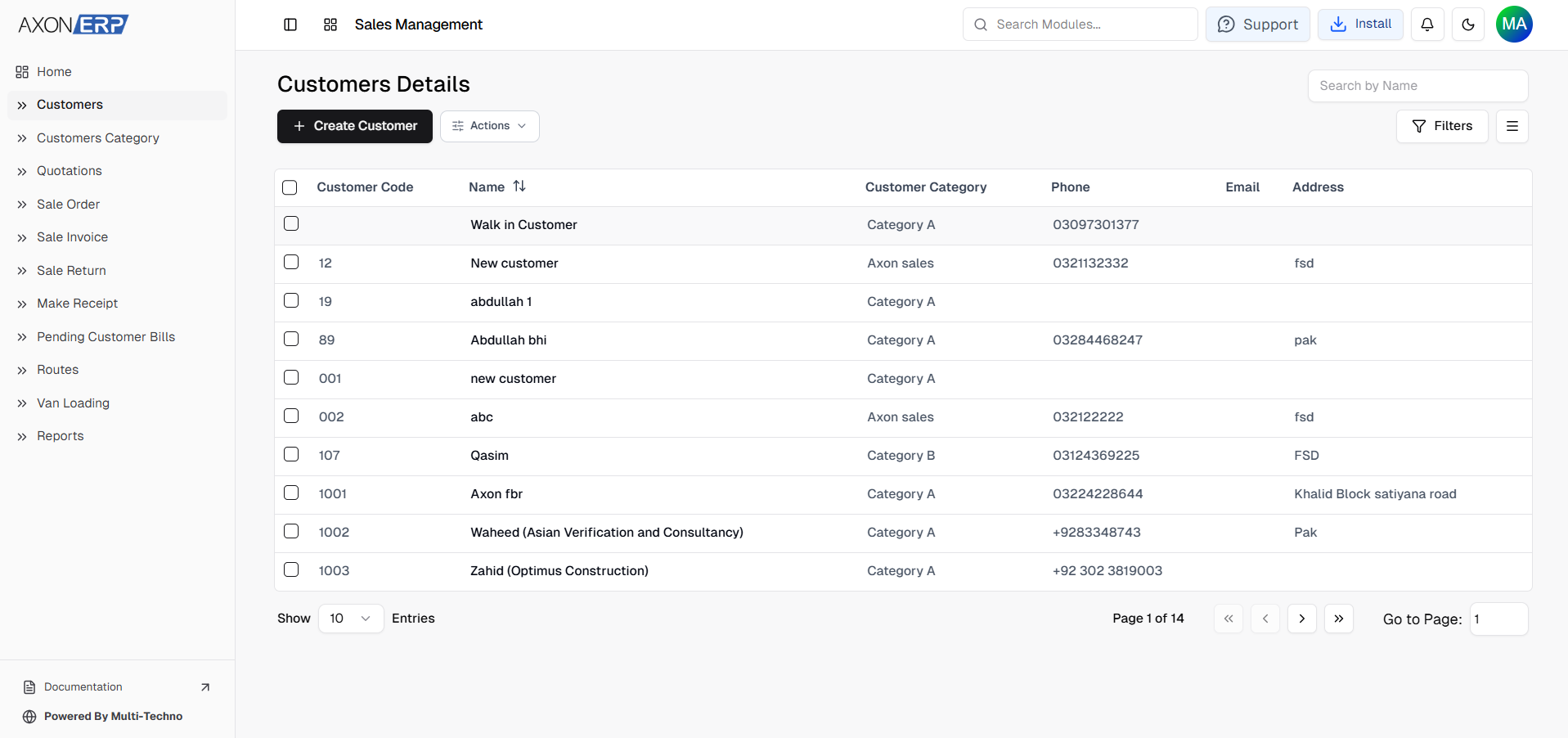
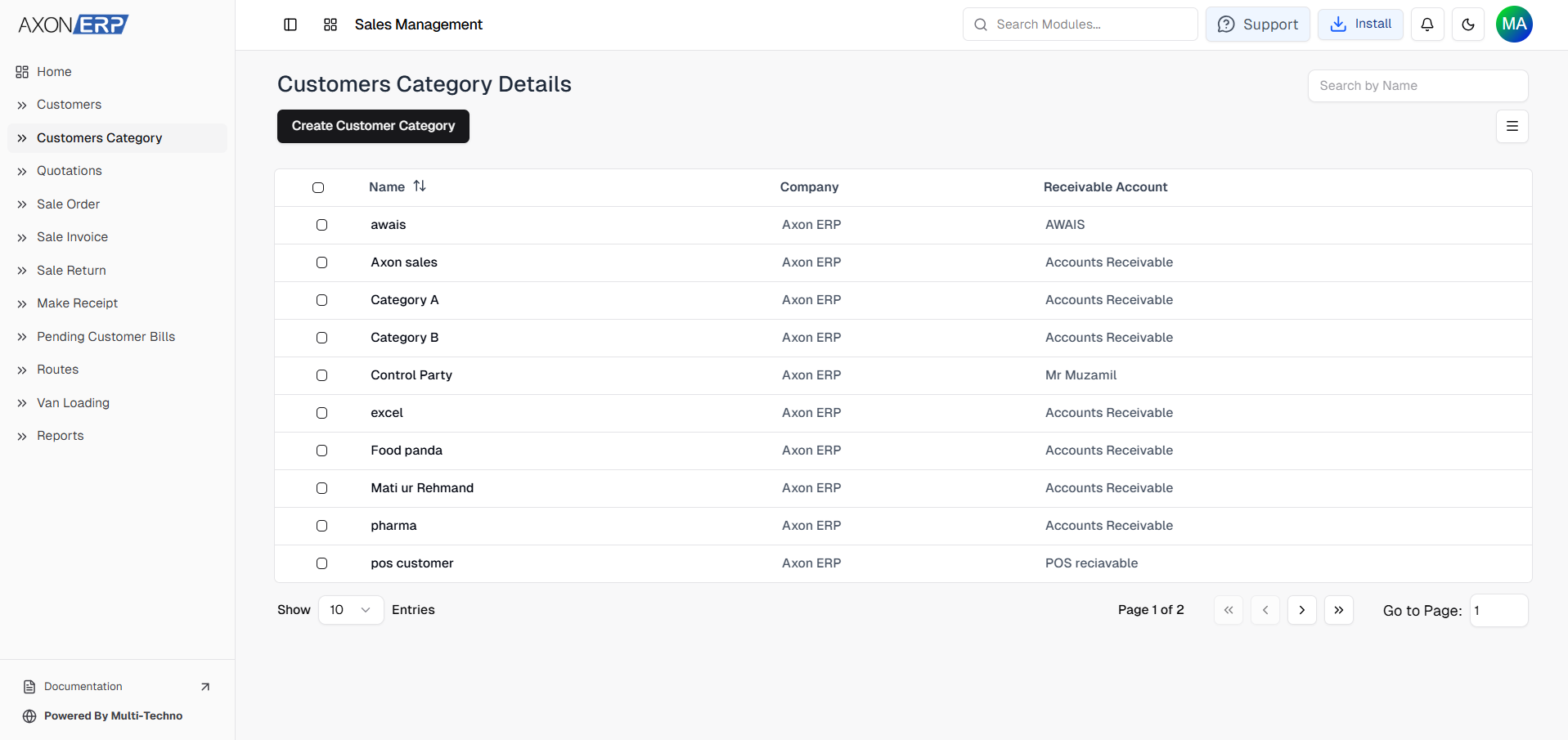
The process starts with creating a Customer Category, which allows businesses to classify customers according to their business type. During category creation, users define the category name and assign the appropriate Receivable Account. This ensures future customer transactions remain properly connected with the accounting system.
Once the customer category has been created, users can add individual customers by entering their complete business information.
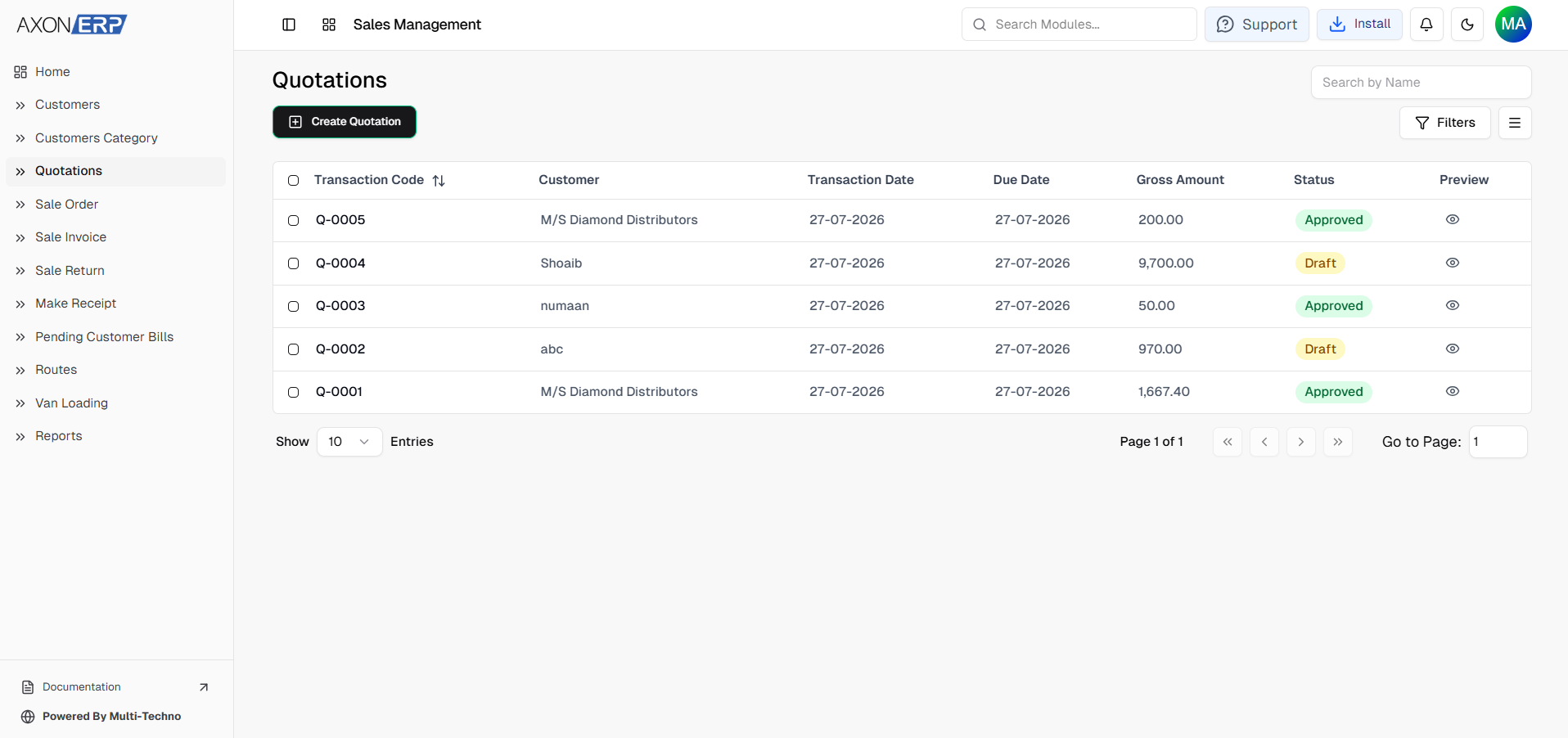
After saving the customer, the same customer record becomes available throughout Axon ERP's Sales Management module. The customer can be selected while creating Quotations, Sales Orders, Sales Invoices, payment transactions, and customer reports without requiring duplicate data entry.
Each customer record includes:
- Customer Code (automatically generated and editable)
- Customer Name
- Customer Category
- Company Information
- Contact Details
- Billing Address
- Delivery Address
- Credit Limit
- Payment Terms
- Assigned Order Booker
- Delivery Route
Because Customer Category is a required field, every customer is automatically organized inside the sales system, making future reporting, customer segmentation, and sales analysis much easier.
Axon ERP also provides powerful search and filtering capabilities, allowing users to locate customers instantly by customer name, company name, mobile number, or customer code while customizing list columns according to business requirements.
How Customers Connect with the Sales Process
Business Contact Management is the starting point of the entire sales workflow.
Once a customer has been created, the same customer record is reused throughout multiple sales activities without requiring duplicate data entry.
The typical sales workflow inside Axon ERP follows this sequence:
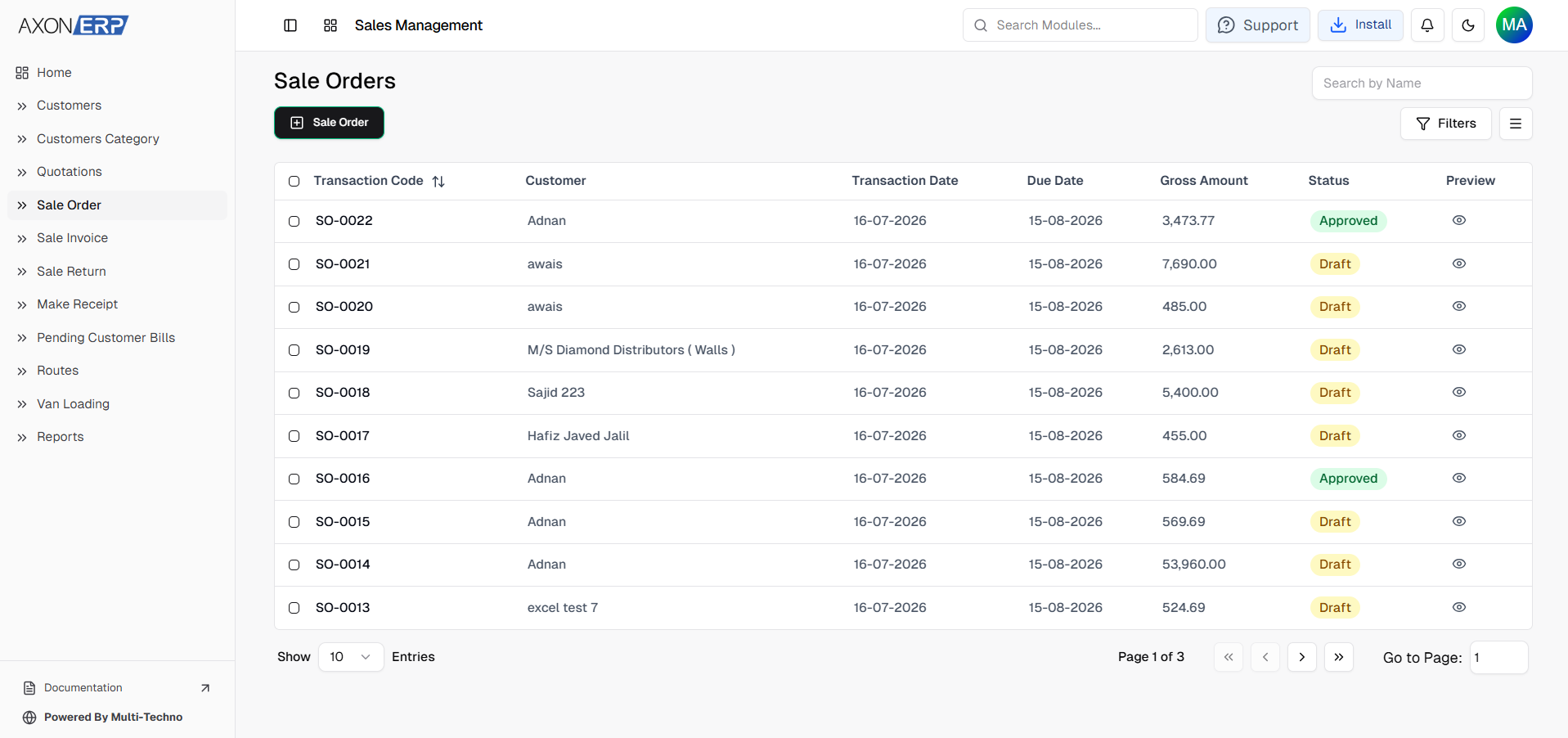
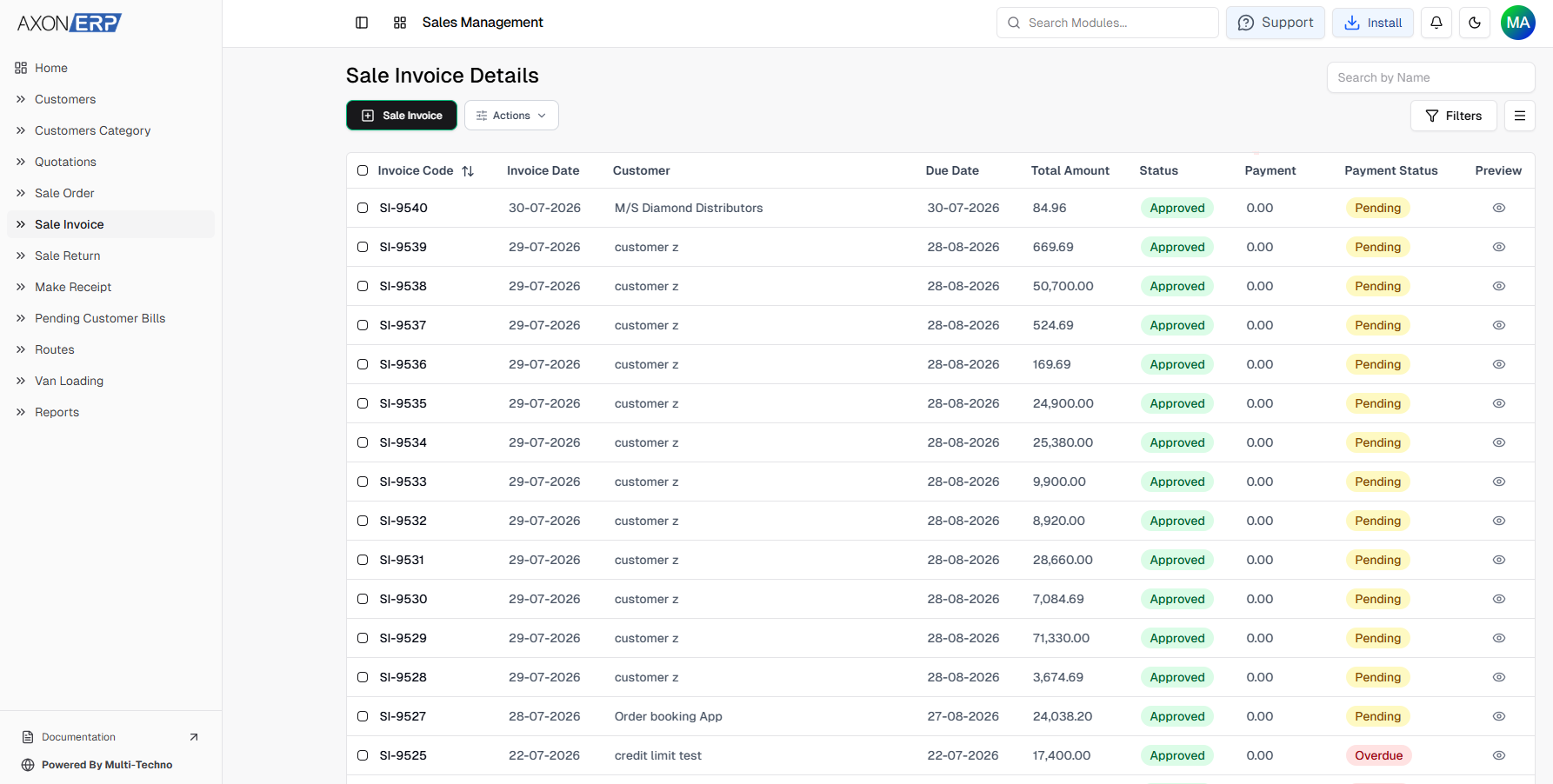
Customer Category → Customer → Quotation → Sales Order → Sales Invoice → Customer Payment
Because every sales document references the same customer record, businesses maintain consistent customer information across the entire sales cycle. This improves sales accuracy, simplifies financial tracking, and provides complete visibility into every customer relationship.
For example, when a sales representative creates a quotation, they simply select the existing customer instead of entering customer details again. Once the quotation is approved, the same customer record automatically continues into the Sales Order. When the order is invoiced, Finance uses the same customer information for billing and payment tracking.
Since every transaction remains connected to one centralized customer profile, businesses eliminate duplicate records while maintaining complete customer history from the very first inquiry to the final payment.
Managing Customer Records Safely
Customer information is one of the most valuable assets inside any business.
Deleting customer records accidentally can affect quotations, sales orders, invoices, payment history, and financial reports.
To maintain data integrity, Axon ERP protects customer records that are already being used within the sales process.
If a customer has never been used in any transaction, the record can be removed whenever necessary.
However, once the customer has been linked with a Quotation, Sales Order, Sales Invoice, or any other related transaction, the system prevents deletion until those transactions are removed.
This ensures businesses always maintain complete historical records while protecting important sales and financial information.
Instead of losing customer history, organizations can confidently review previous transactions whenever required.
Understanding Customer Categories
Before adding customers, businesses should first organize them into meaningful categories.
As companies grow, they often serve different types of customers with different pricing structures, payment terms, and business policies.
In Axon ERP, every customer belongs to a Customer Category before becoming part of the sales process.
Businesses commonly create customer categories such as:
- Retail Customer
- Wholesale Customer
- Distributor
- Dealer
- Corporate Customer
- Walk-in Customer
- Export Customer
- Other
Using Customer Categories keeps the customer database organized while making reporting, pricing management, customer segmentation, and sales analysis much easier.
Instead of manually identifying customer types during every transaction, the system automatically applies the appropriate business rules based on the assigned category.
Benefits of ERP-Based Business Contact Management
A centralized Business Contact Management system provides significant advantages for organizations managing hundreds or thousands of customer relationships.
Instead of maintaining customer information across spreadsheets or disconnected software, Axon ERP provides a single source of truth for every customer.
Centralized Customer Database
All customer information is stored in one location, allowing sales, finance, warehouse, and management teams to access accurate customer records whenever required.
Faster Sales Process
Since customer details are already available inside the system, users can create Quotations, Sales Orders, and Sales Invoices without repeatedly entering customer information. This reduces manual work and speeds up sales operations.
Improved Data Accuracy
Maintaining one customer record for every client helps eliminate duplicate entries, outdated contact information, and inconsistent customer records across departments.
Better Financial Management
Because every customer is linked with the appropriate Receivable Account, sales transactions remain synchronized with the accounting system, improving financial accuracy and simplifying customer payment tracking.
Complete Customer History
Every Quotation, Sales Order, Sales Invoice, and payment transaction remains connected to the same customer record.
This provides businesses with complete visibility into customer activity, purchasing history, outstanding balances, and previous transactions.
Better Sales Visibility
Management can quickly identify active customers, inactive customers, repeat buyers, and high-value customers without manually collecting information from different departments.
Stronger Customer Relationships
Maintaining complete and accurate customer information enables businesses to communicate more effectively, respond faster, improve follow-ups, and build stronger long-term relationships that generate repeat business.
Best Practices for Managing Customer Records
To maintain an organized customer database and improve sales efficiency, businesses should follow a few simple best practices:
- Create Customer Categories before adding customers.
- Avoid creating duplicate customer records.
- Use meaningful customer names and unique customer codes.
- Keep customer contact information updated.
- Define appropriate payment terms and credit limits.
- Assign the correct Order Booker and Delivery Route where applicable.
- Review inactive customer records periodically.
- Delete customers only if they have not been used in any sales transaction.
- Use a centralized ERP system instead of spreadsheets for managing customer information.
Following these practices helps businesses improve sales efficiency while maintaining accurate customer records throughout the organization.
Final Thoughts
An efficient sales process begins with organized customer information. Without structured customer records, businesses often experience duplicate entries, missed follow-ups, delayed quotations, inconsistent communication, and unnecessary administrative work.
Axon ERP simplifies Business Contact Management by providing a centralized customer database where every customer is categorized, searchable, and connected to the complete sales workflow. From creating Customer Categories to managing Quotations, Sales Orders, Sales Invoices, and customer payments, the system ensures customer information remains accurate and consistent across every transaction.
As businesses continue growing, maintaining structured customer records becomes increasingly important for improving sales efficiency, strengthening customer relationships, and supporting better business decisions.
By implementing Business Contact Management in Axon ERP, organizations build a reliable foundation for a smarter, faster, and more organized sales process. As the first step of the sales lifecycle, effective customer management creates the foundation for Quotations, Sales Orders, Sales Invoices, Accounts Receivable, and the entire customer relationship journey.