


Post Detail
BackAxon ERP Official
55 min ago
What Real-Time Financial Statements Actually Mean in Axon ERP
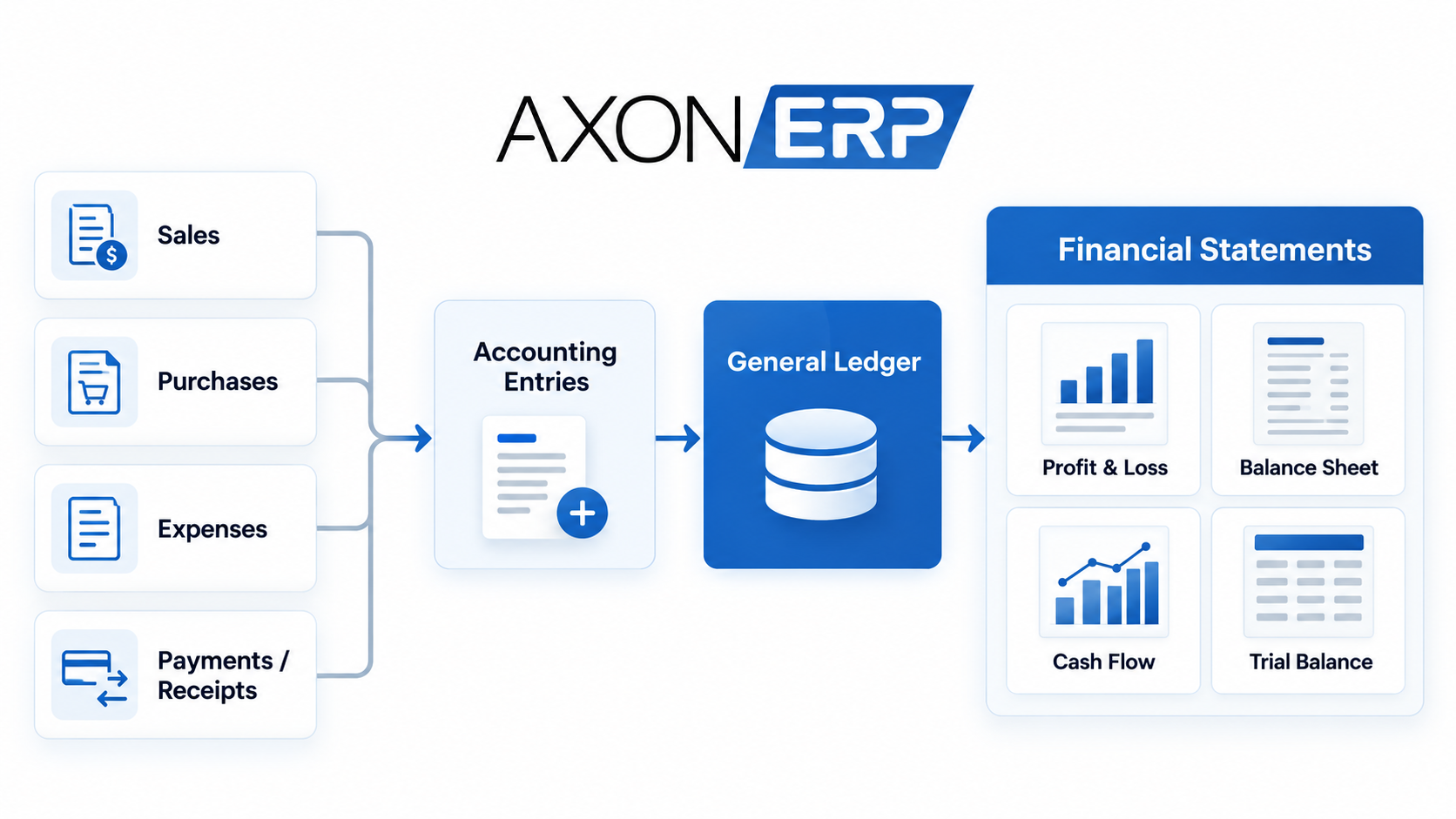
Real-time financial statements mean that financial reports are based on the latest business transactions recorded in the ERP instead of information being collected and consolidated manually later. In an integrated ERP system, transactions such as sales, purchases, payments, and receipts can contribute to accounting records as they are processed, allowing reports such as Profit and Loss, Balance Sheet, Cash Flow, and Trial Balance to reflect current recorded data.
But “real-time” is not simply about how quickly a report opens. The more important question is how a business transaction moves through the system before it appears in a financial report.
What Does Real-Time Financial Reporting Actually Mean?
Many ERP systems use the term “real-time financial reporting,” but it can be misunderstood.
Real-time reporting does not simply mean that a financial report is generated instantly. It means the report is connected to the accounting information being created and updated by business transactions.
Consider a simple customer sale.
A business records a sales transaction. That transaction affects the relevant financial records. As additional transactions are recorded, the underlying accounting information changes. When the business opens its financial reports, those reports can reflect the latest transactions already entered into the system.
The basic flow can be understood as:
Business transaction → Accounting entry → General Ledger → Financial statement
This is different from a setup where sales, purchases, expenses, and payments are maintained in separate systems and someone later has to collect the information before preparing financial reports.
Modern ERP systems are designed to connect different business processes and centralize the information they generate, which is one of the reasons integrated ERP platforms can support more timely financial reporting.
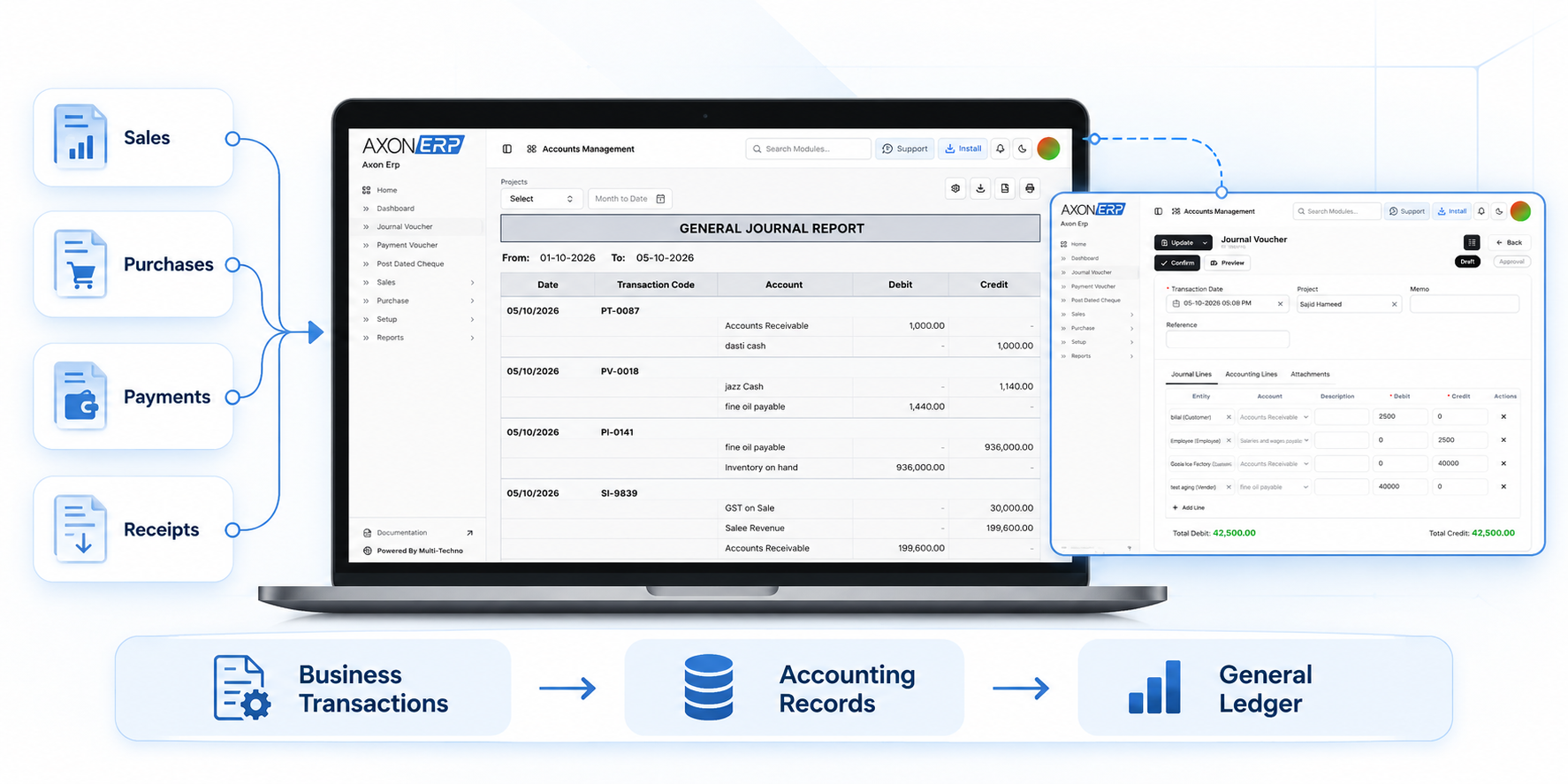
How ERP Transactions Become Financial Information
Financial reporting starts much earlier than the moment an accountant opens a Balance Sheet or Profit and Loss report.
During a normal working day, a growing business may record hundreds of transactions, including:
- Sales invoices
- Purchase invoices
- Customer payments
- Supplier payments
- Receipts
- Expenses
- Inventory-related transactions
- Other accounting transactions
In an integrated ERP environment, these activities can be connected with the company's accounting structure.
For example, when a sale is recorded, the transaction does not have to remain isolated inside the sales process. Relevant accounting information can become part of the company's financial records.
The same principle can apply to purchases, expenses, receipts, and payments.
This connection is what makes real-time financial reporting useful. Instead of waiting for information from multiple systems to be collected and consolidated, the business can work from accounting information that is being updated as transactions are processed.
For businesses that want to understand how sales activity fits into a wider ERP workflow, the sales management side of the system is an important part of that connection.
Why Integrated Accounting Matters for Financial Reporting
A growing business can easily end up with financial information spread across different places.
Sales may be maintained in one system.
Purchases may be recorded somewhere else.
Inventory may be tracked separately.
Payments and expenses may be maintained in accounting software or spreadsheets.
The problem becomes obvious when management needs one current view of the business.
Someone then has to collect information from different sources, check for differences, update records, and prepare financial reports.
An integrated ERP takes a different approach by connecting business operations with accounting.
This does not eliminate the need for accounting controls or review. Instead, it reduces the separation between the transaction that happens in the business and the financial information generated from that transaction.
The accounting foundation matters here as well. A business needs a properly structured accounting structure so that transactions can be classified and reported correctly as they move through the system.
This is why businesses moving toward ERP should consider not only the reports they want to see, but also how their accounts are organized before the system goes live.
Which Financial Statements Can an ERP Provide?
Financial reporting is not limited to one report. Different financial statements answer different business questions.
Profit and Loss Statement
The Profit and Loss statement shows the relationship between revenue, costs, expenses, and the resulting profit or loss for a selected period.
For management, it helps answer a basic question:
Is the business actually making money during this period?
Because the report depends on accounting transactions recorded in the system, its usefulness depends on the completeness and correctness of those records.
Balance Sheet
The Balance Sheet provides a view of the company's financial position at a particular point in time.
It brings together areas such as assets, liabilities, and equity.
For a growing business, this provides a different perspective from the Profit and Loss statement. A company may generate sales and report profit while still having cash tied up in receivables, inventory, or other assets.
Cash Flow Statement
Profit and cash are not always the same thing.
A business can record revenue while customer payments are still outstanding. It can also make purchases or other payments that affect available cash.
The Cash Flow statement helps management understand how cash is moving through the business rather than looking only at accounting profit.
This is also where customer payment tracking becomes important. If customer payments are delayed or not properly updated, management may not have a clear picture of the cash that is actually available to the business.
Similarly, businesses that rely on bank balances to verify recorded transactions need proper bank reconciliation processes to compare accounting records with actual bank activity.
Trial Balance
The Trial Balance provides a view of account balances and is commonly used as an accounting control and review point.
It helps accountants review whether debit and credit balances are aligned and examine individual account balances before relying on financial statements.
General Ledger
The General Ledger sits closer to the underlying accounting records.
When a manager or accountant sees a figure in a financial report, they may need to understand where that figure came from. The ability to move from summarized financial information toward individual accounting records provides important traceability.
This is why simply having financial statements is not enough.
Businesses also need visibility into the accounting records behind those numbers.
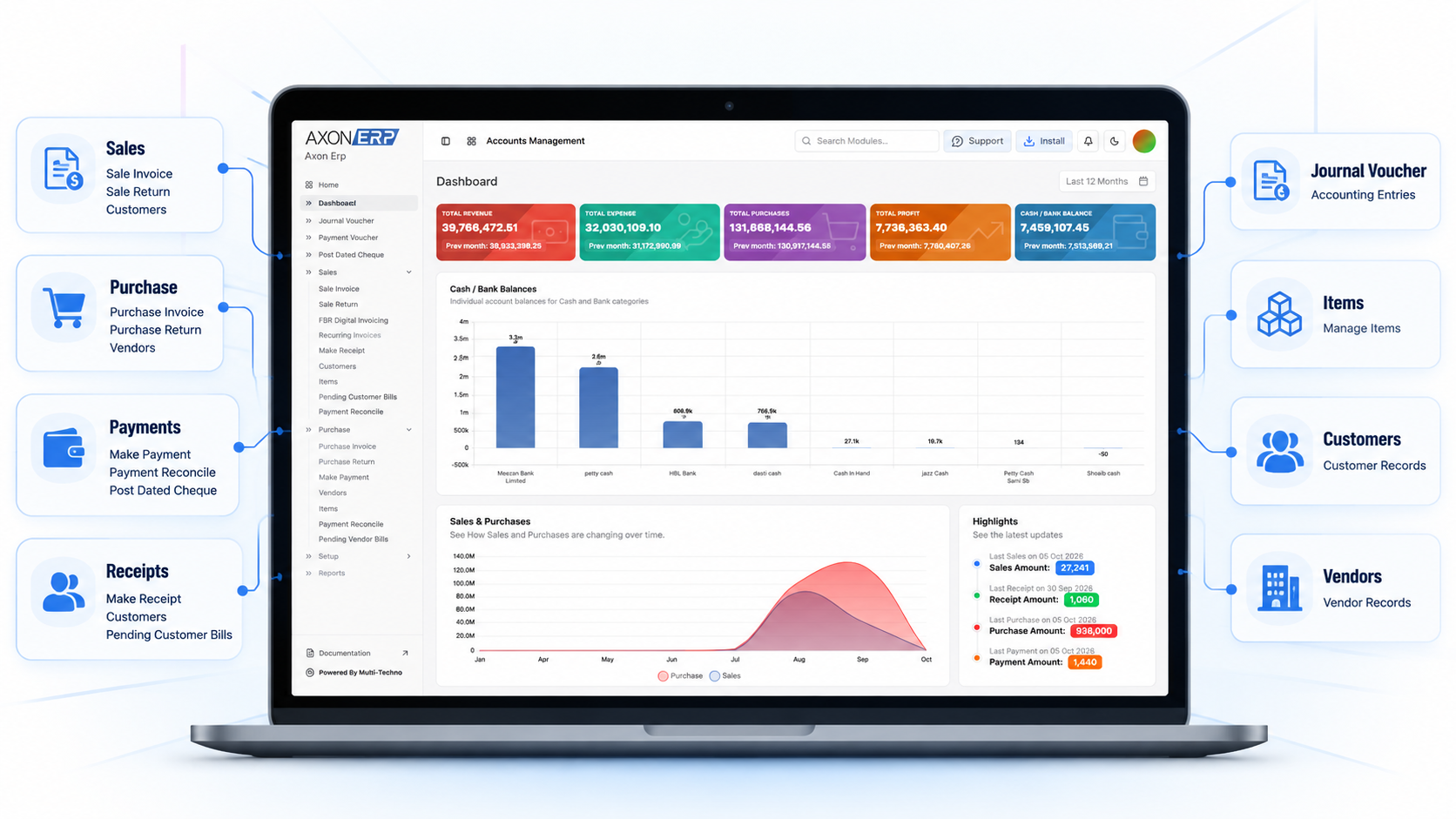
A Simple Example: From Sale to Financial Statement
Suppose a distributor records a customer sale in the ERP.
The process can be understood in four stages.
1. The Transaction Is Recorded
The sales invoice is entered into the system with the relevant customer, items, quantities, prices, and financial information.
2. Accounting Information Is Generated
The transaction contributes to the appropriate accounting records according to the accounting configuration and structure of the business.
3. The Transaction Becomes Part of the Ledger
The relevant information is reflected in the company's accounting records and General Ledger.
4. Financial Reports Reflect the Updated Records
The transaction becomes part of the information used by reports such as Profit and Loss, Balance Sheet, and other financial statements.
The important point is that the financial report is not working independently from the original transaction.
It is the result of accounting information generated and maintained throughout the process.
For an ERP to provide useful financial reporting, the business should therefore be able to understand the relationship between the original transaction, the accounting record, and the final report.
Real-Time Does Not Mean Automatically Correct
This is one of the most important things to understand about real-time financial reporting.
Real-time data can still be wrong.
If a transaction is entered incorrectly, an account is mapped incorrectly, required information is missing, or an accounting process is not configured properly, the resulting report can reflect that problem quickly.
In other words:
Real-time reporting improves timeliness. It does not replace accounting accuracy.
This is why businesses evaluating financial reporting software should look beyond statements such as “real-time reporting” or “one-click financial reports.”
The better questions are:
- Where does the data in the report come from?
- How are transactions connected to accounting?
- Can users trace financial information back to underlying records?
- Which financial statements are available?
- How are journal entries handled?
- Can accountants review the General Ledger and Trial Balance?
- How much manual consolidation is required?
These questions reveal considerably more about an ERP's reporting capability than the phrase “real-time” by itself.
What Should You Look for in Financial Reporting Software?
When comparing financial reporting software, businesses should look at the complete accounting workflow rather than focusing only on the reporting screen.
A useful system should connect operational transactions with financial records, support the accounting structure required by the business, and provide the reports needed by management and accounting teams.
The reporting side should also provide more than a single summary number.
Ideally, users should be able to move between different levels of financial information — from financial statements to account balances and, where supported, toward the underlying transactions.
This creates a more practical reporting environment for businesses that are growing and processing increasing numbers of transactions.
It also reduces the need to treat accounting as a separate activity that happens only after operational data has already been collected.
How Axon ERP Supports Real-Time Financial Reporting
Axon ERP combines accounting with other business processes instead of treating financial reporting as a completely separate activity.
Its Finance functionality includes double-entry accounting, while financial processes are integrated with other ERP modules. Relevant transactions can generate accounting entries in the background, helping connect day-to-day business activity with financial records.
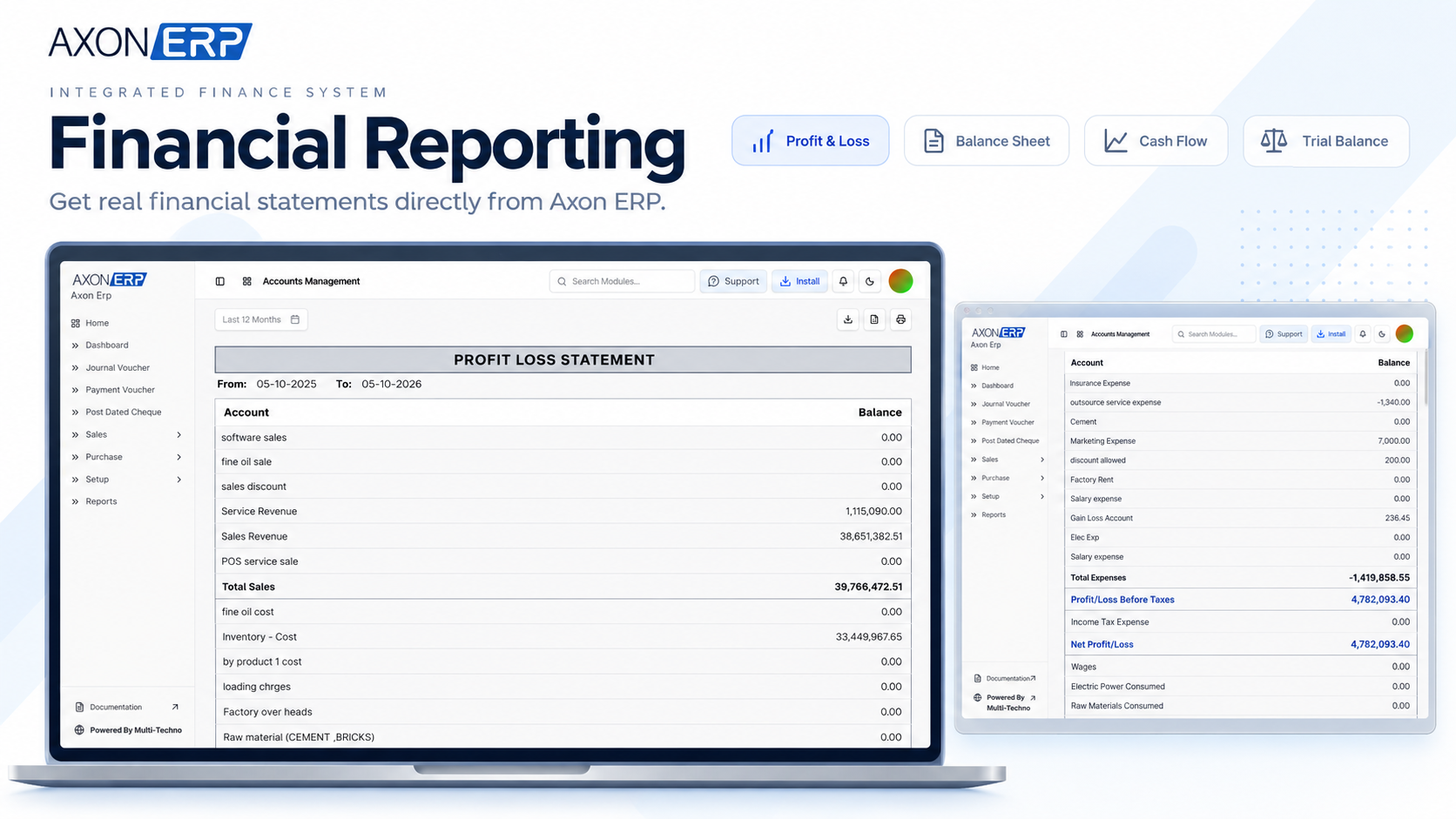
Axon ERP provides financial reports including:
- Profit and Loss
- Balance Sheet
- Cash Flow
- Trial Balance
- General Ledger
The value is not simply in having these reports available.
The more important part is the connection between the transactions entered into the ERP and the accounting information used by those reports.
For example, a company can record its sales, purchases, receipts, payments, and other relevant transactions within the ERP environment and use the resulting accounting information for financial reporting.
This gives management and accounting teams a more connected view of business activity and its financial impact.
Real-Time Reporting Is Only as Useful as the Data Behind It
There is a difference between having a financial report available in an ERP and having reliable financial information available when the business needs it.
If sales are recorded but customer payments are not properly updated, the financial picture may be incomplete.
If purchases are entered incorrectly, financial balances can be affected.
If accounting mappings are not configured properly, a report can be generated quickly while still containing incorrect information.
This is why businesses should evaluate both sides of financial reporting:
How quickly can the report be produced?
and
How reliably does the underlying transaction data reach that report?
The second question is often more important.
An ERP can make reporting faster, but it cannot compensate for incorrect source data or poor accounting processes.
Real-Time Financial Reporting vs. Manual Consolidation
The difference becomes clearer when looking at how information moves through the business.
With a manual or disconnected setup, sales, purchases, expenses, payments, and other records may exist across different systems.
Someone then has to collect that information, reconcile it, and prepare the financial reports.
With an integrated ERP, these business processes can exist within one connected environment. Relevant transactions can contribute to accounting records, which can then be used for financial reporting.
The ERP does not remove the need for accounting review or controls.
Its role is to reduce unnecessary separation between business operations and financial information.
For a growing business, this can make financial information available with less dependence on periodic manual consolidation.
The Real Value of Real-Time Financial Statements
The real benefit of real-time financial reporting is not simply that a report appears immediately after clicking a button.
It is that the report can be based on financial information connected to the business transactions generating it.
For a growing business, that connection can reduce dependence on manually collecting information from different systems and waiting for periodic consolidation.
With Axon ERP, accounting is integrated with the wider ERP environment, while financial reporting includes core statements and accounting reports such as Profit and Loss, Balance Sheet, Cash Flow, Trial Balance, and General Ledger.
That makes “real-time” a more meaningful concept:
Current financial information starts with current, correctly recorded business transactions.
Frequently Asked Questions
What does real-time financial reporting mean in an ERP?
Real-time financial reporting means that financial reports are based on the latest transactions recorded in the ERP rather than relying on delayed manual consolidation of information from separate systems.
Does real-time reporting mean financial statements are always accurate?
No. Real-time reporting improves the timeliness of information, but the accuracy of financial statements still depends on correct transactions, accounting configuration, complete records, and appropriate accounting controls.
Which financial statements can Axon ERP provide?
Axon ERP provides financial reports including Profit and Loss, Balance Sheet, Cash Flow, and Trial Balance, along with accounting information such as the General Ledger.
How does ERP connect transactions with financial reporting?
In an integrated ERP environment, relevant business transactions can contribute accounting information to the company's financial records. Those records then provide the underlying information used by financial reports.
What is the difference between real-time reporting and manual financial reporting?
Manual reporting often requires information to be collected and consolidated from different sources before reports are prepared. Integrated ERP reporting connects business transactions and accounting records within the same system, allowing reports to reflect recorded transactions more directly.
Why is the General Ledger important for financial reporting?
The General Ledger provides detailed accounting records behind financial summaries. It helps accountants review account activity and understand the transactions contributing to financial balances.
See How Axon ERP Handles Financial Reporting
If your business is still combining sales, purchases, payments, expenses, and accounting information manually before preparing financial reports, it may be time to see how an integrated ERP approach works.
Book an Axon ERP demo to explore the Finance module, financial statements, General Ledger, and the connection between everyday transactions and financial reporting.
You can also review Axon ERP pricing plans to compare the available options for your business.