


Post Detail
BackAxon ERP Official
2 hr ago
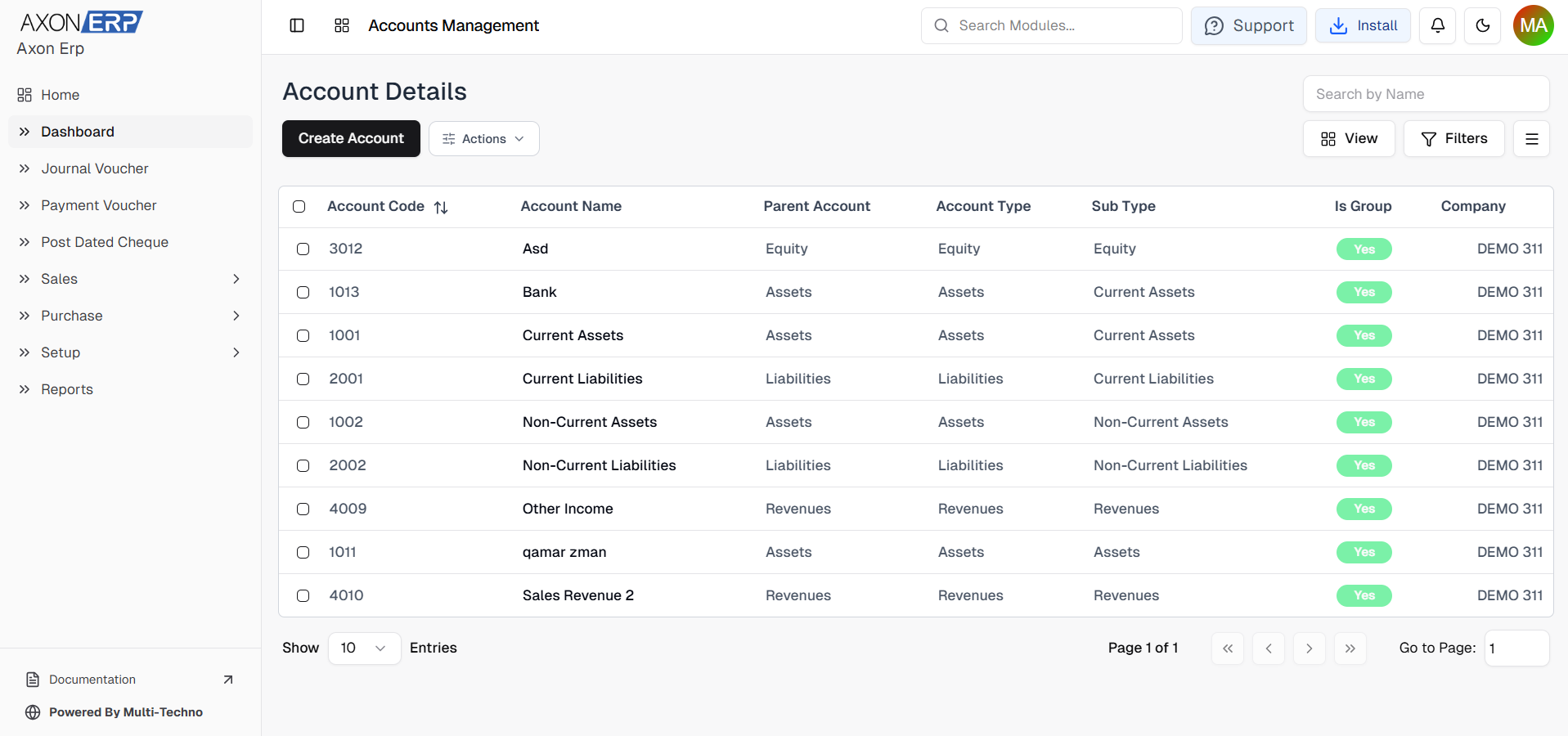
Chart of Accounts in ERP: How to Structure It Before Go-Live
Before an ERP goes live, the Chart of Accounts should already be structured around how the business actually operates and reports its finances. A well-designed ERP chart of accounts connects transactions such as purchases, sales, inventory and expenses to the right financial accounts from day one.
If the structure is poorly planned, the problem usually appears later in financial reports, account balances, inventory valuation and management reporting when correcting historical transactions becomes much harder.
What Is a Chart of Accounts in an ERP?
A Chart of Accounts (COA) is the organized list of accounts a business uses to record and report its financial transactions. Microsoft describes a chart of accounts as a structured list of General Ledger accounts used to establish a financial framework and support financial reporting.
In an ERP, however, the Chart of Accounts is more than a list of account names.
It becomes part of the structure that connects day-to-day transactions with the General Ledger and financial reports.
That is why chart of accounts setup should happen before ERP go-live, rather than being treated as an accounting cleanup task after implementation.
For businesses using an integrated ERP, the COA also needs to work with operational modules. Axon ERP Finance module, for example, supports a multi-level Chart of Accounts alongside General Ledger, Journal Entries, financial statements, bank reconciliation, cost centers and budgeting.
Why Your Chart of Accounts Should Be Ready Before ERP Go-Live
An ERP starts creating financial data as soon as transactions begin.
A purchase invoice can affect payables and inventory. A sale can affect revenue, receivables, inventory and cost of goods sold. Revenue accounts should also align with the way the business records sales and customer transactions. Expenses affect the relevant expense accounts. Payments change cash or bank balances.
If those transactions are mapped to an unclear or incomplete account structure, the resulting reports can become difficult to interpret.
1. Transactions Start Producing Financial Data Immediately
Once the ERP goes live, users should be able to record normal business transactions without repeatedly deciding where every transaction belongs.
The account structure should already define where common transactions will be posted.
2. Historical Corrections Become More Expensive
Changing an account structure after thousands of transactions have been recorded can require reviewing old entries, mappings and reports.
It is much easier to test the structure before go-live than to rebuild it after several months of operational data.
3. Financial Reports Depend on Account Classification
Reports such as Profit & Loss and Balance Sheet are only useful when transactions have been classified correctly.
For example, if an operating expense is placed under an inappropriate account group, management may see an incorrect view of business costs.
4. Different Departments Need Consistent Financial Categories
Sales, purchasing, inventory and finance teams may work on different transactions, but those transactions eventually affect the same financial records.
A properly designed COA gives the ERP a common accounting structure across departments.
5. Growth Becomes Easier to Manage
A business may start with one location and later add branches, warehouses, departments or new product categories.
A good ERP chart of accounts should leave enough room for that growth without creating hundreds of unnecessary accounts.
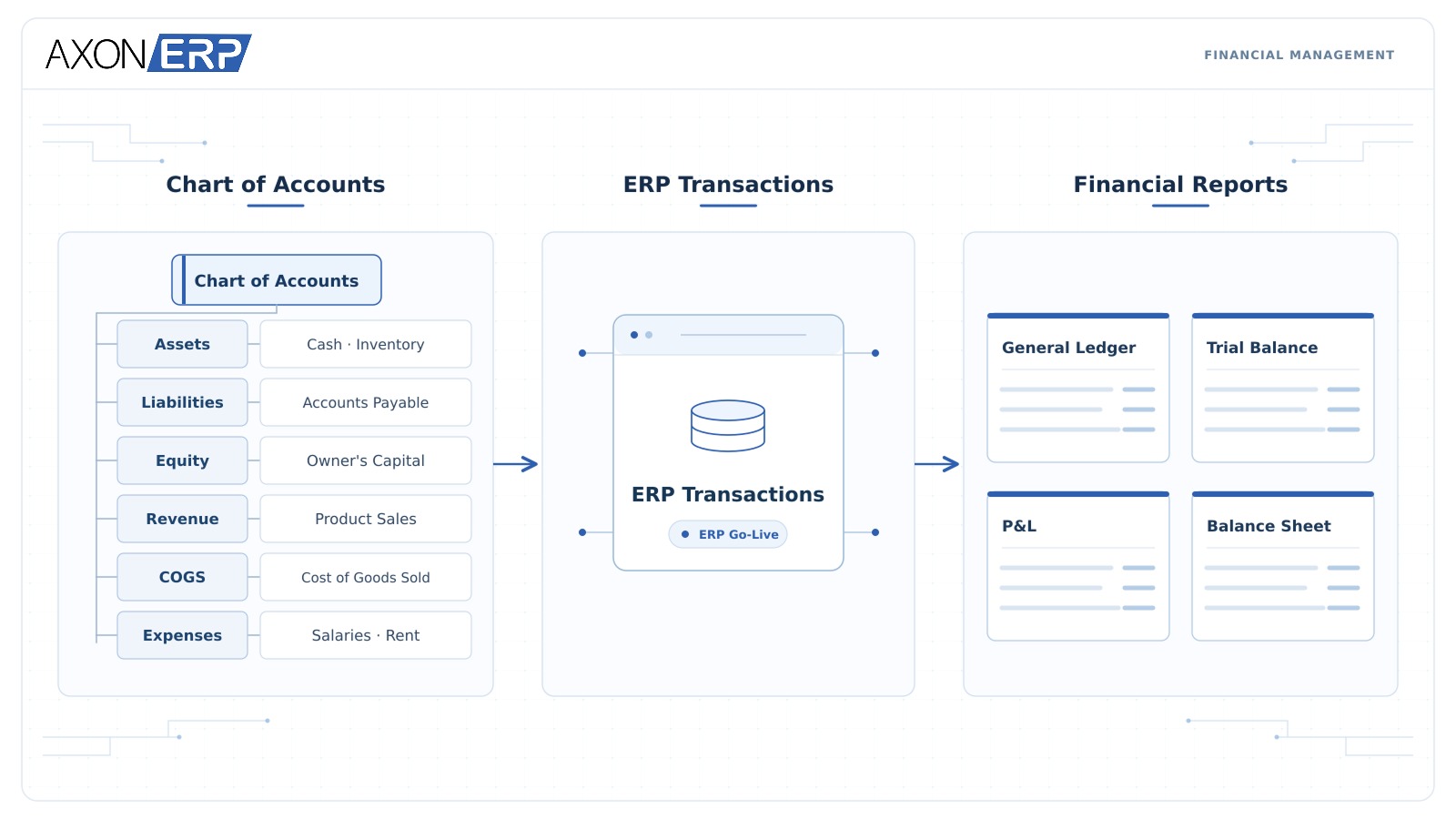
How to Structure a Chart of Accounts for an ERP
The goal is not to create the longest possible list of accounts.
The goal is to create a structure that gives the business enough detail for meaningful reporting without making everyday accounting unnecessarily complicated.
1. Start With the Major Account Groups
Begin with the five major accounting categories:
- Assets
- Liabilities
- Equity
- Revenue
- Expenses
For businesses that sell physical products, Cost of Goods Sold (COGS) should also be planned carefully because it plays an important role in determining gross profit.
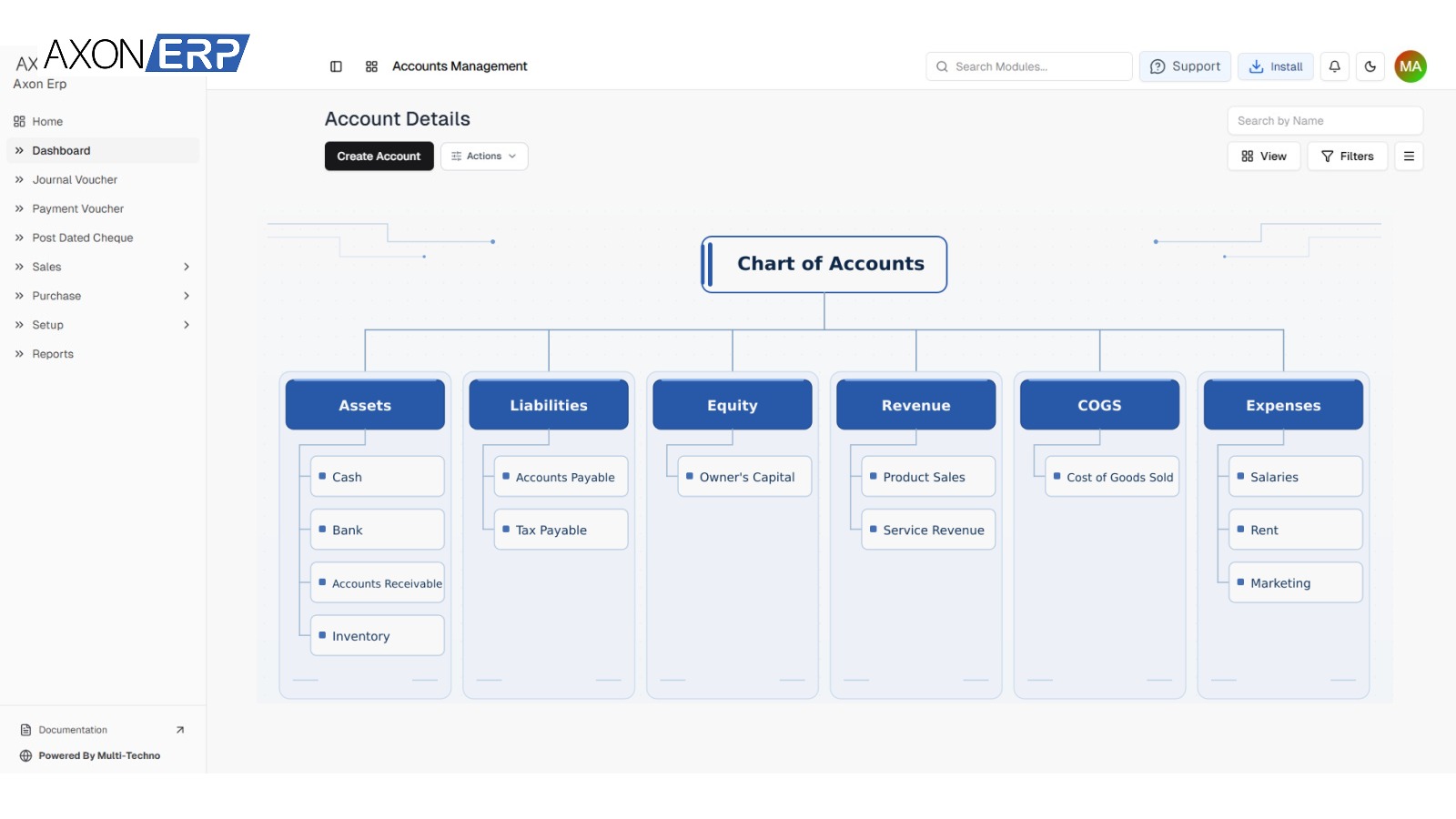
A basic structure might look like this:
Assets
- Cash
- Bank
- Accounts Receivable
- Inventory
- Fixed Assets
Liabilities
- Accounts Payable
- Tax Payable
- Loans Payable
Equity
- Owner's Capital
- Retained Earnings
Revenue
- Product Sales
- Service Revenue
- Other Income
COGS
- Product Cost
- Direct Purchase Cost
Expenses
- Salaries
- Rent
- Utilities
- Marketing
- Office Expenses
This is only a starting point. The final ERP chart should reflect the actual reporting requirements of the business.
2. Build the Right Level of Detail
One common mistake is creating an account for every small variation in spending.
For example, instead of creating separate accounts such as:
- Facebook Advertising
- Google Advertising
- LinkedIn Advertising
- Instagram Advertising
- Newspaper Advertising
a business may sometimes be better served by a broader Marketing & Advertising Expense account, with further analysis handled through another reporting dimension if required.
On the other hand, if management genuinely needs to see advertising channels separately in financial reporting, separate accounts may be justified.
The question should therefore be:
"Will this additional account help us make or review a financial decision?"
If not, the extra complexity may not be worth it.
In larger ERP environments, the account structure can also work with financial dimensions such as department, business unit or cost center to provide additional reporting detail. Microsoft documents account structures as rules that determine valid combinations of main accounts and financial dimensions.
3. Separate Accounts Based on Reporting Needs
The Chart of Accounts should support the reports management expects to review.
For example, a business may need to know:
- Total sales
- Product-wise or category-wise revenue
- Cost of goods sold
- Gross profit
- Operating expenses
- Accounts receivable
- Accounts payable
- Inventory value
- Cash and bank balances
If the COA cannot support the required reporting structure, the problem should be addressed before ERP implementation is completed.
Account Mapping: Where the Chart of Accounts Connects With ERP Transactions
This is where an ERP Chart of Accounts becomes much more important than a simple accounting list.
Operational transactions need to connect with the appropriate financial accounts.
Consider a business selling packaged food products.
Suppose the business creates an inventory category called Packaged Food.
That category can be connected to accounts such as:
- Inventory Asset Account :- tracks the value of stock held
- COGS Account :- records the cost when products are sold
- Revenue Account :- records income from sales
Axon ERP inventory documentation specifically supports this type of category-level account mapping, including Inventory Asset, COGS and Revenue accounts.
A Practical Example
Imagine a company purchases packaged food inventory worth Rs. 100,000.
The purchase transaction should ultimately affect the appropriate inventory and payable accounts according to the configured accounting setup. This is why the accounting structure should be tested together with purchase management before go-live.
Later, the company sells products worth Rs. 150,000, with a cost of Rs. 100,000.
The accounting impact needs to distinguish between:
Revenue: Rs. 150,000
COGS: Rs. 100,000
Gross Profit: Rs. 50,000
The important point is that the user should not have to manually decide these accounting relationships every time a normal sale is recorded.
The ERP configuration should already know which accounts are associated with the relevant item or category.
Axon ERP documentation also describes accounting references for payable, receivable, COGS/expense, income, inventory asset, stock adjustment, WIP and other accounts during setup.
This is why account mapping in ERP should be tested before go-live. The relationship becomes even more important when inventory transactions are connected with financial reporting.
From Operational Transaction to Financial Report
A simplified ERP flow looks like this:
Purchase / Sale / Adjustment
↓
Account Mapping
↓
Journal Entry
↓
General Ledger
↓
Trial Balance
↓
Profit & Loss / Balance Sheet / Cash Flow
The exact accounting entries depend on the transaction and system configuration, but the principle remains the same: operational activity must eventually produce correctly classified financial information.
For example, a business operating several branches may require additional reporting dimensions or account structures to understand branch-level performance.
A project-based business may also need project or cost-center reporting.
Axon ERP supports cost center accounting for departments, projects and branches, allowing revenues and costs to be allocated for more detailed profitability reporting.
How the Chart of Accounts Affects ERP Financial Reports
A Chart of Accounts directly influences how financial information is presented.
General Ledger
The General Ledger provides the transaction history associated with individual accounts.
If the account structure is clear, finance teams can trace activity and understand what contributed to an account balance.
Axon ERP Finance module provides General Ledger access with transaction-level drill-down.
Trial Balance
The Trial Balance brings account balances together so the finance team can review the overall accounting position before preparing financial statements.
Incorrect account mapping or incomplete setup can make this review more difficult.
Profit & Loss
The P&L depends heavily on correct classification of:
- Revenue
- COGS
- Operating expenses
- Other income
- Other expenses
Revenue classification is especially important when customer invoices are being generated through the ERP.
For example, putting a direct product cost into an unrelated operating expense account can distort gross-profit analysis.
Balance Sheet
The Balance Sheet depends on correctly classified:
- Assets
- Liabilities
- Equity
Inventory, receivables, cash, payables and other balances therefore need appropriate account mapping.
Cash Flow
Cash-related transactions also need to be recorded consistently so management can understand how cash is moving through the business.
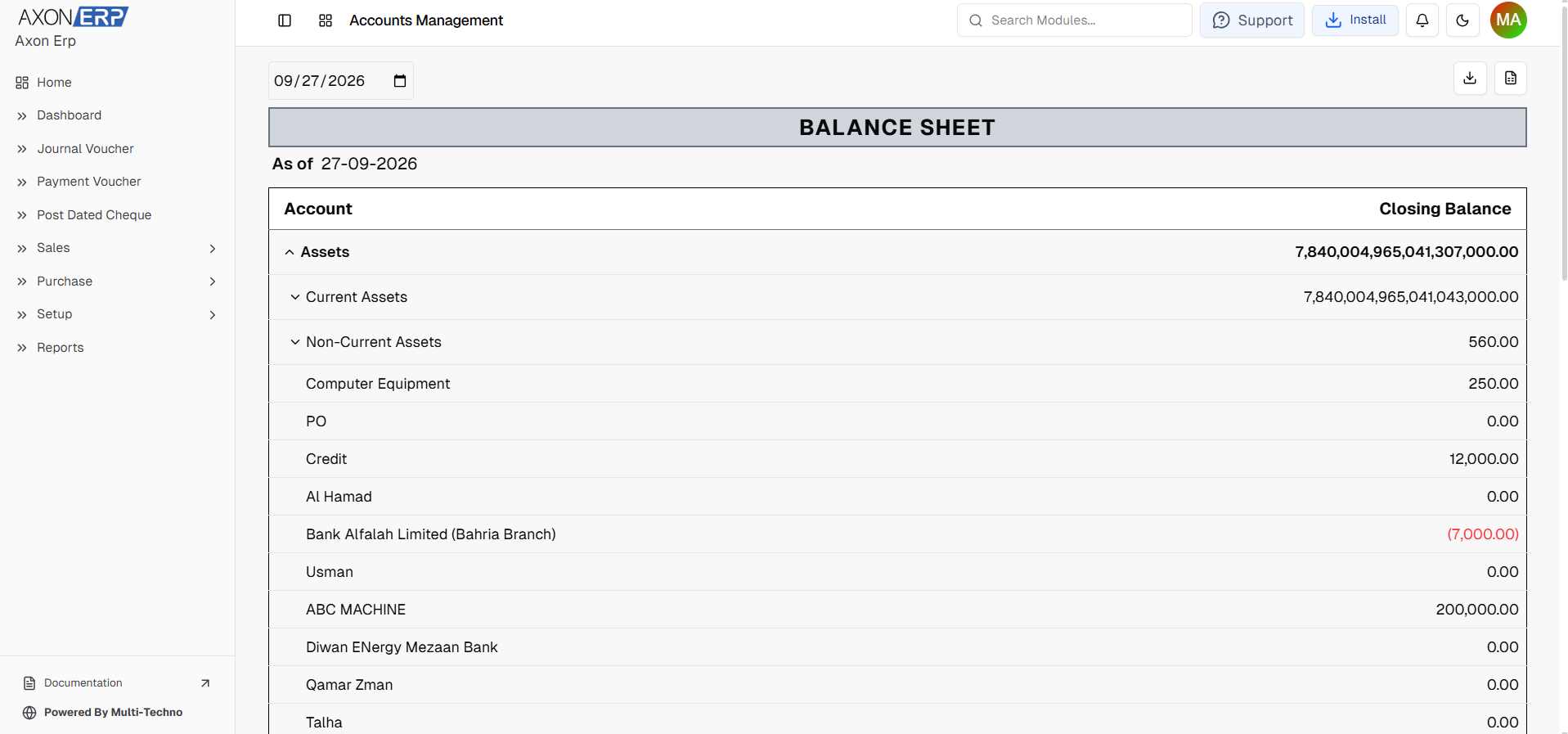
Axon ERP provides one-click financial statements including Profit & Loss, Balance Sheet, Trial Balance and Cash Flow.
Common Chart of Accounts Mistakes to Avoid
1. Copying Another Company's COA Without Adapting It
A manufacturing company should not automatically use the same structure as a service business.
The COA should reflect the company's own transactions, reporting requirements and operational model.
2. Creating Too Many Accounts
More accounts do not automatically mean better accounting.
If users cannot easily determine which account to use, the structure becomes difficult to maintain.
3. Using Unclear Account Names
Names such as "Miscellaneous 1" or "Other Expenses 2" may create confusion later.
Account names should be specific enough for finance users to understand their purpose.
4. Ignoring Inventory, COGS and Revenue Mapping
For businesses selling physical products, these three areas are particularly important.
Inventory needs an appropriate asset account, product costs need the correct COGS treatment, and sales need the appropriate revenue account.
This is also where the connection between inventory management and accounting setup becomes critical. Proper inventory setup includes item categories and financial account mapping rather than treating stock as a completely separate system.
5. Starting Transactions Before Testing Reports
Do not assume that a COA is correct simply because all account names have been created.
Test actual business scenarios.
For example:
- Create a purchase.
- Receive inventory.
- Record a supplier invoice.
- Make a sale.
- Receive customer payment.
- Review the General Ledger.
- Check the Trial Balance.
- Review P&L and Balance Sheet.
If the reports do not look as expected, fix the configuration before normal operations begin.
Chart of Accounts Go-Live Checklist
Before moving an ERP into production, finance and implementation teams should review the following:
Account Structure
- Major account groups created
- Account hierarchy reviewed
- Account names standardized
- Duplicate or unnecessary accounts removed
- Required sub-accounts created
Sales & Revenue
- Revenue accounts configured
- Customer receivable account configured
- Sales transaction tested
- Customer payment tested
Purchasing & Payables
- Payable account configured
- Purchase-related accounts reviewed
- Supplier invoice tested
- Supplier payment tested
Inventory
- Inventory asset accounts configured
- COGS accounts configured
- Revenue accounts mapped where required
- Item categories reviewed
- Inventory valuation tested
- Opening stock reviewed
Taxes & Adjustments
- Relevant tax accounts configured
- Stock adjustment account reviewed
- Required suspense or temporary accounts reviewed
- Tax-related transactions tested
Opening Balances
- Cash balances verified
- Bank balances verified
- Receivables verified
- Payables verified
- Inventory balances verified
- Equity/opening balances reviewed
Reporting
- General Ledger reviewed
- Trial Balance reviewed
- P&L reviewed
- Balance Sheet reviewed
- Cash Flow reviewed
- Branch/department/project reporting tested where applicable
Chart of Accounts should also be reviewed as part of the broader company setup in ERP, rather than being configured independently from the rest of the implementation. Only after these checks should the business move from testing into regular ERP operations.
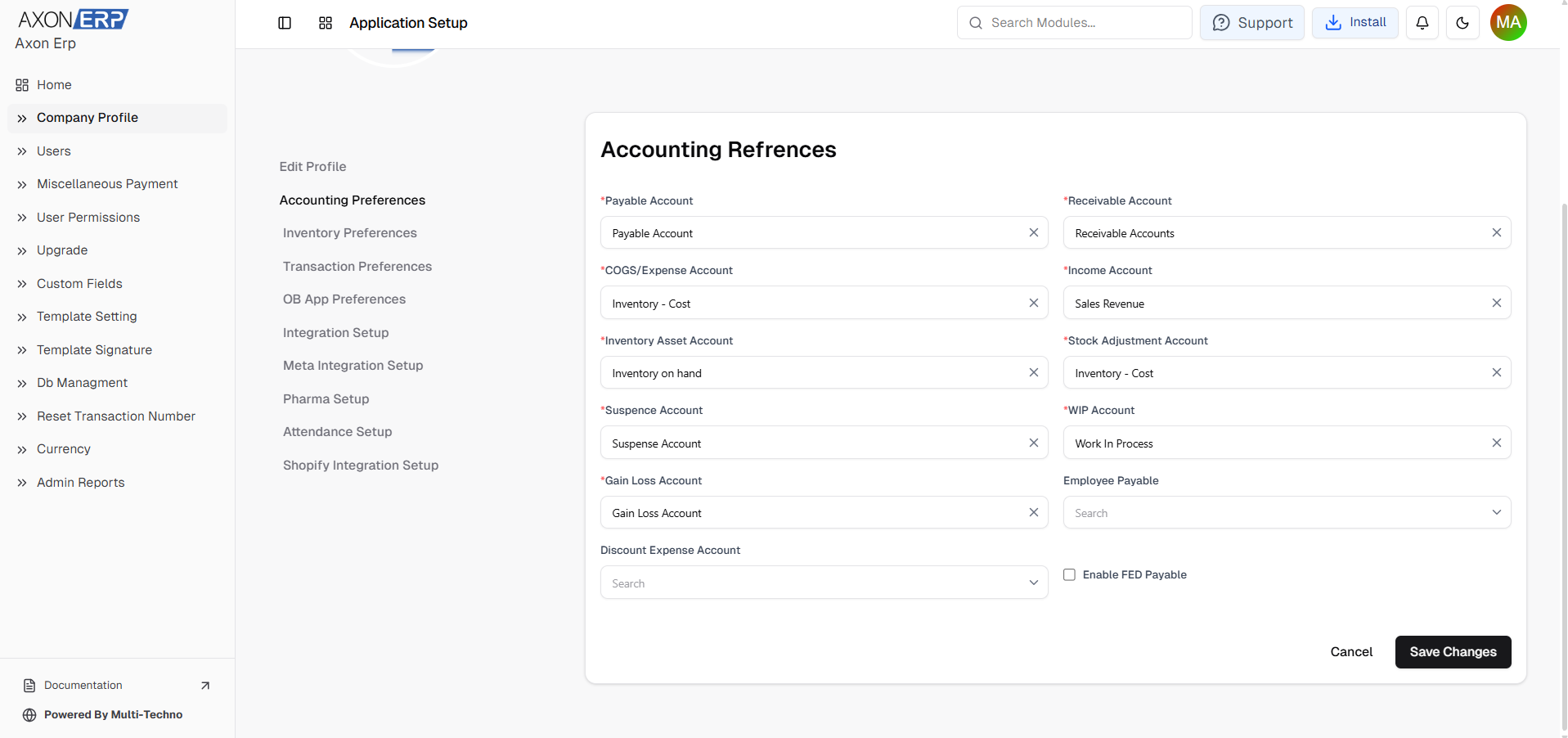
How Axon ERP Supports Chart of Accounts and Financial Setup
Axon ERP Finance module is designed to connect accounting with the rest of the ERP rather than keeping finance as an isolated function.
The module includes:
- Multi-level Chart of Accounts
- Journal Entries
- General Ledger
- Bank Management
- Bank Reconciliation
- Financial Statements
- Cost Center Accounting
- Budgeting
- Tax Reports
It also supports automatic journal entries from module transactions, helping operational activity flow into the accounting system.
The connection becomes particularly important when finance works alongside inventory, sales and purchasing.
For example, Axon's Inventory Setup allows item categories to be associated with Inventory Asset, COGS and Revenue accounts.
Meanwhile, its Inventory Management module provides stock valuation, multi-warehouse tracking, inventory adjustments and inventory reporting.
Sales and purchasing can then operate as part of the same ERP environment rather than requiring finance teams to reconstruct every transaction manually. Axon's Sales Management includes sales tracking and reporting, while Purchase Management covers purchasing, GRNs, payables and supplier-related workflows.
If you are setting up an ERP for a growing business, it is worth reviewing the Accounts & Finance module alongside the operational modules before finalizing your accounting structure.
Final Takeaway
A Chart of Accounts should not be treated as a list of account names that can be completed after an ERP goes live.
It is part of the structure that determines how purchases, sales, inventory, expenses and other transactions become financial information.
Before go-live, businesses should define the account hierarchy, decide the required level of detail, configure account mappings, test real transactions and verify the resulting financial reports.
The objective is simple: when the first real transaction is entered into the ERP, the system should already know where that transaction belongs and how it should appear in the business's financial reporting.
That preparation makes the transition to an ERP much easier to control and gives finance teams a cleaner foundation for future transactions, reporting and growth.