


Post Detail
BackAxon ERP Official
1 hr ago
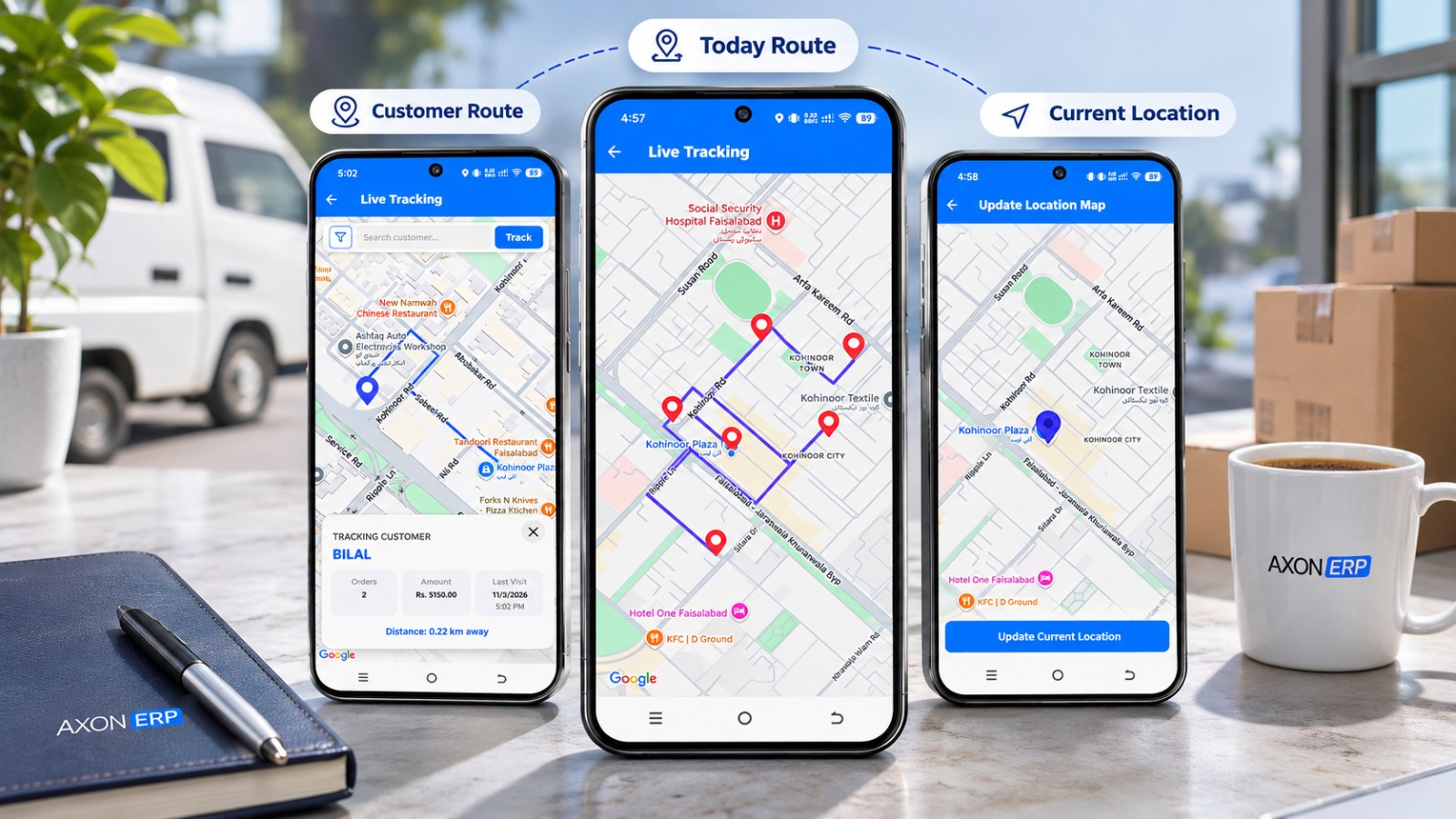
How Sales Representatives Track Visits and Book Orders Even Without Internet
Field sales management software helps businesses organize daily customer visits, monitor sales representative activity, and keep field operations connected with the office. With a mobile field sales app, representatives can follow assigned routes, record their location, and book orders or payments even without an internet connection. Once connectivity is available, they can manually synchronize transaction data with the ERP.
Why Managing Field Sales Representatives Becomes Difficult
Managing a field sales team involves more than assigning customers and setting daily sales targets. Representatives spend much of their working day outside the office, visiting customers, discussing requirements, collecting orders, and recording payments. Without a structured system, managers may have limited visibility into how these activities are being carried out.
In many wholesale and distribution businesses, representatives receive their daily customer lists but manage their visits independently. Managers often depend on phone calls, messages, and end-of-day updates to understand which customers were visited, which visits were missed, and what happened during the day.
This creates gaps between planned activities and actual field operations. A representative may visit several customers, change the planned route, or spend time on activities that are not reflected in the office records. Without reliable customer visit tracking and activity reports, reviewing field performance becomes difficult.
Businesses need a way to organize daily visits while maintaining visibility into representative activity. A connected field sales management software solution can bring customer assignments, route planning, location records, and sales transactions into a more organized workflow.
How Field Sales Software Organizes Daily Customer Visits
A field sales team generally works with a list of assigned customers and a daily visit plan. The challenge is to make this information accessible to representatives while allowing managers to understand how visits are progressing.
Assigning and Prioritizing Customer Visits
Customer assignments provide representatives with a clear list of businesses they are expected to visit. Instead of relying on manually prepared lists or scattered messages, businesses can manage customer information and assignments through their ERP system.
Customer priority also matters when planning daily activities. Some customers may require more frequent visits, while others may be located farther away or have different business requirements. Organizing these visits helps representatives plan their working day more effectively.
Planning Daily Sales Routes
Sales route tracking helps representatives understand where they need to go and which customer visits are planned for the day. A daily route can provide a practical starting point for organizing visits, particularly when representatives handle multiple customers across different locations.
In Axon's Order Booking App, representatives receive a daily notification called Today Route. When they open it, the app displays a map showing their assigned customer visits for that day.
The app creates a route based on customer priority and proximity. Representatives can follow the assigned route or choose their own route according to their field requirements. Following the suggested route is optional, allowing representatives flexibility while keeping the daily visit plan accessible.
This approach gives field teams a structured starting point without making every movement dependent on a fixed route.
How Sales Representative Tracking Provides Field Visibility
Knowing which customers are assigned to a representative is only one part of field sales management. Businesses also need a way to review field activity and understand how representatives move between customer locations.
GPS visit tracking can help provide this visibility by recording location information during field operations. However, businesses should distinguish between a planned customer visit and recorded location activity. A route on a map does not, by itself, confirm that a customer interaction took place.
Recording Representative Locations Through GPS
Sales representative tracking through GPS allows businesses to maintain location records while representatives are working in the field. These records can help managers review movement and understand the route taken during working hours.
In Axon's Order Booking App, representatives manually enable live location tracking. While this option remains ON, the app repeatedly records GPS coordinates, including latitude and longitude, in the database.
Location recording continues even if the application is closed or the internet connection is disconnected, provided live location remains enabled. Tracking stops when the representative manually turns live location OFF.
This distinction is important: GPS location history is not dependent on the representative synchronizing sales transactions with the ERP. Location activity is recorded separately, so it can be available for review before transaction data is manually synchronized.
Businesses evaluating GPS tracking for field sales representatives should understand what the software records, when tracking operates, and how managers can review the resulting activity.
Reviewing Customer Visits and Route Activity
Recording location data is useful only when businesses can review it in a meaningful way. Sales managers need accessible activity records to understand field operations rather than relying entirely on verbal updates from representatives.
Axon's Order Booker Activity Report provides a view of the representative's route and recorded activities. The report includes filters that allow users to review activity according to their requirements.
This gives managers a way to examine recorded field activity and review location history independently of transaction synchronization. For example, a representative may complete customer visits and record location activity during the day, while the sales transactions remain stored in the app until the representative performs a manual sync.
For businesses managing multiple representatives, having a dedicated activity report can make field operations easier to review and organize.
If you want to understand how these activities connect with customer orders and ERP records, you can explore the Axon Order Booking App and see how its field sales workflow operates.
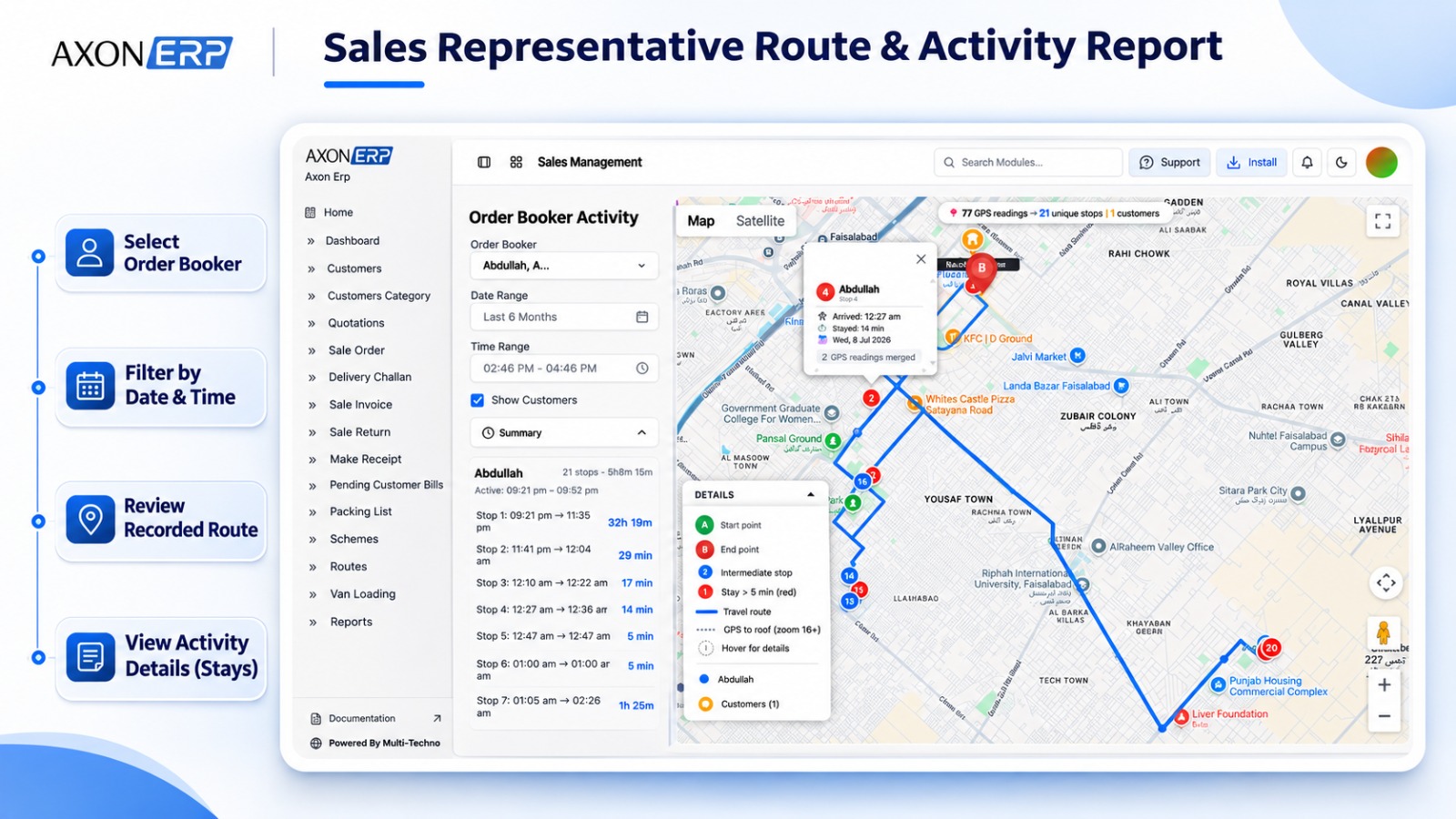
How Field Representatives Continue Working Without Internet
Field representatives do not always have a reliable internet connection throughout their working day. They may visit areas where connectivity is weak or temporarily unavailable. If their work depends entirely on a continuous connection, recording customer transactions can become difficult.
An offline sales app helps address this problem by allowing representatives to continue essential activities on their mobile devices and synchronize the saved transaction data when connectivity becomes available.
Recording Orders, Receipts and Payments Offline
Representatives often need to complete several activities during a customer visit. These may include booking a new order, generating a receipt, recording a credit sale, or entering a payment received from a customer.
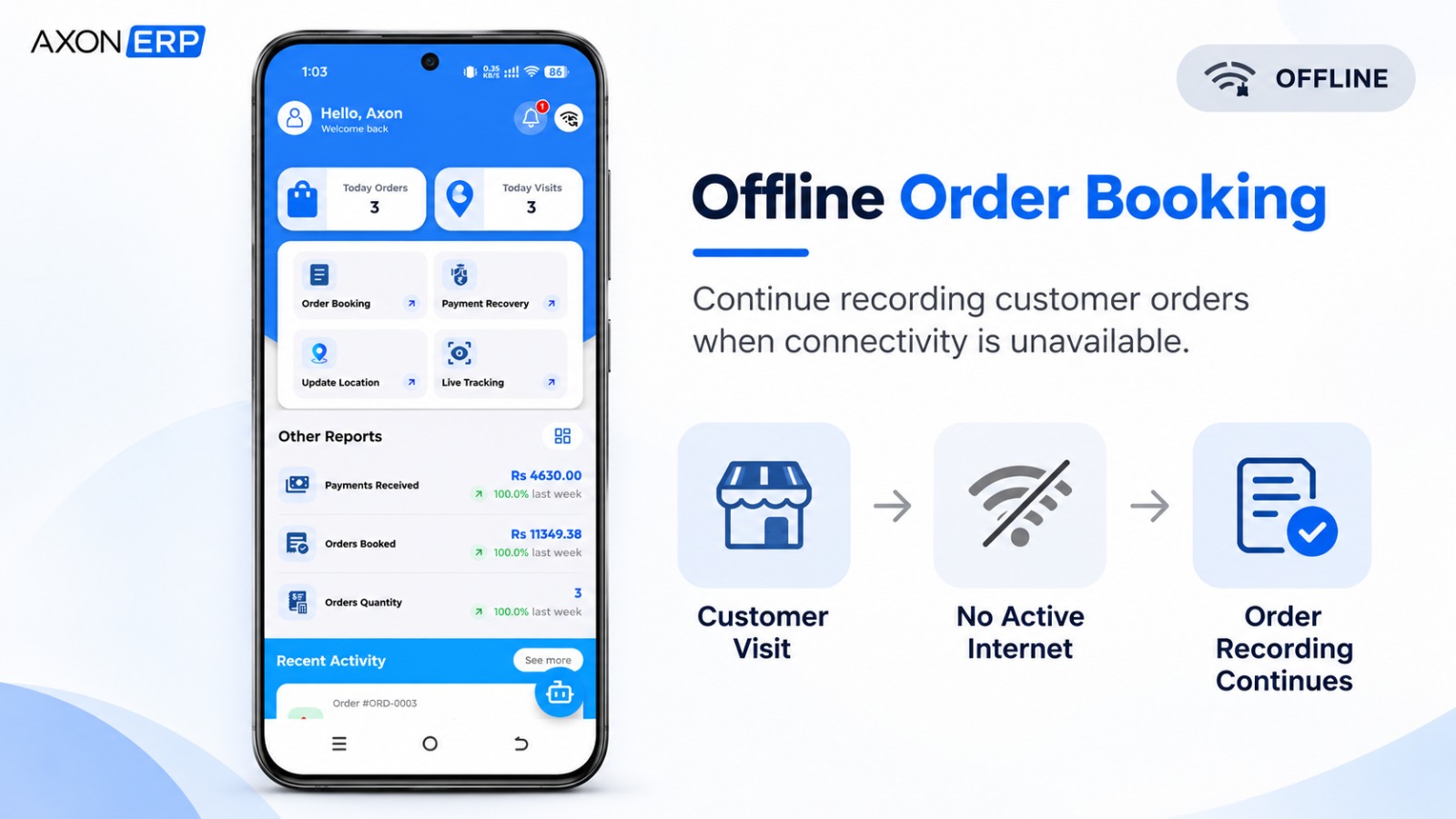
Axon's Order Booking App allows representatives to perform these activities without an active internet connection. Orders, receipts, credit sales, and payments can be recorded and saved offline. Representatives can also share or print generated receipts.
This means a temporary loss of connectivity does not necessarily prevent a representative from completing the customer transaction. The saved information remains available in the app until it is ready to be synchronized with the ERP.
For a closer look at how field representatives check stock and record customer orders, businesses can also explore offline field sales order booking.
Syncing Field Transactions With the ERP
Recording transactions offline is only one part of the process. Businesses also need those transactions to reach their central ERP system so that sales and related records can be managed from the office.
In Axon's workflow, the representative must manually press the Sync option to send saved transaction data to the ERP. Transactions do not automatically synchronize simply because an internet connection becomes available.
The resulting ERP record depends on the business's configuration. For example, a synchronized transaction can be created as a Sale Invoice or a Sales Order, depending on the configured option. Another setting determines whether the resulting record is saved as Draft or Approved.
When the Approved configuration is enabled, the applicable accounting entries are processed in the ERP. Payments follow a similar configuration-based process.
This gives businesses control over how field transactions enter their ERP workflow. It also makes it important to understand the difference between recording a transaction in the mobile app and completing its synchronization and processing in the ERP.
Once synchronized, the relevant records can be managed through the ERP's connected sales and inventory management in ERP processes.
What to Look for in Field Sales Management Software
Choosing field sales management software requires more than checking whether an application can record orders. Businesses should consider how well the solution connects daily field activities with their existing sales and ERP operations.
Before selecting a solution, evaluate whether it supports the following capabilities:
- Customer assignment: Can the business assign customers to individual sales representatives through its ERP?
- Daily visit planning: Does the application provide a clear view of the customers scheduled for each day?
- Route planning: Can representatives view their assigned customer locations and plan their daily visits?
- Route flexibility: Can representatives choose their own route when operational requirements change?
- GPS location tracking: Does the system record representative location activity, and can users control when tracking is enabled or disabled?
- Activity reporting: Can managers review recorded routes and representative activity through a dedicated report?
- Offline transactions: Can representatives record orders, receipts, credit sales, and payments without an internet connection?
- ERP synchronization: Is there a clear process for sending saved transactions to the ERP?
- Transaction configuration: Can the business control how synchronized orders and payments are processed and approved?
These requirements help businesses evaluate whether a field sales app supports their actual working processes rather than offering isolated mobile features.
Bringing Field Sales Activities and ERP Operations Together
Managing field sales effectively requires visibility into more than sales totals. Businesses need to organize customer visits, provide representatives with practical route information, review recorded location activity, and ensure that customer transactions reach the ERP through a controlled process.
A connected field sales management solution brings these activities closer together. Representatives can access their daily visit plans, record location activity, and continue booking orders and payments even when internet connectivity is unavailable. Managers can then review field activity through dedicated reports and manage synchronized transactions within the ERP.
Axon ERP's Order Booking App combines daily route planning through Today Route, GPS location recording, offline transaction entry, and the Order Booker Activity Report in one field sales workflow.
Businesses looking to improve their field sales operations can request a live demo of the Axon Order Booking App to see how representatives manage daily visits, record customer transactions, and synchronize their work with the ERP.
Frequently Asked Questions
1) What is field sales management software?
Field sales management software helps businesses organize and monitor the activities of representatives who work outside the office. Depending on its capabilities, it can support customer assignments, daily visit planning, route management, GPS tracking, activity reporting, and mobile order booking.
2) How can businesses track sales representatives in the field?
Businesses can use GPS-enabled field sales applications to record representative location activity during working hours. These records can help managers review routes and field activity through reports. The exact tracking behavior depends on the application's settings and functionality.
3) Can field sales representatives record customer visits without internet?
Yes, depending on the application's offline capabilities. A field sales app may allow representatives to continue recording transactions and other supported activities without an active internet connection. In Axon's Order Booking App, location recording also continues while live location is enabled, even if internet connectivity is unavailable.
4) Does GPS tracking work when a field sales app is offline?
It can, provided the application supports offline location recording. In Axon's Order Booking App, GPS coordinates continue to be recorded while live location is ON, even when the internet connection is disconnected or the application is closed. Tracking stops when the representative manually turns live location OFF.
5) Can sales representatives book orders and record payments offline?
Yes. Axon's Order Booking App allows representatives to record customer orders, generate receipts, enter credit sales, and record payments offline. The saved transaction data can then be sent to the ERP through the app's manual Sync option.
6) How do offline field sales transactions sync with an ERP?
The synchronization process depends on the application and ERP configuration. In Axon's Order Booking App, representatives manually press Sync when they want to send saved transaction data to the ERP. Configuration determines whether a transaction creates a Sale Invoice or Sales Order and whether the resulting record is Draft or Approved.