

Post Detail
BackAxon ERP Official
12 weeks ago
How to Manage Purchase Returns Efficiently and Reduce Inventory Losses
Every purchase doesn't end exactly as planned.
A supplier may deliver damaged products, send the wrong items, or supply fewer quantities than requested. Sometimes the goods don't meet the agreed quality standards, while in other cases businesses discover defects only after receiving the shipment. If these situations aren't handled properly, inventory records become inaccurate, supplier balances no longer match, and recovering the value of returned goods becomes difficult.
Many businesses still manage supplier returns through emails, spreadsheets, or manual paperwork. As purchasing volumes grow, it becomes harder to track which items were returned, which supplier should issue a refund, and whether inventory and financial records have been updated correctly.
A structured purchase return process helps businesses resolve these issues while maintaining accurate inventory, supplier records, and financial control.
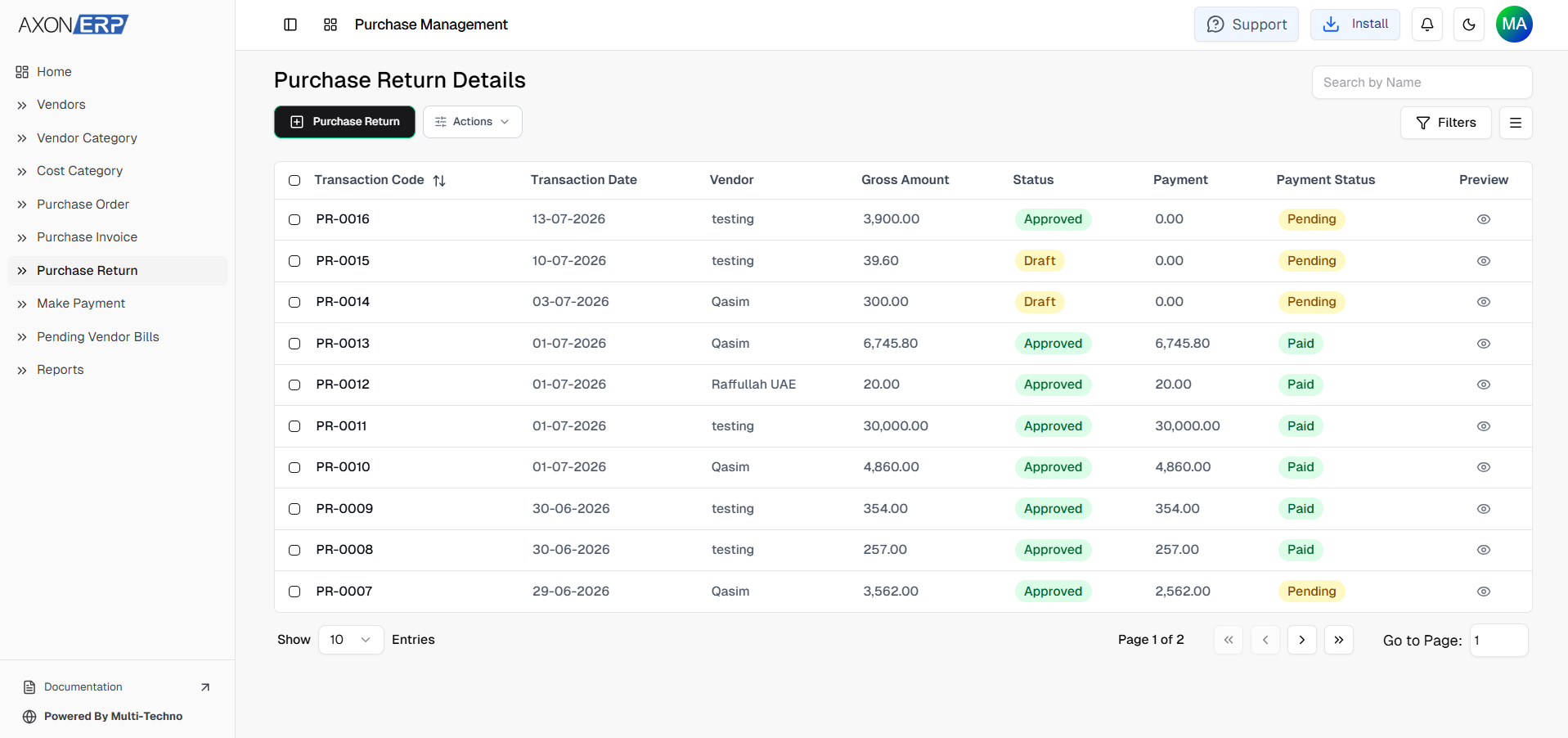
Axon ERP simplifies this process through its Purchase Return Management system. Businesses can record supplier returns, maintain complete traceability with purchase invoices, process supplier refunds, and keep inventory and accounting records synchronized within a single workflow.
What Is a Purchase Return?
A Purchase Return is the process of sending previously purchased goods back to a supplier.
Returns may occur for several reasons, including:
- Damaged or defective products
- Incorrect items delivered
- Wrong quantities received
- Poor product quality
- Goods that don't match the agreed specifications
Unlike a Purchase Order or Purchase Invoice, which record purchasing activities, a Purchase Return documents inventory that is being returned to the supplier and serves as the official record for that transaction.
A typical Purchase Return includes:
- Vendor
- Warehouse
- Transaction Date
- Payment Terms
- Reference Number
- Returned Items
- Quantity
- Unit Price
- Discount
- Tax
- Total Amount
- Notes or Attachments
Once approved, the Purchase Return becomes part of the purchasing history and provides complete documentation of the returned goods.
Why Purchase Return Management Matters
Supplier returns affect much more than inventory.
If returned items aren't recorded properly, businesses often experience:
- Incorrect inventory quantities
- Supplier balance discrepancies
- Difficulty tracking returned products
- Duplicate purchasing records
- Delayed supplier refunds
- Poor purchasing visibility
- Errors in financial reporting
As procurement activities increase, manually tracking supplier returns becomes increasingly difficult.
Axon ERP helps eliminate these challenges by centralizing the entire Purchase Return process. Every return remains linked to the appropriate supplier while maintaining accurate purchasing records and improving visibility across procurement operations.
Creating Purchase Returns in Axon ERP
Axon ERP provides two flexible ways to create Purchase Returns depending on how the business manages its purchasing process.
The most common approach is to generate a Purchase Return directly from an existing Purchase Invoice. Since the original purchasing information is already available, businesses can quickly create the return while maintaining complete traceability between both transactions.
Organizations also have the flexibility to create a Purchase Return directly from the Purchase Return module whenever they need to record a supplier return independently.
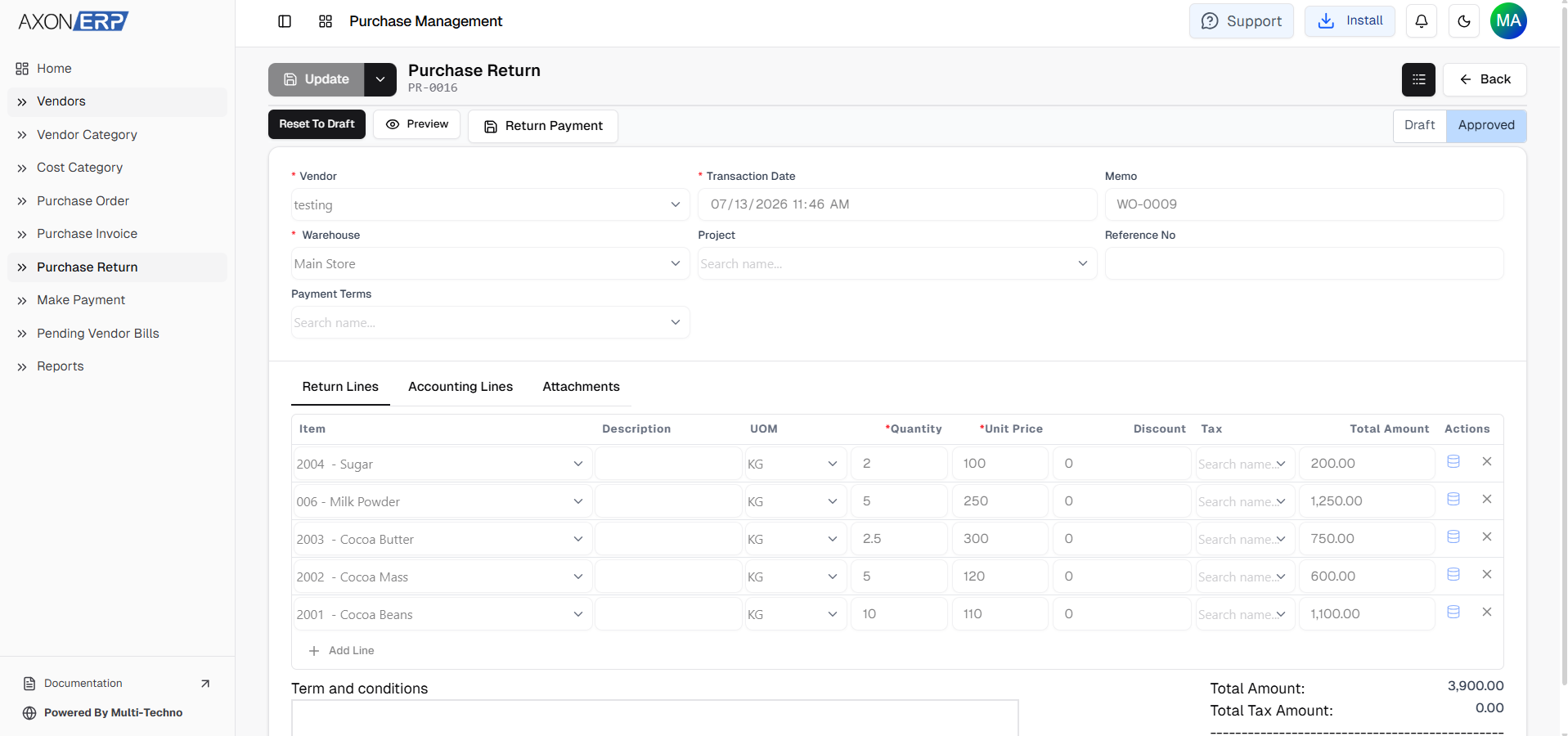
When creating a Purchase Return, users enter information such as:
- Vendor
- Warehouse
- Transaction Date
- Payment Terms
- Project (optional)
- Reference Number
- Memo
After completing the header information, users add the returned inventory items by specifying:
- Item
- Description
- Unit of Measure (UOM)
- Quantity
- Unit Price
- Discount
- Tax
- Total Amount
Supporting documents can also be attached whenever additional documentation is required.
Like other purchasing documents in Axon ERP, every Purchase Return is initially saved as a Draft, allowing users to review the transaction before final approval.
Confirming Purchase Returns and Processing Supplier Refunds
Creating a Purchase Return does not immediately complete the return process.
Like other purchasing transactions in Axon ERP, a Purchase Return is first saved as a Draft. This allows users to review the supplier information, returned items, quantities, pricing, and other transaction details before final approval.
Once everything has been verified, the Purchase Return can be Approved.
After approval, Axon ERP records the return as part of the purchasing process and automatically generates the related accounting entries. This ensures that the return is properly reflected in both operational and financial records while maintaining complete transaction history.
If the return was created directly from a Purchase Invoice, the relationship between both documents remains intact, making it easy to trace the complete purchasing lifecycle from receipt to return.
Managing Supplier Refunds
Returning goods is only part of the process. Businesses also need to recover the amount associated with the returned items.
Once a Purchase Return has been approved, Axon ERP provides a Return Payment option that allows users to create the supplier refund transaction directly from the Purchase Return.
Since the vendor and return details are already available, businesses don't need to enter the same information again. The refund transaction is created in Draft status, allowing finance teams to review it before final processing.
Keeping supplier refunds connected with the original Purchase Return improves financial visibility while reducing manual work and maintaining accurate supplier records.
Purchase Return Reports in Axon ERP
Monitoring supplier returns is important for identifying recurring purchasing issues and evaluating supplier performance.
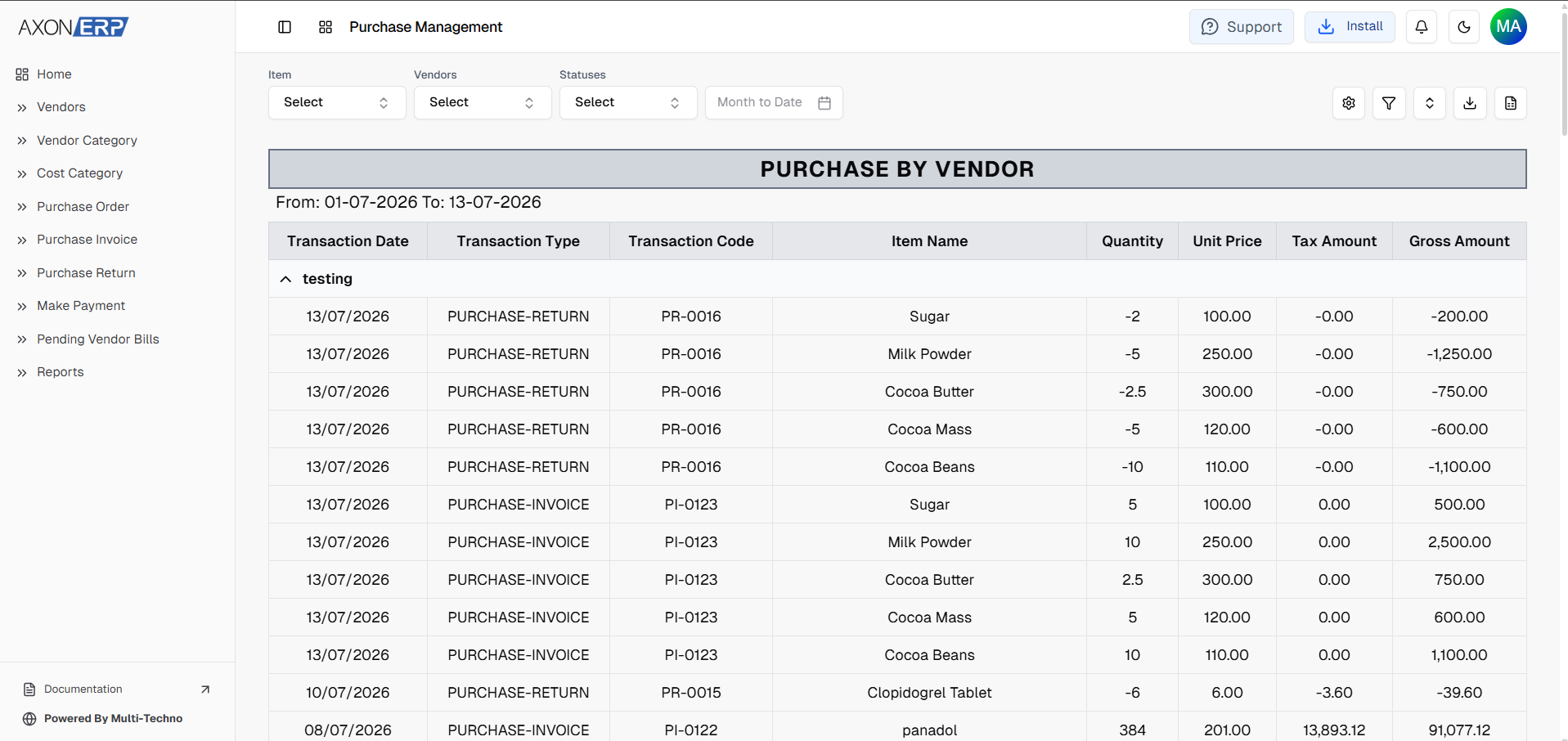
Axon ERP includes dedicated Purchase Return reports that allow businesses to analyze returned goods from different perspectives.
Available reports include:
- Purchase Returns by Month for reviewing return trends over specific periods.
- Purchase Returns by Item for identifying products that are returned frequently.
- Purchase Returns by Vendor for evaluating supplier performance and return history.
These reports help purchasing teams identify quality issues, monitor supplier reliability, reduce unnecessary procurement costs, and make better purchasing decisions using real business data.
Like other reporting modules in Axon ERP, report views can also be customized according to business requirements.
Benefits of ERP-Based Purchase Return Management
Managing Purchase Returns through an integrated ERP system provides businesses with better control over procurement, inventory, and supplier relationships.
Improved Inventory Accuracy
Recording returns through a structured workflow helps businesses maintain inventory records that accurately reflect actual stock.
Better Supplier Management
Every Purchase Return remains connected with the corresponding supplier, making it easier to monitor supplier performance and resolve purchasing issues.
Faster Refund Processing
Creating supplier refunds directly from approved Purchase Returns reduces manual work while improving financial accuracy.
Complete Transaction Traceability
Purchase Returns remain linked with Purchase Invoices, suppliers, accounting records, and refund transactions, providing complete visibility throughout the purchasing process.
Stronger Procurement Control
Centralizing supplier returns allows businesses to identify recurring quality issues, improve purchasing decisions, and build stronger supplier relationships over time.
Best Practices for Managing Purchase Returns
To maintain accurate purchasing and financial records, businesses should follow a few practical guidelines:
- Verify returned items before approving the Purchase Return.
- Whenever possible, create Purchase Returns directly from the related Purchase Invoice.
- Record accurate return quantities and pricing.
- Keep supporting documents attached to the transaction when required.
- Process supplier refunds through the associated Return Payment workflow.
- Regularly review Purchase Return reports to identify supplier and product trends.
- Maintain all purchasing records within the ERP system instead of relying on spreadsheets or manual documentation.
Following these practices helps organizations improve inventory accuracy, strengthen supplier accountability, and simplify procurement management.
Final Thoughts
Supplier returns are a normal part of business operations, but managing them manually often leads to inventory discrepancies, delayed refunds, and incomplete purchasing records.
A structured Purchase Return process helps businesses maintain accurate inventory, improve supplier accountability, and keep financial records synchronized throughout the procurement cycle.
Axon ERP simplifies this workflow by allowing businesses to create Purchase Returns independently or directly from Purchase Invoices, maintain complete traceability, generate accounting entries after approval, process supplier refunds through Return Payments, and analyze return activity using dedicated reports.
As purchasing operations grow, having a centralized Purchase Return Management system enables organizations to reduce manual work, improve procurement visibility, and build a more reliable and efficient purchasing process.