

Post Detail
BackAxon ERP Official
13 weeks ago
How Inventory Adjustment in ERP Improves Inventory Accuracy and Stock Reconciliation
No matter how well a business manages its inventory, there are times when the stock available in the system doesn't match what's physically present in the warehouse.
This can happen for many reasons items may be damaged during handling, products may expire, counting mistakes can occur during stock audits, or inventory may need to be corrected after an opening stock import. Even small discrepancies can affect inventory reports, purchasing decisions, financial records, and overall business operations.
Many businesses still correct these differences by manually editing spreadsheets or making undocumented stock changes. While this may seem like a quick solution, it often creates inaccurate inventory records and makes it difficult to understand why stock levels changed.
An ERP system solves this problem by providing a structured Inventory Adjustment process. Instead of making direct changes to inventory, users create an adjustment document that records every correction, updates stock accurately after approval, and automatically generates the required accounting entries.
Whether the adjustment increases inventory, reduces stock, or records opening balances, every transaction becomes part of a complete audit trail that improves inventory accuracy and financial transparency.
What Is Inventory Adjustment in ERP Software?
Inventory Adjustment is the process of correcting inventory quantities or values when the physical stock differs from the quantity recorded in the ERP system.
Unlike an Inventory Transfer, which simply moves stock between warehouses, Inventory Adjustment changes the actual inventory balance to reflect the correct physical stock.
Businesses commonly use Inventory Adjustment to:
- Correct differences found during physical stock counts.
- Record damaged, expired, or lost inventory.
- Add inventory that was previously missing from system records.
- Upload or correct opening stock balances.
- Fix inventory errors caused by manual processes.
Instead of making undocumented changes, ERP software records every adjustment through a controlled workflow, ensuring inventory remains accurate, traceable, and fully synchronized with accounting records.
Why Inventory Adjustment Matters
Accurate inventory is essential for every business. When the quantity shown in the system doesn't match the actual stock available in the warehouse, almost every department is affected.
Common problems include:
- Inventory shortages during production or customer orders.
- Incorrect purchasing because stock records are inaccurate.
- Financial reports that don't reflect actual inventory value.
- Time wasted investigating stock discrepancies.
- Reduced confidence in inventory reports.
A structured Inventory Adjustment process ensures these discrepancies are corrected properly while maintaining a complete history of every inventory change.
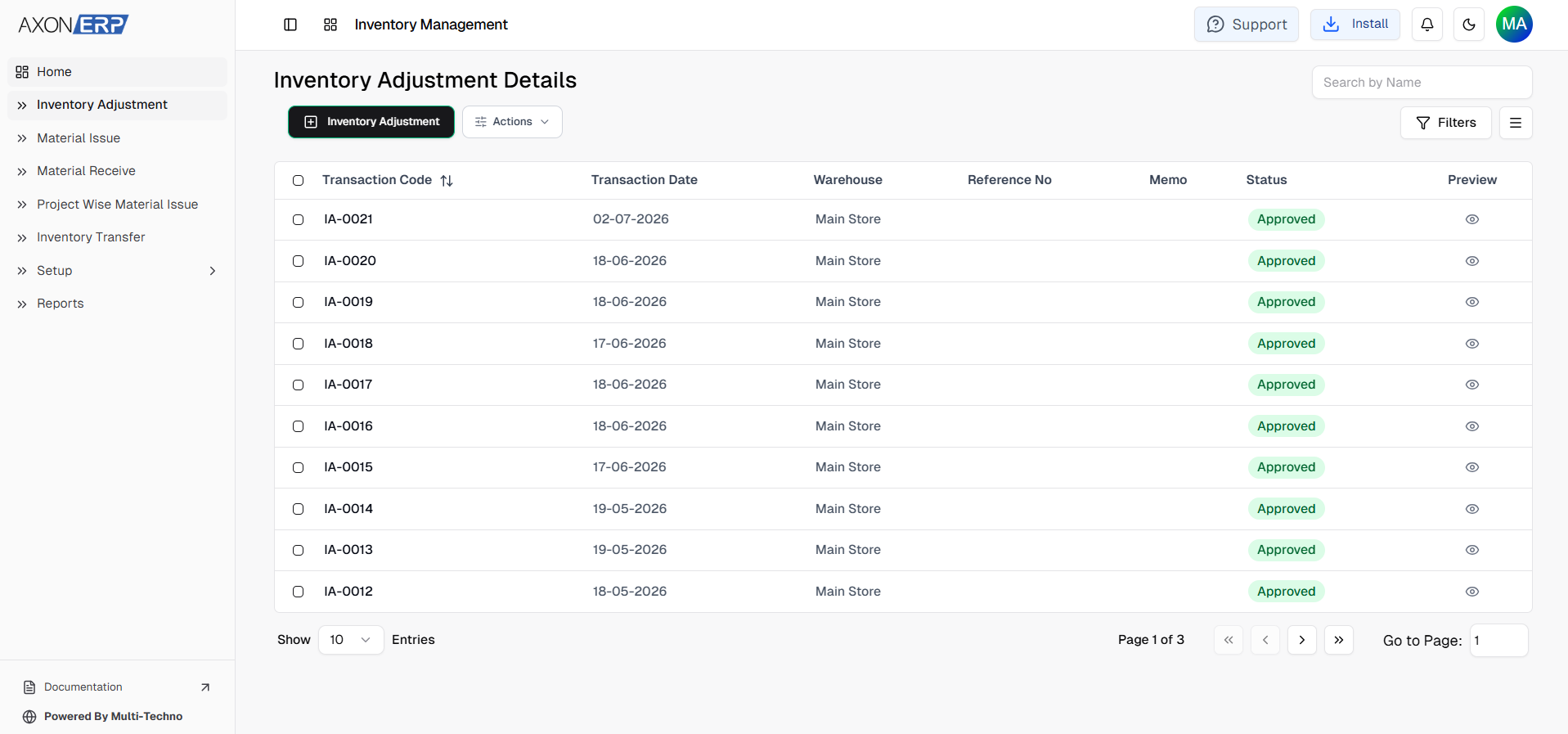
How Inventory Adjustment Works in Axon ERP
Axon ERP provides a structured workflow that allows businesses to adjust inventory without making undocumented changes to stock records. Instead of editing quantities directly, every adjustment is recorded through an Inventory Adjustment document, ensuring complete traceability and accurate reporting.
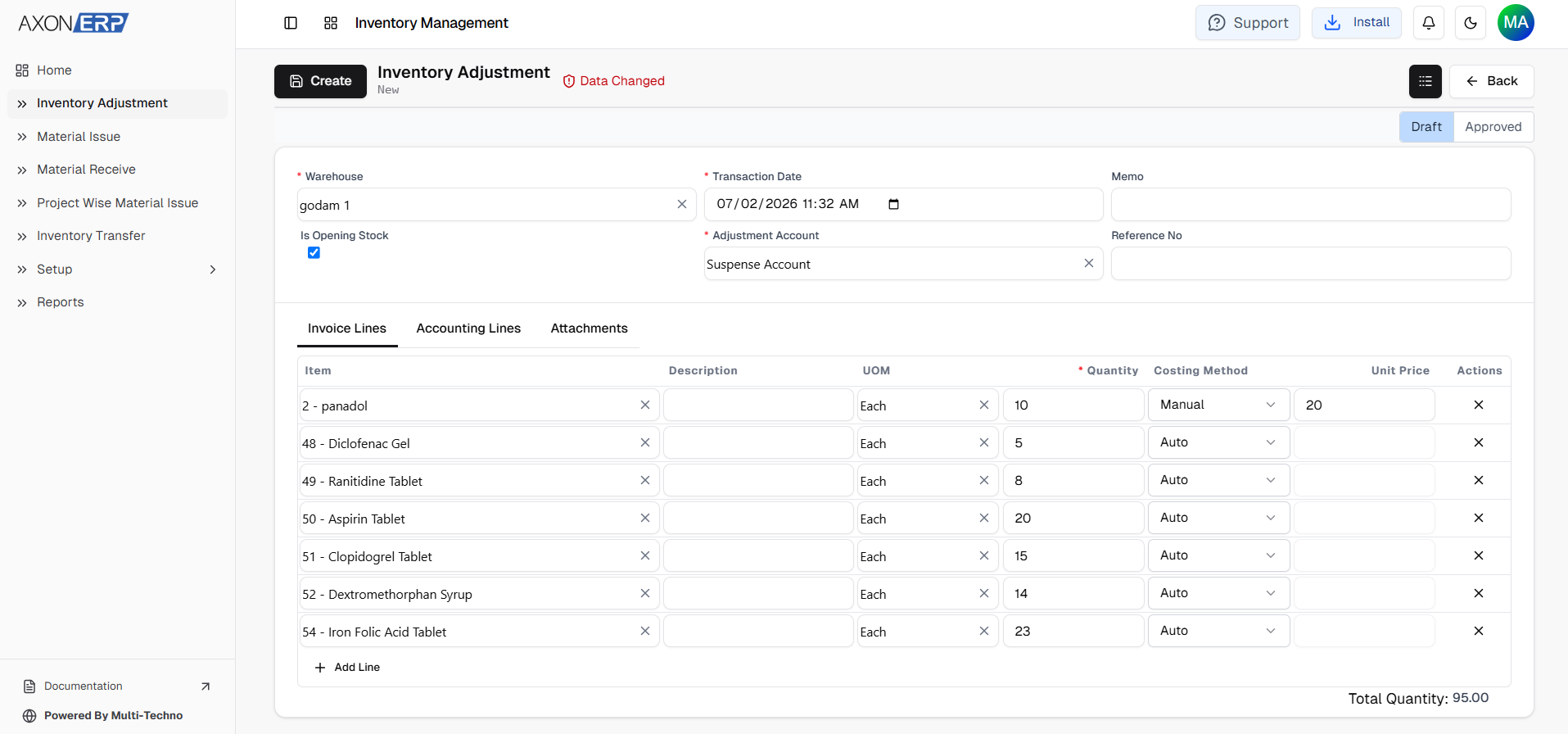
Users begin by creating a new Inventory Adjustment and selecting the appropriate Warehouse, Transaction Date, and Adjustment Account. If the transaction is related to the company's initial inventory setup, the Opening Stock option can also be selected.
Additional information such as a Reference Number and Memo can be entered to provide context for the adjustment, making future audits and Stock Reconciliation much easier.
After completing the header information, users move to the Invoice Lines section, where the inventory items are added.
For each item, the following information is recorded:
- Item
- Description
- Unit of Measure (UOM)
- Quantity
- Costing Method (Auto or Manual)
- Unit Price
This structured process helps maintain consistent Inventory Management records while reducing manual errors during stock corrections.
Draft and Approval Workflow
Like other inventory transactions in Axon ERP, every Inventory Adjustment starts in Draft status.
While the document remains in Draft, users can review quantities, update prices, modify inventory items, or make any necessary corrections before final approval. During this stage, warehouse stock remains unchanged.
Once an authorized user approves the adjustment, the ERP system automatically updates inventory quantities and applies the changes to the selected warehouse. Because an Inventory Adjustment changes the actual inventory balance, Axon ERP also generates the required Accounting entries automatically, ensuring inventory records and financial data remain synchronized.
This integration eliminates duplicate work between warehouse and finance teams while improving overall data accuracy.
Costing Method and Accounting Integration
One of the important features of Inventory Adjustment is the ability to select a Costing Method.
Users can choose Auto Costing, where Axon ERP calculates inventory values based on existing costing rules, or Manual Costing, where a specific unit price is entered for the adjustment. This flexibility allows businesses to handle different inventory correction scenarios without compromising reporting accuracy.
Every approved adjustment also updates inventory values used for Inventory Valuation and automatically records the corresponding entries in the General Ledger. This keeps inventory records and financial data synchronized, eliminating the need for separate manual journal entries.
Whether businesses are correcting damaged stock, recording shortages, adjusting excess inventory, or updating opening balances, every transaction becomes part of a complete audit trail that improves both operational control and financial accuracy.
Benefits of ERP-Based Inventory Adjustment
A well-structured Inventory Adjustment process helps businesses maintain accurate inventory records while ensuring financial data remains reliable. Instead of relying on spreadsheets or manual stock corrections, ERP software provides a controlled workflow that records every adjustment with complete visibility.
Improved Inventory Accuracy
One of the biggest benefits of Inventory Adjustment is maintaining accurate stock records.
When differences are identified during stock counts or warehouse audits, businesses can correct inventory immediately rather than allowing discrepancies to grow over time. This improves overall Inventory Accuracy and ensures teams can trust the inventory data available in the system.
Better Stock Reconciliation
Regular Stock Reconciliation becomes significantly easier when every adjustment is properly documented.
Businesses can compare physical inventory against system records, identify discrepancies quickly, and maintain consistent inventory balances across warehouses.
Accurate Inventory Valuation
Inventory is often one of the largest assets recorded on a company's balance sheet.
Because Inventory Adjustments update both quantities and values, businesses can maintain accurate Inventory Valuation, improving the quality of financial reporting and decision-making.
Stronger Financial Control
Since approved adjustments automatically generate accounting entries, finance teams no longer need to create manual corrections separately.
This integration helps keep inventory records and the General Ledger synchronized while reducing the risk of accounting errors.
Complete Audit Trail
Every adjustment records important information such as:
- Warehouse
- Transaction Date
- Reference Number
- User Activity
- Inventory Items
- Quantity Changes
- Adjustment Values
This creates a complete audit history that improves compliance and simplifies future investigations.
Inventory Adjustment Reports
Accurate reporting is one of the most valuable outcomes of ERP-based inventory management.
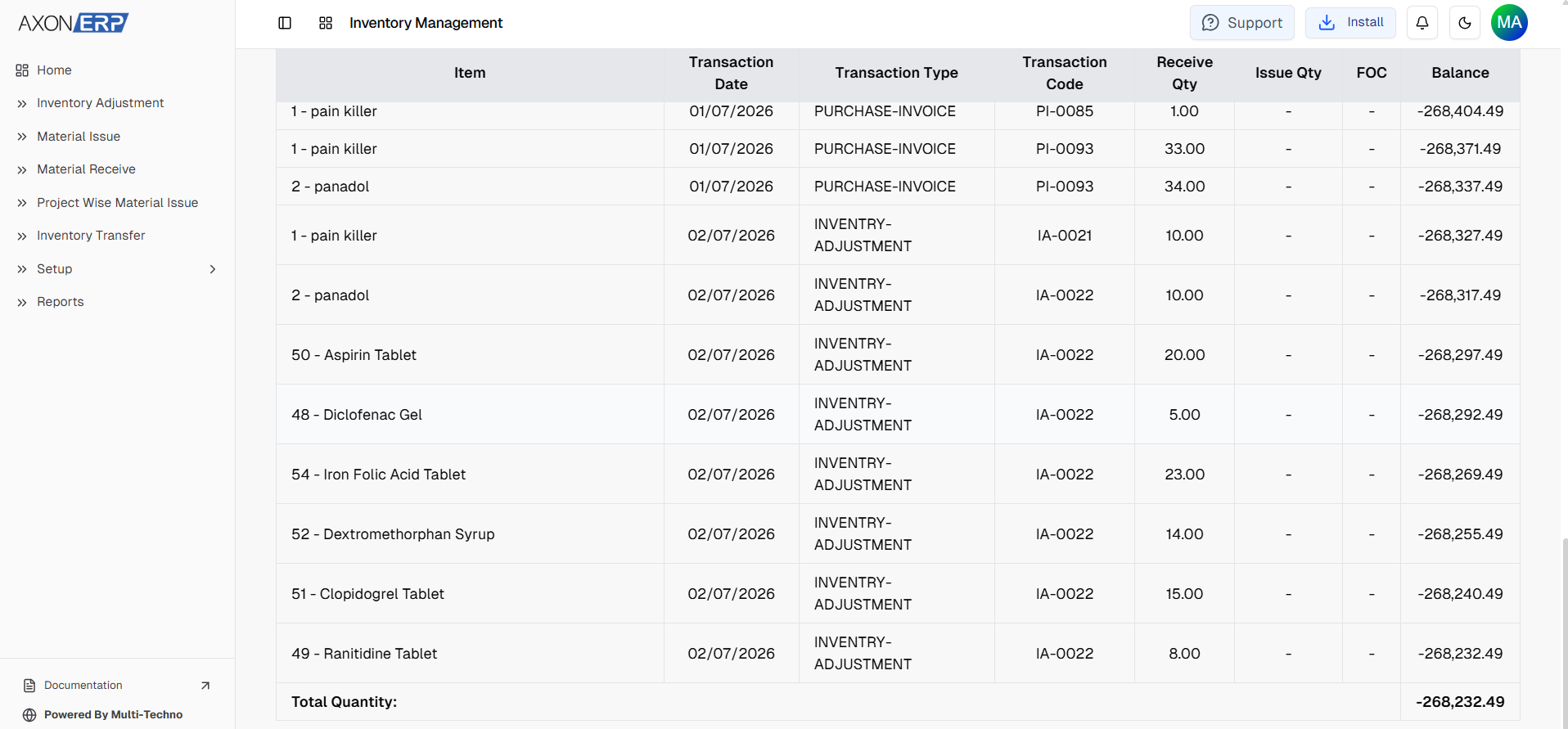
Once an Inventory Adjustment is approved, the transaction becomes available throughout the reporting system, giving management full visibility into inventory corrections and stock movements.
Common reports may include:
- Inventory Adjustment Register
- Item Ledger Report
- Inventory Movement Report
- Warehouse Wise Stock Report
- Inventory Quantity Summary
- Inventory Valuation Report
These reports help businesses identify recurring inventory issues, monitor stock accuracy, and make better purchasing and operational decisions.
Best Practices for Inventory Adjustments
To maintain reliable inventory records, businesses should follow a few simple best practices:
- Perform regular physical inventory counts.
- Use Inventory Adjustments instead of manual stock changes.
- Include reference numbers and remarks whenever possible.
- Verify quantities before approving adjustments.
- Restrict approval permissions to authorized users.
- Review adjustment reports regularly.
- Investigate frequent inventory discrepancies.
- Reconcile inventory before month-end closing.
Following these practices helps improve inventory control while reducing operational and financial risks.
Final Thoughts
Inventory discrepancies are unavoidable in most businesses. However, how those discrepancies are managed determines the accuracy of inventory records and the reliability of financial reporting.
Instead of relying on spreadsheets or undocumented stock corrections, ERP software provides a structured Inventory Adjustment process that records every change, updates stock levels accurately, and automatically generates the necessary accounting entries.
With Axon ERP, businesses can manage inventory corrections confidently through a controlled workflow that supports accurate stock records, reliable financial data, and complete audit visibility.
As organizations grow, an effective Inventory Adjustment process becomes essential for maintaining inventory accuracy, improving stock reconciliation, and supporting better business decisions.
Looking for a smarter way to manage inventory? Contact the Axon ERP team to see how our integrated inventory management solution can help your business improve stock accuracy, warehouse efficiency, and operational control.