


Post Detail
BackAxon ERP Official
13 hr ago
How to Use an ERP Reorder Report to Identify Low Stock Items
An ERP reorder report helps businesses identify inventory items whose closing stock has fallen below their defined minimum stock level. By comparing minimum stock levels with current inventory balances, businesses can identify items that need attention and make more informed replenishment decisions. Instead of manually checking individual products, inventory teams can use ERP reporting to monitor stock levels and review purchasing requirements more efficiently.
What Is an ERP Reorder Report?
An ERP reorder report is an inventory management report that helps businesses identify items that have fallen below their configured minimum stock levels. It provides visibility into which products may require replenishment, allowing inventory managers to review stock availability before shortages affect daily operations.
For businesses managing hundreds or thousands of inventory items, checking every product individually can become difficult and time-consuming. An inventory reorder report simplifies this process by bringing relevant stock information together in one place. Inventory reports can also help businesses assess stock status, identify replenishment needs, and review how inventory levels affect their wider operations.
However, identifying a low-stock item and deciding how much to purchase are two different activities. A reorder report highlights inventory that requires attention, while the final purchasing decision should also consider pending purchase orders, sales demand, supplier availability, and warehouse stock.
Understanding the Information in an ERP Reorder Report
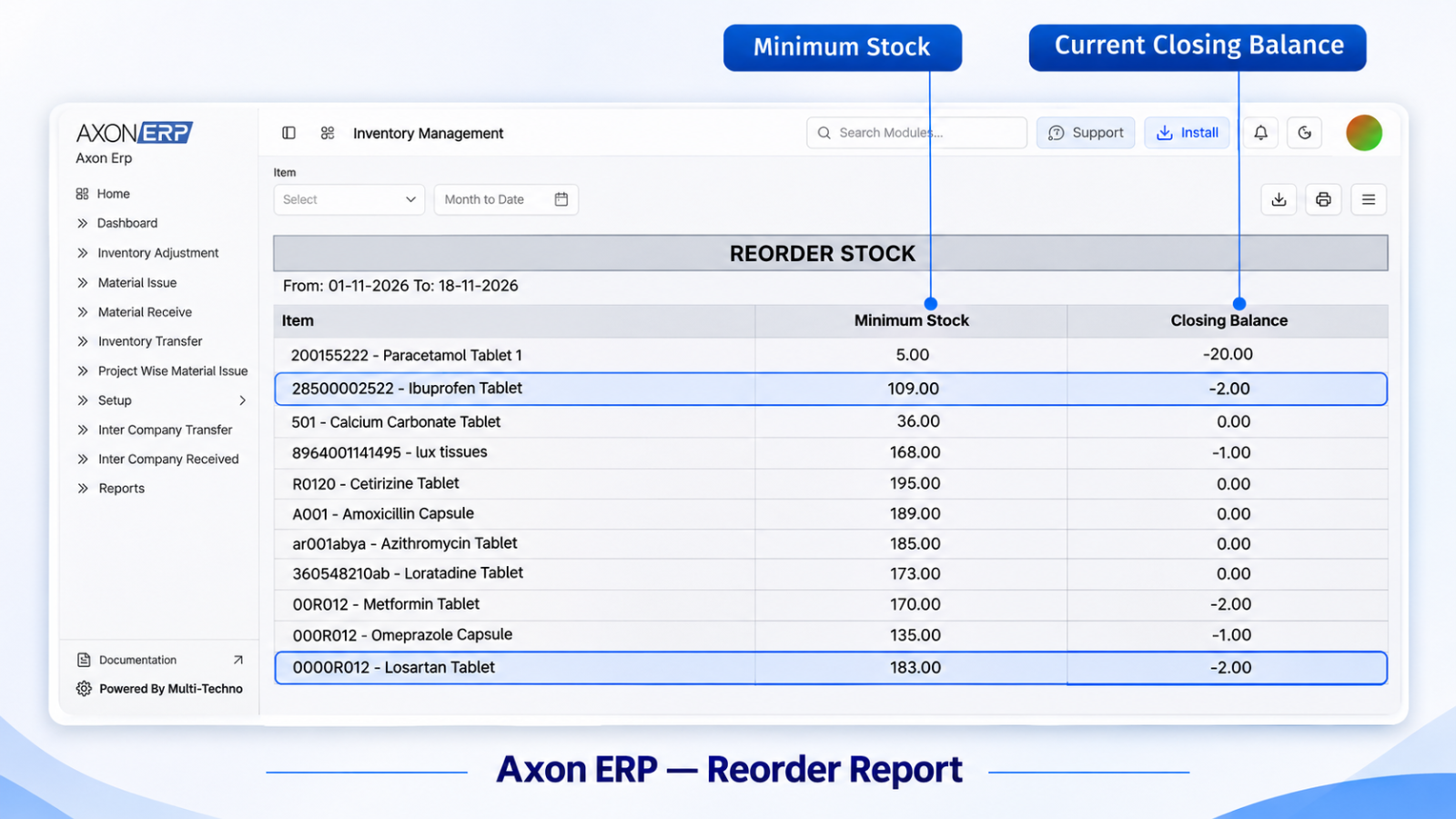
To use an ERP reorder report effectively, businesses first need to understand the information it provides. In Axon ERP, the Reorder Report includes three important columns: Item, Minimum Stock, and Closing Balance.
Item
The Item column identifies the inventory product being monitored. Businesses dealing with multiple products can use this information to identify exactly which items require attention.
For example, a distributor may manage different product categories, brands, sizes, and stock-keeping units. Identifying each item individually helps inventory teams review stock requirements without confusing one product with another.
Minimum Stock
Minimum Stock represents the predefined stock threshold for an inventory item. Businesses establish this level according to their operational requirements, product movement, and inventory planning practices.
When the recorded stock balance falls below this threshold, the item can be identified for further review.
Minimum stock levels should reflect actual business requirements. Setting them too high or too low can reduce the usefulness of inventory reorder reporting.
Closing Balance
Closing Balance represents the recorded remaining inventory quantity for an item at the relevant reporting point.
Inventory teams compare this value against the configured Minimum Stock level to understand whether an item has fallen below its required threshold.
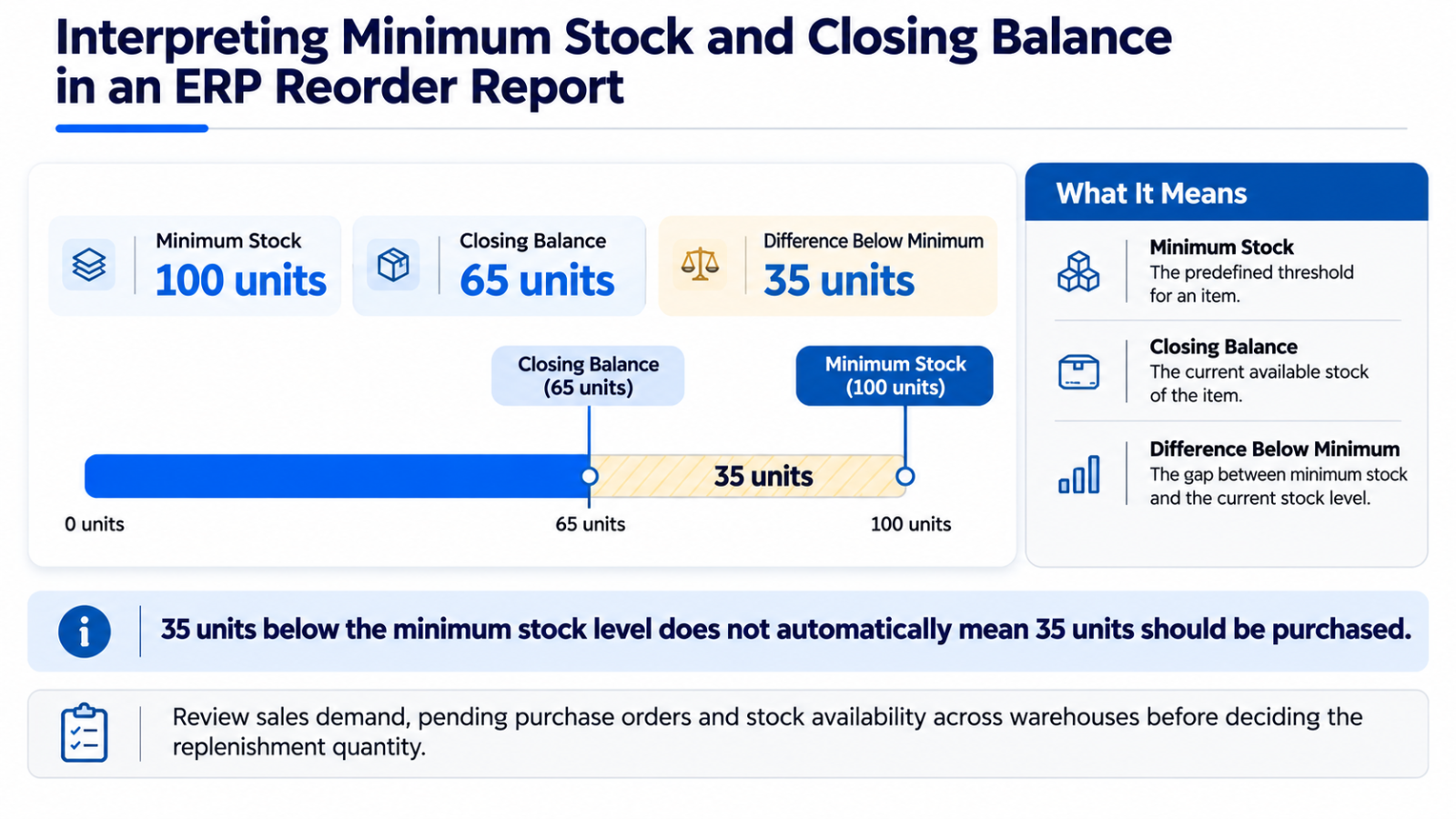
For example, if an item has a Minimum Stock level of 100 units and its Closing Balance is 65 units, the recorded stock is below the configured minimum.
Why Minimum Stock and Closing Balance Matter Together
Neither value provides the complete picture on its own. Minimum Stock establishes the threshold, while Closing Balance shows the recorded inventory position.
Comparing these values helps businesses identify items that need attention. It also gives purchasing teams a clearer starting point for reviewing replenishment requirements.
It is important to understand the difference between minimum stock, safety stock and reorder points, as these concepts serve different purposes in inventory planning. These concepts can support broader inventory planning, but they should not automatically be treated as the same calculation.
How to Use an ERP Reorder Report to Identify Low Stock Items
An ERP reorder report becomes useful when businesses establish appropriate stock thresholds and regularly review the information provided by the system. The following steps explain how inventory teams can use this information to identify items requiring attention.
1. Set Minimum Stock Levels for Inventory Items
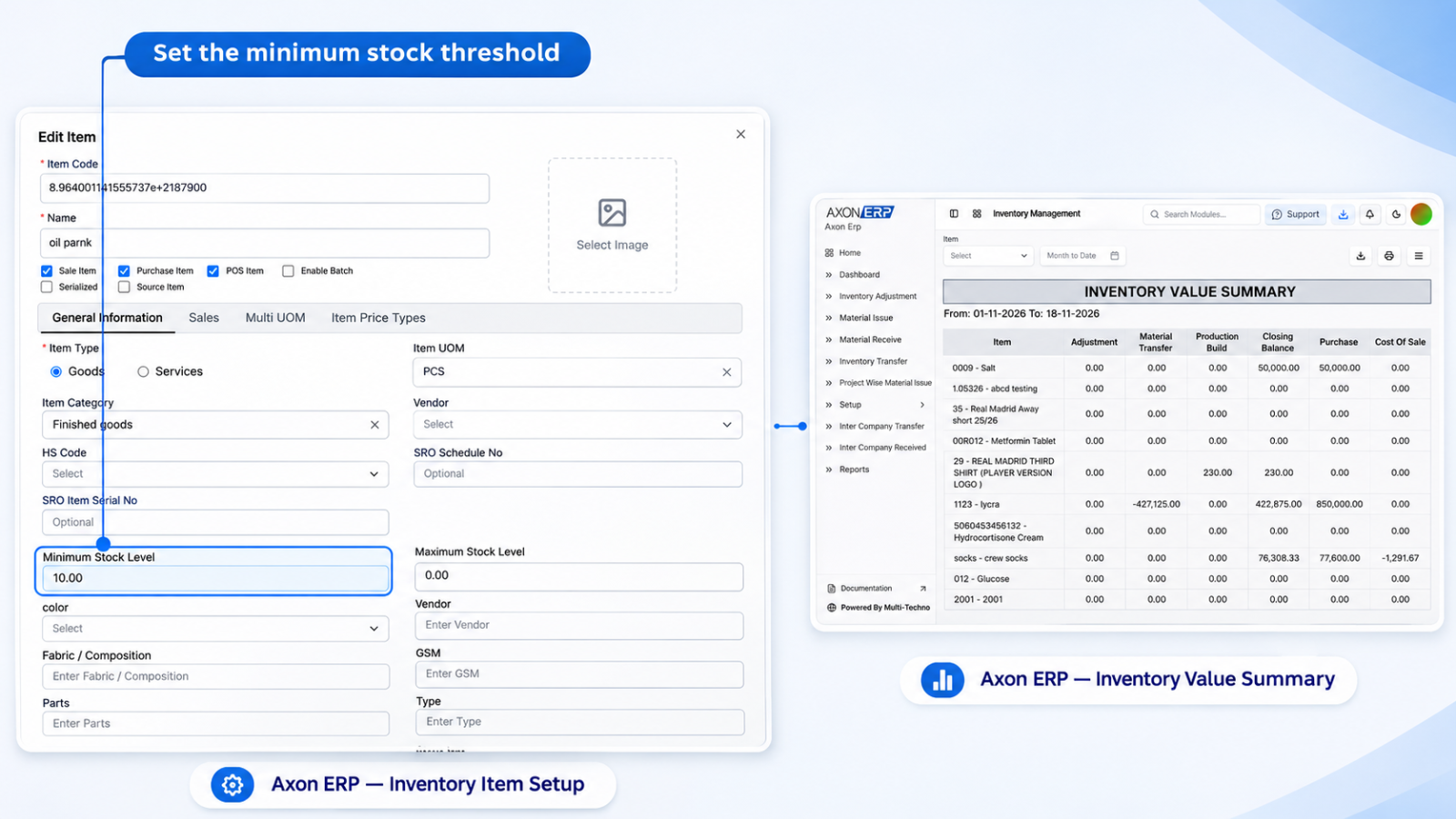
The first step is to establish minimum stock levels for the inventory items that need monitoring.
Businesses should consider how frequently an item sells, its operational importance, supplier delivery times, and the consequences of running out of stock. Different products may require different minimum stock levels because their demand and replenishment requirements are not necessarily the same.
For example, a fast-moving product may require a higher minimum stock threshold than an item that sells occasionally.
Businesses should also review these values periodically. Changes in customer demand, purchasing patterns, and supplier availability may make previously configured thresholds less suitable. Businesses can also review their inventory setup in ERP software to understand how item records and stock-related settings are organized.
2. Open and Review the Reorder Report
Once minimum stock levels have been configured, inventory teams can use the ERP Reorder Report to review relevant stock information.
In Axon ERP, the Reorder Report presents three key pieces of information:
- Item
- Minimum Stock
- Closing Balance
These columns allow users to identify inventory items and compare their recorded closing balances against their configured minimum stock levels.
Rather than reviewing individual inventory records separately, businesses can use this report as a centralized reference when monitoring stock requirements.
3. Identify Items Below Minimum Stock
The next step is to compare the Minimum Stock and Closing Balance values for each item.
If the Closing Balance is lower than the Minimum Stock level, the item has fallen below its configured threshold and should be reviewed.
For example, an item with a minimum stock level of 200 units and a closing balance of 120 units requires attention because its recorded balance is below the business-defined minimum.
Items that remain above their minimum stock levels do not fall below this particular threshold. However, businesses may still review them according to expected demand or other operational requirements.
This process helps inventory managers identify low-stock items without relying entirely on manual stock checking.
4. Review Low-Stock Results Before Making Purchasing Decisions
Identifying an item below its minimum stock level does not necessarily mean that a new purchase order should be created immediately.
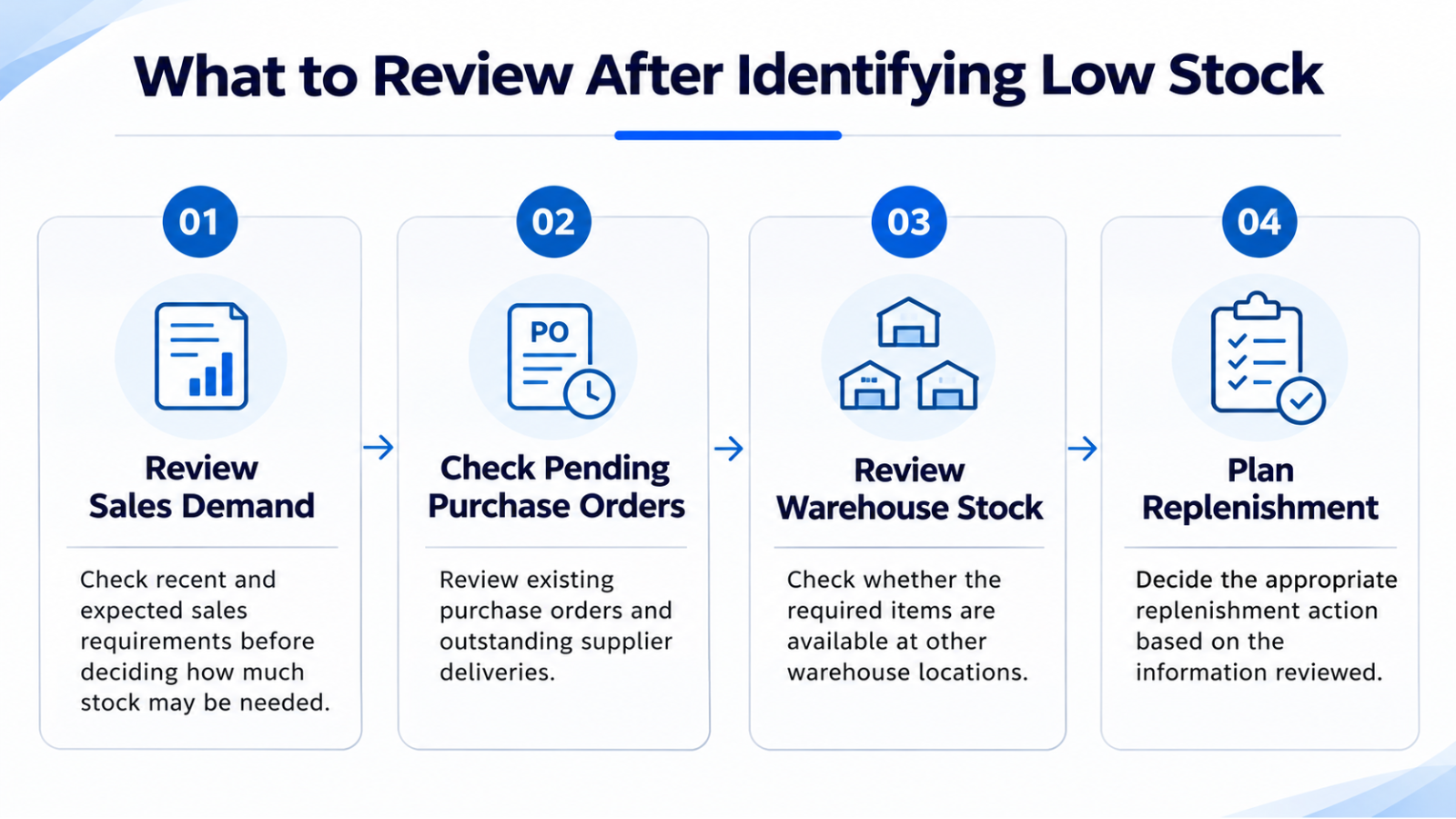
Before making a purchasing decision, businesses should review the surrounding inventory information.
Consider the following:
- Are there existing purchase orders for the same item?
- Are any supplier deliveries still pending?
- Does another warehouse have sufficient available stock?
- Are there confirmed sales orders or upcoming customer requirements?
- Has the item's demand changed recently?
These checks help businesses avoid unnecessary purchasing while reducing stock availability problems that can affect customer orders and daily operations.
A low-stock report is most useful when its results are considered alongside the wider purchasing and inventory position of the business.
Practical Example: Identifying Low Stock Through an ERP Reorder Report
Consider a wholesale distributor that manages several inventory items through an ERP system.
The business has configured a minimum stock level of 100 units for one of its frequently sold products. During a report review, the Reorder Report shows a Closing Balance of 65 units.
The item has therefore fallen 35 units below its configured minimum stock level.
The inventory manager identifies the item for further review. Before placing a purchase order, the purchasing team checks whether additional stock is already on order, whether another warehouse has available inventory, and whether upcoming sales requirements could increase demand.
After reviewing this information, the business can determine an appropriate replenishment quantity and purchasing schedule.
The difference between Minimum Stock and Closing Balance helps identify the shortage against the configured threshold. However, that difference should not automatically be treated as the exact quantity that needs to be purchased.
What Should Businesses Do After Identifying Low Stock?
Identifying low-stock items is only one part of inventory management. Businesses must also review their purchasing and operational requirements before deciding how to respond.
Review Sales Demand
Recent sales activity can help businesses understand how quickly an item is moving. Products with consistent demand may require more frequent monitoring than slow-moving inventory.
Upcoming customer orders should also be considered when planning replenishment.
Check Pending Purchase Orders
Before placing another order, purchasing teams should review existing purchase orders and understand how purchase order management in ERP helps track outstanding orders and supplier deliveries.
This helps businesses avoid duplicate purchasing and provides a clearer understanding of how much inventory is already expected to arrive.
Review Stock Across Warehouses
Businesses operating multiple warehouses should check stock availability across their locations before purchasing additional quantities.
An item that appears low in one warehouse may already be available in another. Depending on business requirements, an inventory transfer between warehouses may be a suitable option for balancing stock availability.
Plan the Replenishment Action
After reviewing demand, pending purchases, and warehouse availability, the purchasing team can decide whether additional inventory is required.
The decision may involve purchasing from an existing supplier, adjusting an upcoming purchase, or transferring available stock between locations.
Connecting inventory monitoring with purchase management helps businesses make decisions based on their wider operational requirements rather than a single stock figure.
Common Mistakes When Using ERP Reorder Reports
Even when businesses have access to inventory reporting, incorrect practices can reduce its usefulness.
Some common mistakes include:
- Setting unrealistic minimum stock levels: Incorrect thresholds can cause unnecessary alerts or delay the identification of genuine stock shortages.
- Ignoring changes in demand: Minimum stock levels should be reviewed when purchasing patterns or customer requirements change.
- Confusing minimum stock with purchase quantity: The difference between minimum stock and closing balance does not automatically determine how much inventory should be ordered.
- Ignoring pending purchase orders: Placing new orders without checking existing purchases can result in excess inventory.
- Overlooking warehouse availability: Businesses may purchase additional stock even when sufficient quantities are available at another location.
- Reviewing reports irregularly: Infrequent monitoring can delay the identification of inventory items requiring attention.
Avoiding these mistakes helps businesses use inventory reorder reports more effectively and make better-informed replenishment decisions.
How ERP Inventory Reports Support Better Inventory Control
A reorder report is one part of a broader inventory management and reporting process. Businesses may also need information about inventory quantities, warehouse-wise stock, item balances, and inventory value to understand their overall stock position.
Dedicated ERP inventory reports bring relevant information together and help inventory teams monitor different aspects of stock management.
When businesses regularly review these reports and connect their findings with purchasing and sales activities, they can improve inventory visibility and make more informed decisions about stock availability.
Frequently Asked Questions
What Is an ERP Reorder Report?
An ERP reorder report is an inventory report that helps businesses identify items whose recorded stock balances have fallen below their configured minimum stock levels. It supports low-stock monitoring and replenishment planning.
How Does an ERP Reorder Report Identify Low Stock Items?
The report compares an item's Closing Balance with its configured Minimum Stock level. When the Closing Balance is lower than the Minimum Stock value, the item can be identified for further review.
What Is the Difference Between Minimum Stock and Closing Stock Balance?
Minimum Stock is the predefined inventory threshold established by a business. Closing Balance represents the recorded remaining inventory quantity. Comparing these values helps identify whether an item has fallen below its minimum stock requirement.
Does a Reorder Report Tell Businesses Exactly How Much Stock to Purchase?
Not necessarily. A reorder report can identify items below their minimum stock levels, but the final purchasing quantity should also consider sales demand, pending purchase orders, warehouse availability, supplier lead times, and business requirements.
How Often Should Businesses Review Their Reorder Reports?
The review frequency depends on inventory movement, transaction volume, product importance, and the nature of the business. Companies dealing with fast-moving products or frequent sales transactions may need to monitor low-stock information more regularly.
Improve Inventory Visibility with Axon ERP
Managing inventory across multiple products and warehouses requires accurate stock information and consistent monitoring. An ERP reorder report helps businesses identify items below their configured minimum stock levels and gives inventory teams a clearer starting point for reviewing replenishment requirements.
Axon ERP provides inventory management and reporting capabilities that help businesses manage stock information and support their purchasing and operational processes.
If your business wants better visibility into inventory levels and more organized stock management, explore Axon ERP and book a demo to see how its inventory management capabilities can support your operations.