


Post Detail
BackAxon ERP Official
11 hr ago
How to Choose Between Offline POS and Cloud-Based POS Software
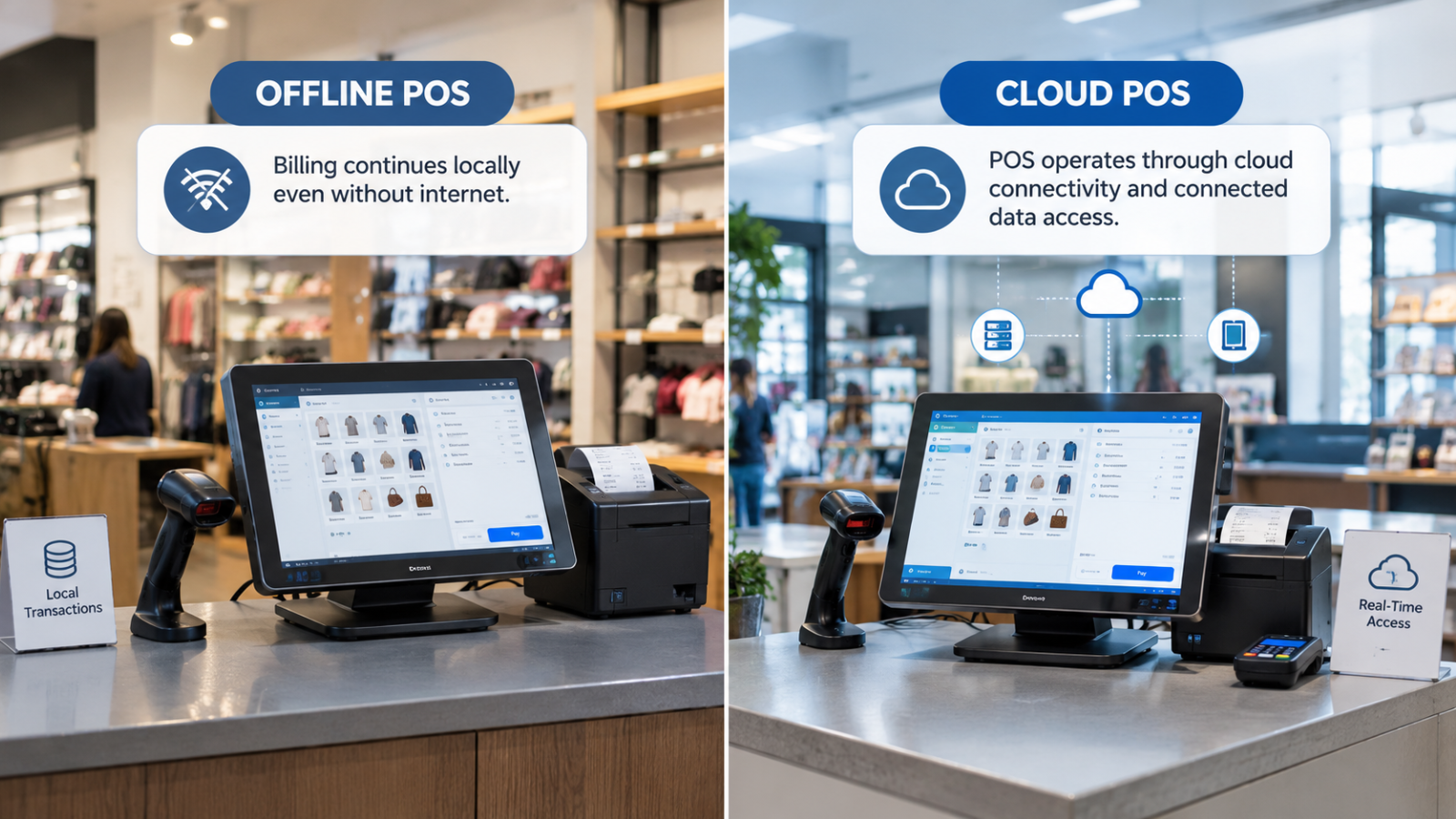
Choosing between offline POS and cloud-based POS software depends on how your retail business operates, how reliable your internet connection is, and how you need to manage sales across your stores. Offline POS software can help maintain billing operations during internet interruptions, while cloud-based POS software provides browser-based access and centralized, real-time updates. The right choice is the system that supports your daily operations without creating unnecessary complications.
Before selecting a POS solution, it is important to understand how both systems work, what happens when connectivity is interrupted, and how transactions reach your central business records.
What Is Offline POS Software?
Offline POS software allows a retail business to process supported sales transactions without requiring a continuous internet connection. Unlike a cloud-only POS system, an offline-capable solution can store transaction data locally on the device or application and synchronize it with the central system when connectivity becomes available.
This can be particularly useful for stores that experience unreliable internet, operate in locations with limited connectivity, or cannot afford to stop checkout operations whenever their connection drops.
However, offline functionality varies between POS providers. Some systems support only basic cash transactions, while others offer a wider range of sales operations. Businesses should verify exactly which functions remain available before choosing a solution.
How Does an Offline POS System Work?
An offline POS application generally needs to be configured and synchronized before it can be used without internet access. Depending on the software, the process may involve:
- Installing or opening the POS application on a supported device.
- Logging in and loading the required business information.
- Accessing available products, customers, and terminal settings.
- Processing supported sales transactions while disconnected.
- Storing those transactions locally until connectivity is restored.
- Synchronizing the pending records with the central system.
The synchronization method is not the same across all POS products, so businesses should confirm whether pending transactions transfer automatically or require a manual sync action.
What Is Cloud-Based POS Software?
Cloud-based POS software operates through an internet-connected system, commonly accessed using a web browser or supported application. Instead of relying entirely on locally stored transaction records, it connects users to centralized business data.
When a cashier processes a sale through an online POS system, the transaction can update the connected business records in real time. This can help managers monitor sales, review inventory information, and access updated operational data without depending on a single local computer.
Cloud-based POS software is particularly useful for businesses that need centralized access, consistent reporting, and the ability to manage operations through internet-connected devices.
How Does a Cloud-Based POS System Work?
A typical browser-based cloud POS workflow includes:
- The user opens the POS system through a supported browser.
- The user logs in using authorized business credentials.
- Products, customers, pricing, and other relevant information are accessed from the connected system.
- The cashier processes a customer transaction.
- The transaction is recorded in the central system.
- Connected business records update according to the software's configured workflow.
The main advantage is centralized access to business information. However, a cloud-only POS system generally depends on an active internet connection to process transactions and communicate with its central platform.
Offline POS vs Cloud-Based POS: Key Differences
Both options can support retail billing, but they differ in how they handle connectivity, transactions, data access, and business continuity.
1. Internet Dependency
An offline POS application can support selected operations without a continuous internet connection, provided the required data and application setup are already available locally.
A cloud-based POS system generally requires internet connectivity to access its central platform and process transactions.
For businesses with stable connectivity, this may not create a significant operational concern. However, stores that frequently experience interruptions should evaluate offline capabilities before choosing a cloud-based solution.
2. Billing During Internet Outages
This is one of the most important differences for retail businesses.
With an offline-capable POS application, supported sales operations can continue during an internet interruption. This can help retailers avoid billing interruptions and unnecessary checkout delays.
A cloud-only POS system may become unavailable for transaction processing when its internet connection is lost.
However, not every offline POS supports the same operations. Some may allow basic sales but restrict returns, discounts, customer records, or other functions. Businesses should test their actual checkout requirements rather than relying only on an offline-mode label.
3. Data Storage and Synchronization
Offline POS software needs a way to retain transactions while the application is disconnected. Depending on its architecture, records may remain on the local device until they can be transferred to the central system.
Cloud-based POS software normally records transactions through its connected platform, allowing business information to update centrally.
For offline systems, the synchronization method matters. Some products synchronize automatically after reconnection, while others require users to initiate synchronization manually. Businesses should also understand how duplicate records, incomplete transfers, and synchronization errors are handled.
4. Access and Business Visibility
Cloud-based POS software provides browser-based access to centralized information, depending on user permissions and the system's supported features. This can make it easier for authorized managers to review business activity without being physically present at the checkout counter.
Offline POS applications may be more dependent on the device on which they are installed. Although transactions can be processed locally, central visibility may depend on successful synchronization.
Businesses should consider whether they need local checkout continuity, centralized reporting, or both.
5. Multiple Terminals and Locations
Retail businesses may operate several checkout counters within one store or manage multiple branches.
A POS system should support the number of terminals required by the business and provide a reliable way to organize their transactions.
Cloud-based systems can offer centralized access across locations, depending on their multi-location capabilities and configuration. This can be particularly useful for retail businesses managing multiple stores.
Offline POS systems may also support multiple terminals, but businesses should verify how each terminal is configured, how its transactions are stored, and how those records are synchronized with the central ERP.
Supporting multiple terminals does not automatically mean every terminal shares the same offline data or can operate independently under every condition.
6. Operational Continuity and Data Recovery
Offline functionality can help a store continue supported checkout operations when internet access becomes unavailable. However, it does not eliminate every operational risk.
For example, a computer failure, application problem, or damaged local storage may affect transactions that have not yet synchronized. Businesses should understand the software's backup and recovery procedures and establish a process for checking pending transactions.
Cloud-based systems also require appropriate backup, security, and recovery arrangements. Centralized storage alone should not be treated as a complete data-protection strategy.
7. Cost and Maintenance Considerations
The cost of POS software involves more than its subscription or purchase price. Businesses should consider hardware requirements, installation, support, maintenance, updates, internet connectivity, and any additional terminal or user charges.
A desktop-based offline application may require supported computers and local installation. A browser-based cloud POS may reduce some installation requirements but depends on reliable internet access and the provider's pricing model.
Compare the total operating cost against the features your business actually needs instead of choosing a system based only on its advertised starting price.
Can a Cloud-Based POS Work Without Internet?
Not every cloud-based POS system can operate without an internet connection. Some providers offer limited offline checkout features, while others require an active connection for normal transaction processing.
Even when offline functionality is available, certain operations may remain restricted. For example, a system might allow cash sales but prevent inventory synchronization, online receipts, or particular return operations until connectivity is restored.
For example, Shopify's offline checkout capabilities and limitations for its POS system. Square offline payment also provides functionality with conditions around pending transactions and their processing after reconnection.
This is why businesses should not assume that all cloud POS products work in the same way. Ask the provider to demonstrate what happens during an actual internet interruption, including the transactions that can be completed and the steps required after reconnection.
How Axon ERP Supports Both Cloud and Offline POS Operations
Retail businesses do not always need to choose between centralized ERP management and the ability to continue billing during an internet interruption. Axon ERP provides a browser-based POS option as well as a separate desktop application for offline POS operations.
These are two distinct ways to access POS functionality, each designed for different operating conditions.
Browser-Based Cloud POS
Axon ERP's browser-based POS operates through an internet connection. Authorized users can access the POS through the browser and process transactions within the connected ERP environment.
As transactions are processed, the relevant business data updates in real time. This provides a connected workflow for businesses that have reliable internet access and want their POS operations linked with their central ERP records.
Separate Offline POS Desktop Application
Axon ERP also provides a separate desktop application that users can download without an additional download charge.
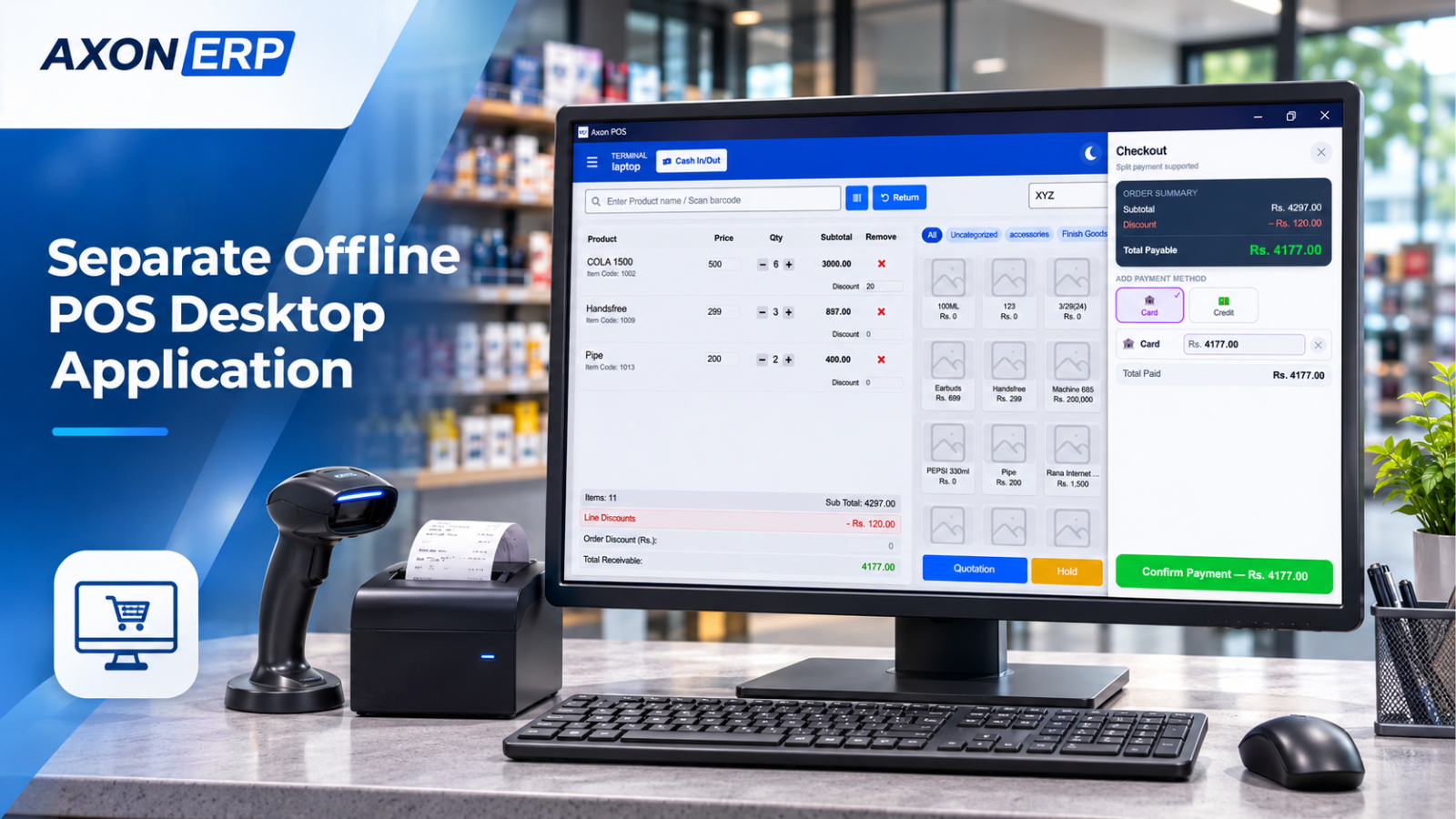
The application uses the user's existing Axon ERP login credentials. After logging in, the relevant user data, products, items, and configured terminals become available within the application.
If the internet connection is interrupted, the user can continue supported POS operations through this desktop application instead of relying on the browser-based POS.
The workflow includes:
- The user opens the offline POS desktop application.
- The user logs in using their Axon ERP credentials.
- Available products, customers, and configured terminals are accessed.
- The user starts a terminal and processes transactions by selecting or scanning products, choosing customers, setting quantities, and applying discounts.
- Sales and return transactions can be processed and stored within the application.
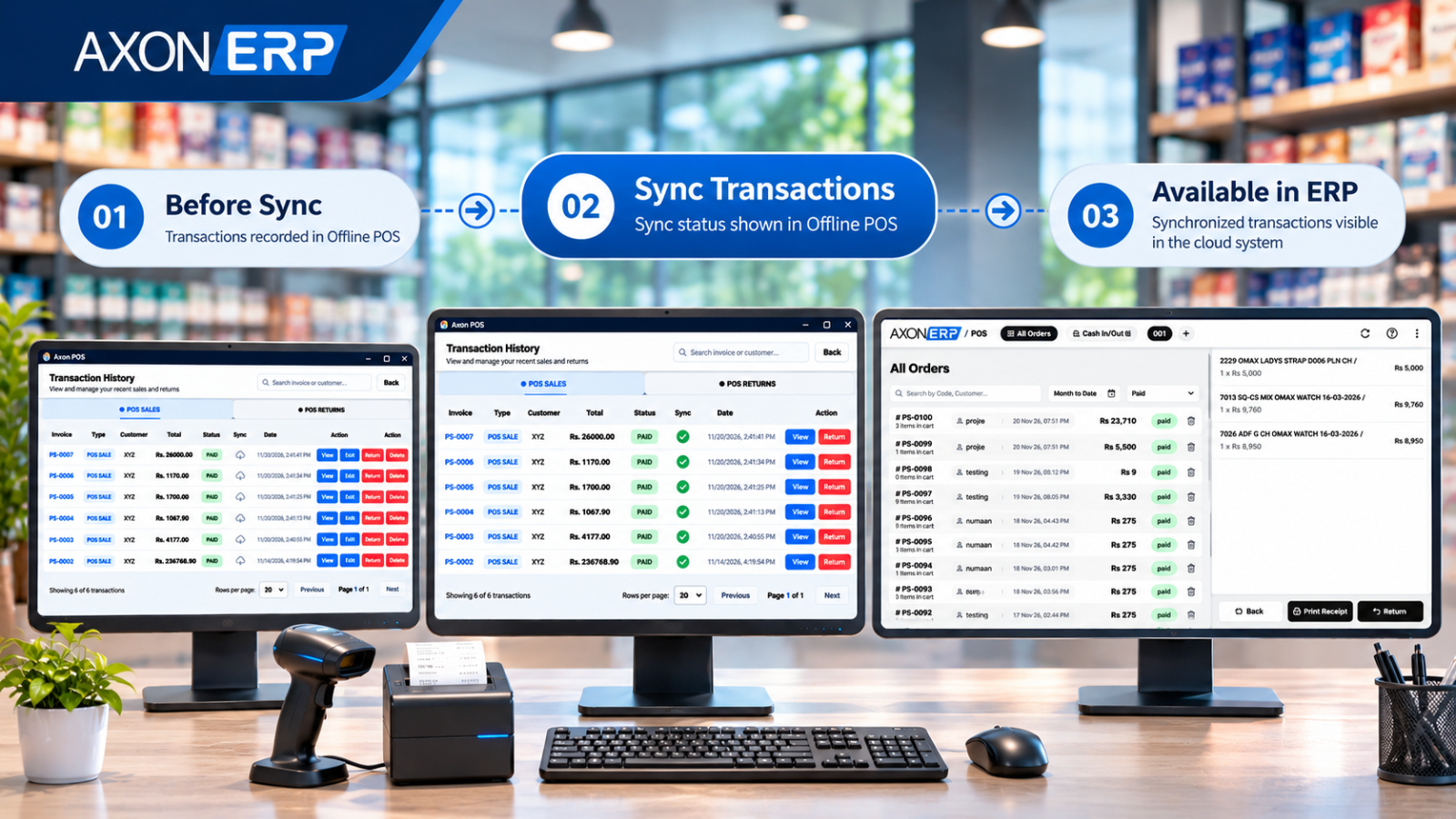
- When the internet connection becomes available again, the user presses the Sync button in the top-right corner of the application once.
- The pending transaction data is synchronized with Axon ERP. Approved POS sale invoices are created, and the corresponding accounting and inventory records are updated.
This workflow allows supported checkout operations to continue locally while keeping the transactions connected to the central ERP after synchronization.
Multiple POS Terminals
Axon ERP users can configure multiple POS terminals within their ERP. Those configured terminals are displayed in the offline desktop application after login.
Users can select an available terminal and process transactions through it. This gives businesses with multiple checkout counters an organized way to manage their POS operations.
Businesses should still evaluate their own terminal setup and synchronization requirements before deployment.
Which POS Software Should Your Retail Business Choose?
The right POS solution depends on the problems your business needs to solve.
When Offline POS May Be the Better Choice
Consider an offline-capable POS solution if:
- Your store regularly experiences internet interruptions.
- Checkout operations need to continue during connectivity problems.
- You want supported sales transactions to be stored locally.
- Your business needs a desktop-based checkout option.
- You want to synchronize locally processed transactions with a central ERP after reconnecting.
Before choosing, confirm which transactions and features remain available offline and how synchronization works.
When Cloud-Based POS May Be the Better Choice
A cloud-based POS may be more suitable if:
- Your business has reliable internet connectivity.
- Browser-based access is important.
- Managers need centralized, real-time business information.
- You want connected access to sales and inventory records.
- Your retail operation depends on managing information across multiple locations.
The system should also provide appropriate access controls, reporting, support, and data-protection features.
When Your Business Needs Both Options
Some retail businesses need the advantages of both operating models.
For example, a business may prefer browser-based access and centralized ERP records during normal operations but still need a separate offline application to maintain billing during internet outages.
In this situation, a POS solution that supports both connected and offline operations may be worth evaluating. The important requirement is that the two workflows integrate properly and that offline transactions can be transferred into the central business records.
Questions to Ask Before Choosing POS Software
Before purchasing or implementing a POS system, ask the provider these questions:
- Can the POS process transactions when the internet connection is disconnected?
- Does offline mode require an initial login or data synchronization?
- Which operations are supported offline, including sales, returns, discounts, and customer selection?
- Where are offline transactions stored?
- Does data synchronize automatically or require a manual action?
- Can all pending transactions be synchronized through one action?
- How are synchronization errors and duplicate transactions handled?
- Does the system support multiple terminals?
- How are backups and unsynchronized transactions protected?
- Can the POS integrate with accounting and inventory management?
Request a practical demonstration instead of relying entirely on feature descriptions. A short test involving an internet disconnection and reconnection can reveal important differences between POS solutions.
Final Verdict: Choose POS Software Based on How Your Business Operates
Offline POS and cloud-based POS software serve different operational needs. Cloud-based systems provide connected access to centralized business information, while offline-capable solutions help maintain supported checkout operations during internet interruptions.
For businesses with stable connectivity and a preference for browser-based access, cloud POS may be sufficient. For stores that cannot afford to interrupt billing during connectivity problems, offline functionality can be an important requirement.
Some businesses may benefit from having both options available through an integrated ERP environment.
Axon ERP provides browser-based POS functionality alongside a separate offline desktop application that supports local transactions and one-click manual synchronization with the ERP. Retail businesses evaluating these options can explore Axon ERP's POS capabilities and request a demonstration to understand how the workflows fit their operational requirements.
Frequently Asked Questions
1. What is the difference between offline POS and cloud-based POS?
Offline POS software can process supported transactions locally without a continuous internet connection. Cloud-based POS software connects to a centralized platform through the internet and generally requires connectivity for normal operations.
2. Can POS software work without an internet connection?
Yes, if the software supports offline functionality. However, the available operations vary by provider. Some systems support only selected payments or sales, while others offer a wider range of offline transaction features.
3. Does cloud-based POS always require internet?
A cloud-only POS generally requires internet connectivity. Some cloud POS providers offer limited offline functionality, but businesses should verify which operations remain available when disconnected.
4. How does offline POS synchronize transactions?
Offline POS applications store supported transactions locally while disconnected. Once connectivity returns, the system transfers the pending records to its central platform. Depending on the provider, this may happen automatically or require the user to initiate synchronization.
5. Can offline POS support multiple terminals?
Some offline POS solutions support multiple configured terminals. However, businesses should confirm how terminals are managed, where transactions are stored, and how records are synchronized with the central system.
6. Which POS system is better for retail businesses?
Neither option is universally better. Cloud POS is useful for connected, centralized operations, while offline POS is valuable when stores need billing continuity during internet interruptions. The best choice depends on connectivity, checkout requirements, business size, and management needs.